
Instagram Reel Script Writer
Type a Reel topic and audience, pick a goal and a 7, 15 or 30 second length, and get a hook, a timed scene-by-scene script, caption ideas and hashtags to film from.
Grow your Business & Social Media Marketing
- Branded Link Shortener
- QR Code Generator
- Bio Page Builder
- Tracking & Analytics
- 16+ Integrations
Tools You May Need for Instagram Video Content Creation
What the Instagram Reel Script Writer gives you
You get a filming plan for one short Reel: an opening line, a timed table of scenes that says what to show, what to put on screen and what to say, two caption ideas, a list of hashtags and a few filming tips. It’s a reel script generator for people who know what they want to teach or show but freeze when it’s time to plan the shots.
The script is built from four things you type or pick. The tool can’t see your account, your footage or what’s trending today, so treat the result as a first draft you check and adjust.
Fill in four fields, then generate
The form is short, and the first two fields carry most of the weight:
- Reel Topic/Core Keyword. One clear idea for one Reel, at least 5 characters long. “How to tell if a houseplant needs water without a moisture meter” works better than “plant tips.”
- Target Audience. Who’s watching, also at least 5 characters. “New plant owners in small apartments” lets the script pick examples that fit them.
- Reel Goal. Education (Teach a quick tip), Entertainment (Funny sketch/skit), Product Demo (Showcase a feature) or Inspiration (Motivational/Transformation).
- Target Video Duration. 7 seconds, 15 seconds or 30 seconds. The form starts on 15 seconds.
Click Generate Reel Script. The Clear button empties the form so you can start another idea.
A 15-second plant care script from our test
We ran the tool on November 3, 2026, with the houseplant topic and audience above, the Education goal and the 15-second length. The script appeared in about 7.4 seconds.
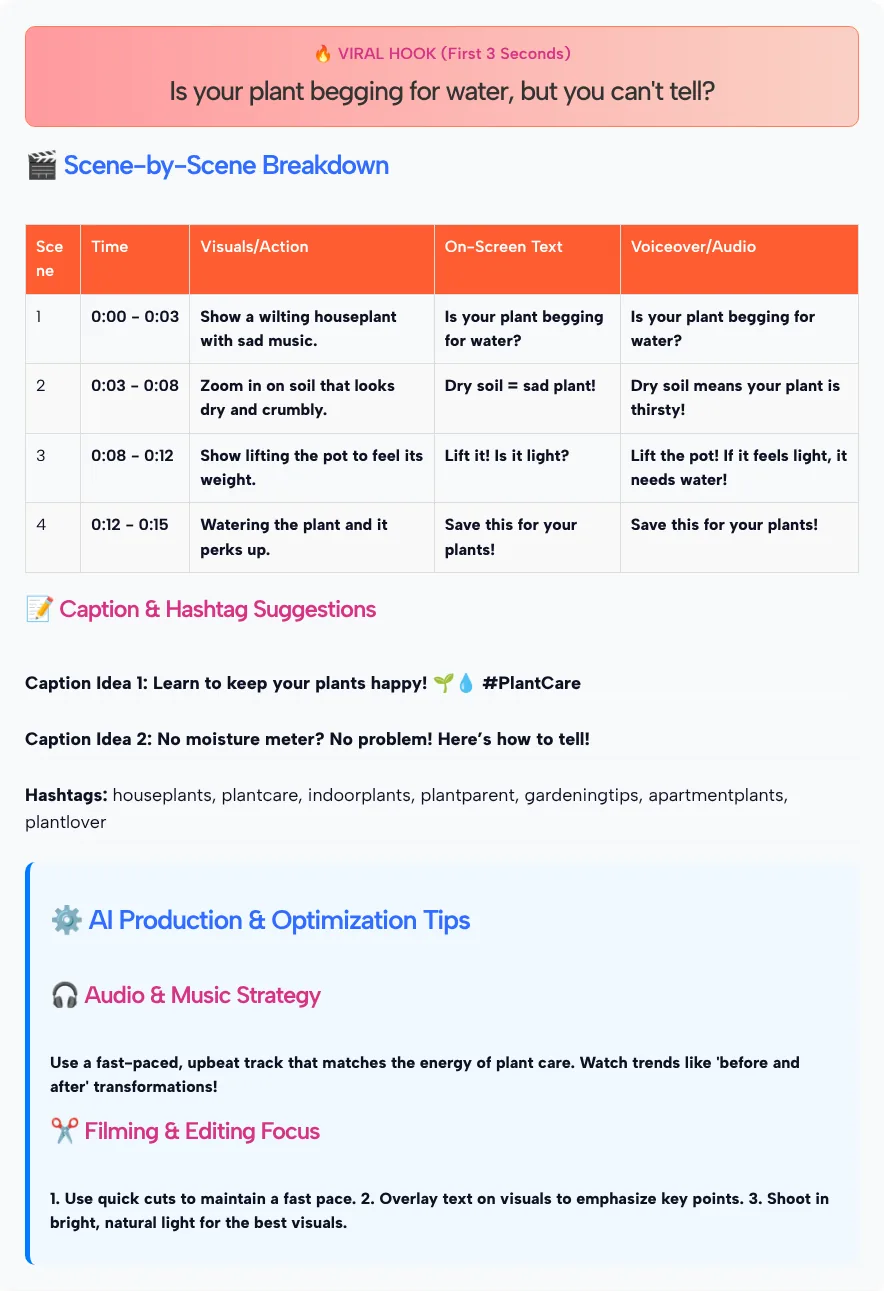
The hook it wrote for the first 3 seconds was “Is your plant begging for water, but you can’t tell?” Then came this scene table:
| Scene | Time | Visuals | On-screen text | Voiceover |
|---|---|---|---|---|
| 1 | 0:00 to 0:03 | A wilting houseplant with sad music | “Is your plant begging for water?” | “Is your plant begging for water?” |
| 2 | 0:03 to 0:08 | Close-up of dry, crumbly soil | “Dry soil = sad plant!” | “Dry soil means your plant is thirsty!” |
| 3 | 0:08 to 0:12 | Lifting the pot to feel its weight | “Lift it! Is it light?” | “Lift the pot! If it feels light, it needs water!” |
| 4 | 0:12 to 0:15 | Watering the plant as it perks up | “Save this for your plants!” | “Save this for your plants!” |
A few things stood out when we read it closely:
- The timing added up. Four scenes covered exactly 0:00 to 0:15, so you can film to the table without doing math.
- There was one hook, not a set to choose from. The tool labels it “VIRAL HOOK,” but that’s just the heading it uses. Nothing in the script was tested against real viewers.
- Text and voiceover often repeat each other. In scenes 1 and 4 they’re identical. That works for viewers watching with the sound off, but you may want the voiceover to add something new.
- Hashtags came without the # sign. The tool listed seven plain words, such as houseplants and plantcare.
- The audio tip was a mood, not a song. It suggested “a fast-paced, upbeat track,” so you still pick the actual audio yourself.
The plant advice itself (dry soil, a light pot) came from the AI, not from an expert. Check any how-to claim in your niche before you film it.
Instagram’s own notes on Reels length and reach
The 7, 15 and 30 second targets in this tool are short compared with what Instagram allows, as Instagram for Creators announced in January 2025 that creators in the United States could publish reels up to 3 minutes long in the Reels editor, and that those reels could be shown to non-followers in places like the Reels tab and Explore.
That same post introduced trial reels, which let you share a reel with people who don’t follow you before your followers see it. Trial reels are a handy way to compare two hooks for the same script without filling your profile with near duplicates.
The post also points to posting original content on a steady schedule as a way to grow. A script generator helps with the schedule. The “original” part is up to you: your footage, your examples and your voice.
Turn the draft into a Reel that sounds like you
A generated script is a skeleton. Here’s how to put your own work on it:
- Read the voiceover out loud with a timer. If a line doesn’t fit its time slot, cut words rather than speeding up.
- Swap the hook for something you’ve seen. “My pothos dropped three leaves last week” beats a generic question because it’s true and specific.
- Give the voiceover its own job. Let the on-screen text name the step and the voiceover explain why it works.
- Pick the audio in the Instagram app. Use the tool’s mood note as a filter, then choose a track from the app’s audio options.
- Trim the hashtag list. Add the # sign and keep only the few that describe this Reel. For more options to choose from, run the topic through our Instagram hashtag generator.
- Write a fuller caption if you need one. The two caption ideas are one-liners. The caption generator and hook generator linked above go further on each part.
Which Reel Goal and length to pick
Match the goal to what you want viewers to do after watching. We tested only the Education goal at 15 seconds, so the notes for the other options describe what each setting is for, not results we’ve seen:
| If your Reel is… | Reel Goal | Length to try |
|---|---|---|
| One quick tip or fix | Education (Teach a quick tip) | 15 seconds |
| A short how-to with several steps | Education (Teach a quick tip) | 30 seconds |
| A joke, skit or relatable moment | Entertainment (Funny sketch/skit) | 7 or 15 seconds |
| A feature of your product in use | Product Demo (Showcase a feature) | 15 or 30 seconds |
| A before-and-after or personal story | Inspiration (Motivational/Transformation) | 30 seconds |
The 7-second option suits a single visual moment that can loop. If your idea needs more than one step, it will feel rushed at that length.
Instagram Reel Script Writer FAQ
Is the Instagram Reel Script Writer free?
Yes. You can use it on this page without an account. The script, captions, hashtags and tips appear right below the form.
Can it write a script longer than 30 seconds?
No. The form offers 7, 15 or 30 seconds. For a longer Reel, generate the 30-second version as your core and add scenes of your own, or run the tool again for a second part.
How many hooks does it write per script?
One. In our test the script opened with a single hook line for the first 3 seconds. If you want options, run the same topic again or write two versions yourself and compare them.
Does it pick trending audio for my Reel?
No. It describes a mood or style of track, such as fast-paced and upbeat. Choose the actual audio inside the Instagram app.
Why does the tool show an error when I click generate?
The topic and the audience each need at least 5 characters. Write a full phrase in both fields, for example a specific tip and a specific group of viewers.
Does it film, edit or post the Reel?
No. It only writes the plan. You record, edit and publish the Reel yourself, using the scene table as your shot list.