
Posting a link and watching the click count go up feels like progress. But a rising number by itself does not tell you whether that link is working.
Ten clicks from your target country beat a thousand clicks from a country you do not sell in.
Click analytics answer the question a raw click count cannot. Who clicked, from where, on what device, and through which channel.
Once you see that breakdown, you can tell which channels are worth repeating. And which ones are quietly wasting your time.
This guide walks through the metrics worth tracking, how a link shortener’s analytics differ from Google Analytics, and how to read a real click report.
The goal is data that leads to a decision, not just a chart.
In this article, you will learn:
- The core metrics that make up link performance, and what each one actually tells you
- How click analytics differ from website analytics, and why you often need both
- How to read a real click report step by step
- How UTM parameters and short link analytics work together
- Common mistakes that make link data misleading
A Better Way to Share Links
Create short, branded links that are easier to share and track. It’s free to get started and only takes a few seconds.
Key Takeaways
- A click count on its own is not a performance metric. Where those clicks come from, what device they used, and whether they were unique visitors all change what the number means.
- Unique clicks matter more than total clicks for judging real reach, since total clicks can be inflated by the same person clicking a link multiple times.
- Short link analytics capture what happens before someone lands on your site. Website analytics like Google Analytics capture what happens after. You need both to see the full path.
- Country, platform, and referrer breakdowns let you catch mismatched targeting, like a US-only offer getting most of its clicks from outside the US, something a raw click total would never reveal.
- Third-party cookies are being phased out across most major browsers, which makes UTM parameters and first-party link analytics more reliable for attribution than they used to be.
Quick Answer
Measuring link performance means looking past the total click count to unique clicks, click source, and timing. A link shortener with built-in analytics captures this data automatically for every link you create. UTM parameters let you label which specific campaign, channel, or post a click came from. Together, they show not just how many people clicked, but who they were and where they came from.
What Metrics Actually Make Up Link Performance?
Link performance is not one number. It’s a combination of metrics that each answer a different question about who clicked and why it matters.
It starts with creating a short link built to be tracked in the first place.
- Total clicks: The simplest metric and the easiest to misread. It counts every click, including repeat clicks from the same visitor.
- Unique clicks: Filters that out by counting distinct visitors instead of raw click events. A wide gap between total and unique clicks means a small group is clicking repeatedly.
- Geographic breakdown: Shows which countries and cities generated clicks. A link meant for US customers pulling 30% of clicks from outside the US points to a targeting problem, not a content problem.
- Device and platform data: Shows whether clicks come from mobile, desktop, or a specific operating system. Strong desktop performance but weak mobile can point to a rendering issue on the landing page.
- Referrer source: Shows where the click actually came from: a social platform, an email client, a search engine, or a direct visit. This tells you which channel is doing the heavier lifting.
- Click timing: Shows when clicks happen over the reporting period. A link that dies after 24 hours behaves very differently from one that keeps getting clicks a week later.
How Is Click Analytics Different from Website Analytics?
Click analytics and website analytics like Google Analytics measure two different halves of the same journey. Mixing them up leads to gaps in your data.
This is also part of what a link shortener actually does beyond just making a URL shorter.
Click analytics capture everything up to and including the click itself. Which link, from where, on what device, through which referrer.
This data exists even if the visitor closes the tab before your website fully loads.
Website analytics take over once someone lands on your page. They track time on page, scroll depth, conversions, and on-site behavior.
The gap between the two shows up when click counts look healthy but website sessions from that source are much smaller.
That gap usually means one of three things. A slow redirect, a landing page problem, or bot traffic inflating the click count.
Running both side by side is how you catch which of those three is actually happening.
The UTM parameters guide covers how to label links so both systems report on the same campaign consistently.
How to Read a Real Click Report
A click report is only useful if you know what order to read it in.
Jumping straight to the geographic map before checking the summary numbers tends to produce conclusions that don’t hold up.
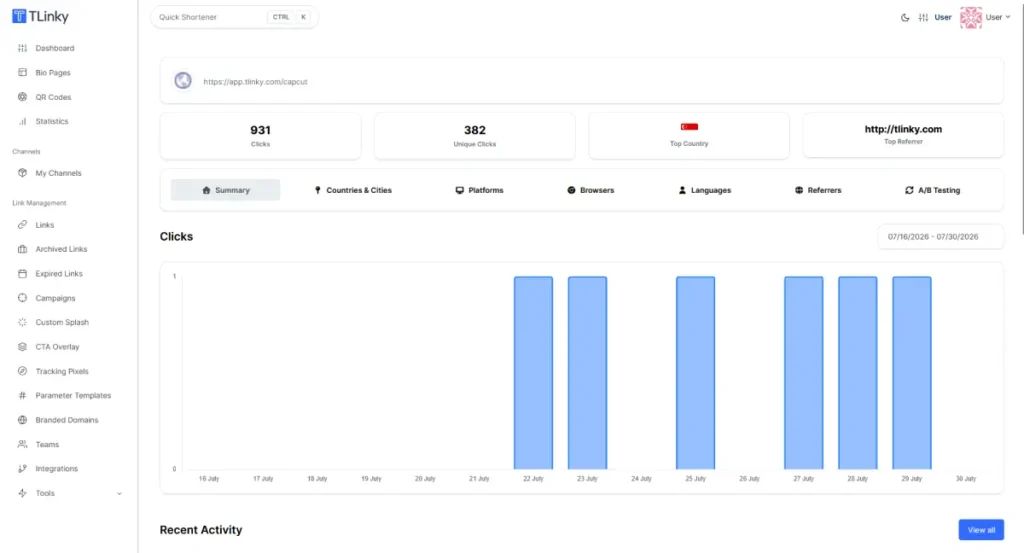
- Start with the summary metrics. Total clicks, unique clicks, top country, and top referrer give you the shape of the data before you dig into any single tab. If unique clicks are dramatically lower than total clicks, note that first.
- Check the date range and daily pattern. A bar chart of clicks by day shows whether traffic was a single spike or spread out. A spike usually lines up with a specific post or send.
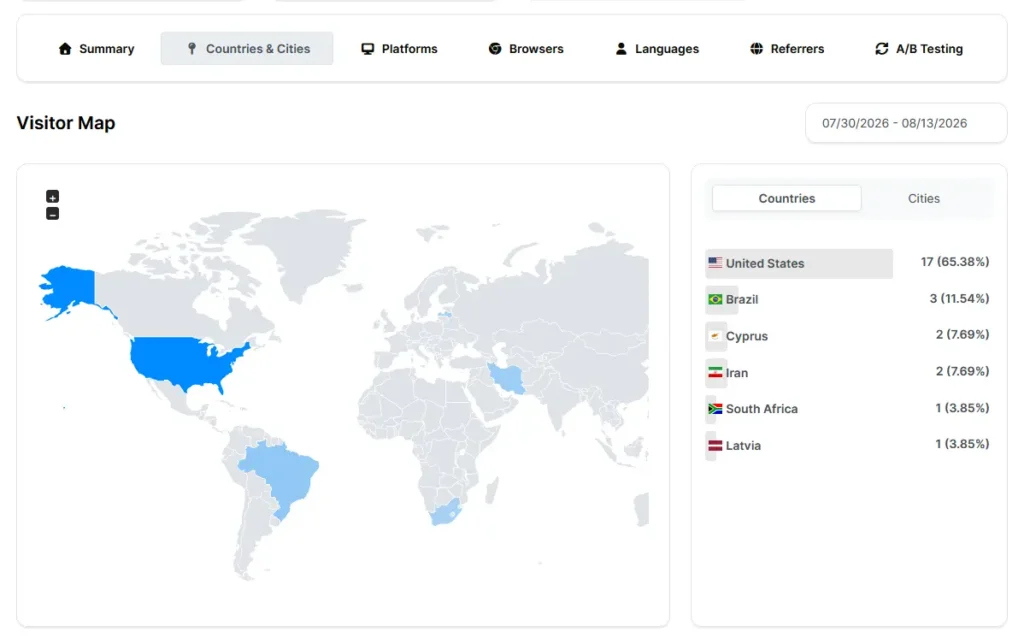
- Move to geography next. Compare where clicks are actually coming from against where you expected them to come from. A mismatched country breakdown is one of the fastest signals that targeting is off.
- Check platform and browser data. This shows what device and software your audience actually uses. Useful for deciding whether to prioritize mobile or troubleshoot a specific browser.
- Finish with referrers. This is where you find out which specific channel actually drove the clicks. A large “Direct” share usually means traffic came from a source that didn’t pass referrer data, like a messaging app.
In TLinky, this full breakdown lives under a link’s Statistics view. Access it from the three-dot menu next to any shortened link.
The Summary tab shows the click chart. Separate tabs cover Countries & Cities, Platforms, Browsers, Languages, and Referrers, so you can move through this reading order without leaving the page.
For a view across every link on your account, the Statistics section in the sidebar shows the same breakdown aggregated account-wide.
Useful for reporting total performance rather than a single campaign.
How UTM Parameters and Link Analytics Work Together
A short link tells you a click happened and where it came from at a technical level. Country, device, referrer domain.
A UTM parameter tells you what you meant that link to represent. Which campaign, which specific post, which exact placement.
Without a UTM tag, a click from Instagram just shows up as an Instagram referral.
With a UTM tag added before you shorten the link, that same click can show up as a specific campaign.
Even if you’re running five different Instagram posts that same week.
This applies whether the link lives in a social media post or an email send. Both channels benefit from the same tagging discipline.
The practical order matters here. Build your UTM-tagged URL first, using consistent naming for source, medium, and campaign values. Then shorten that already-tagged URL.
Shortening a link and adding UTM parameters afterward is one of the most common reasons campaign data ends up fragmented later.
The UTM parameters best practices guide covers naming conventions that keep this consistent across a team.
This pairing matters more now than it did a few years ago. Safari and Firefox have blocked third-party cookies for years, and other major browsers have continued phasing them out.
That shift makes first-party signals like UTM parameters and link-level click data more reliable for attribution than cookie-based tracking alone.
Common Mistakes That Make Link Data Misleading
- Treating total clicks as the only metric: A high total with a low unique-click count is often a small group clicking repeatedly, sometimes your own team testing the link, not a broad new audience.
- Skipping UTM tags on recurring campaigns: Without consistent tagging, clicks from the same campaign across different placements get scattered across generic referrer categories.
- Ignoring the gap between click data and website analytics: A gap between strong click numbers and weak website sessions is worth investigating, since it often points to a redirect or landing page problem.
- Comparing click performance across mismatched time periods: A one-week link and a three-month link will naturally show different totals. Compare click rate or clicks-per-day instead of raw totals.
- Reading a single day’s spike as a trend: One viral post or large email send can distort a short reporting window. A full week or month smooths out single-day anomalies.
FAQ
These are the questions that come up most once you move past the summary numbers and start comparing links against each other.
What’s the difference between clicks and unique clicks?
Clicks count every click event, including repeat clicks from the same person. Unique clicks count distinct visitors instead, deduplicating repeat visits.
If a link shows 500 clicks but only 200 unique clicks, the same group is clicking it repeatedly. Unique clicks is generally the better metric for judging real reach.
Do I need Google Analytics if I already have link analytics?
It depends on what you need to measure. Link analytics show what happens up to the click: source, device, location, and referrer.
Website analytics like Google Analytics show what happens after someone lands on your page: time on page, conversions, and on-site behavior.
If you need both the channel and the on-site behavior, use both together.
How long should I wait before judging a link’s performance?
It depends on the channel. A link shared in a single social post or email send usually shows most of its activity within 48 to 72 hours.
A link placed somewhere persistent, like a bio page or a print QR code, should be measured over weeks or months instead.
Its traffic pattern is meant to be ongoing, not a single spike.
Can click analytics detect bot traffic or click fraud?
Click analytics alone typically cannot definitively identify bot traffic, but unusual patterns are worth investigating.
A sudden spike with no matching increase in website sessions, or a geography that doesn’t match any real promotion, are both signals worth a closer look.
Comparing click analytics against website analytics for the same period is the most practical way to catch this.
Why do some of my link clicks show up as “Direct” with no referrer?
A referrer isn’t always passed along by the platform or app the click came from. Messaging apps, some mobile apps, and certain email clients often strip referrer data.
Tagging links with UTM parameters before sharing them closes this gap.
The campaign source gets embedded in the URL itself instead of relying on referrer data that may or may not arrive.
Wrapping Up
A click count tells you that something happened. Click analytics tell you what actually happened, who clicked, from where, and through which channel.
That’s the difference between a vanity number and something you can act on.
The habit worth building is reading a click report in order. Summary numbers first, then timing, then geography, then device and referrer.
That order turns a dashboard full of charts into an actual decision about what to repeat and what to stop doing.
Pair every shortened link with a UTM tag before you share it.
If commission-based traffic is part of what you’re measuring, the URL shortener for affiliate marketing guide covers attribution for links that carry a direct dollar value.
The benefits of using a URL shortening service guide covers the rest of what a shortener adds beyond analytics alone.
Sources
- Google Analytics Help: About Campaign URL Builder and UTM Parameters
- MonsterInsights: Google Analytics for WordPress