
TikTok Campaign Planner
Describe your product, audience and monthly budget, pick a goal and timeline, and list what you already have; the AI drafts a campaign with a budget split, three launch phases, ad set ideas and a creative testing focus.
[tiktok_campaign_planner]Grow your Business & Social Media Marketing
- Branded Link Shortener
- QR Code Generator
- Bio Page Builder
- Tracking & Analytics
- 16+ Integrations
Tools You May Also Need for TikTok Ads
A month of launch steps on one screen
The TikTok Campaign Planner drafts the shape of a campaign before you spend anything. You describe the product, the audience, the monthly budget, the goal and what you already have, and an AI model returns a campaign name, a budget split, three launch phases with budget shares and metrics to watch, a set of ad set ideas and a creative testing plan.
It’s a planning document, not a setup wizard. Nothing connects to TikTok Ads Manager, and every split and number in the plan is the AI’s suggestion, so check each one against TikTok’s own rules and your own budget before you build anything.
Filling in the form
Four fields are marked Required:
- Product/Service. The product and price, for example “Hand-poured soy candles, $28 each”.
- Target Audience. Country, ages and interests in plain words.
- Total Campaign Budget (Monthly). A text box, so you can type it the way you’d write it, for example $3,000.
- Primary Campaign Goal. Conversions (Purchase/Lead) comes selected. The other options are Traffic (High Volume), App Install and Video Views/Awareness.
Two more fields shape the plan:
- Existing Assets/Data (Optional). List the videos, customer lists or targets you already have. In our test, the plan used it to choose a retargeting audience.
- Target Launch Timeline. 1 Month (Standard), 3 Months (Scaling) or Peak Season (e.g., Q4).
Click Generate Campaign Plan to build it, or Clear to empty the form.
The Q4 candle plan, phase by phase
We tested the planner on November 4, 2026, as a fictional small Ohio candle brand. For our test we entered “Hand-poured soy candles, $28 each”, “US women 25-44 who buy home decor gifts”, a $3,000 monthly budget, Conversions, Peak Season (e.g., Q4) and these assets: two customer UGC videos and an email list of 1,800 past buyers. The plan took about 10.2 seconds.
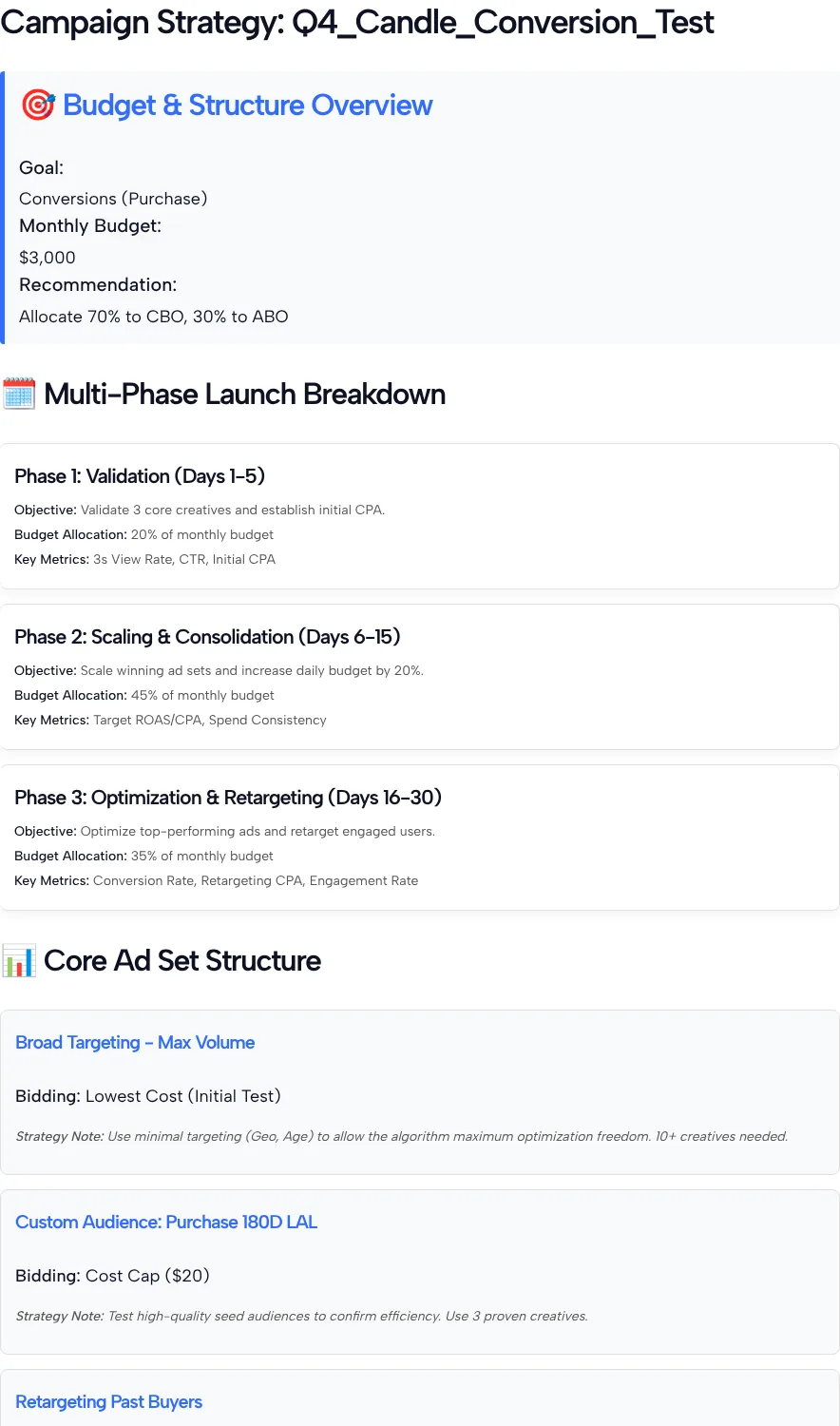
In our test it named the campaign Q4_Candle_Conversion_Test, recommended putting 70% of the budget on CBO and 30% on ABO, and split the month into three phases that add up to 100%. Here are those phases with our test budget of $3,000 turned into dollars and dollars per day:
| Phase | Days | Share (%) | Dollars ($) | Per day ($) | Metrics the plan lists |
|---|---|---|---|---|---|
| 1. Validation | 1 to 5 | 20 | 600 | 120 | 3s View Rate, CTR, Initial CPA |
| 2. Scaling and Consolidation | 6 to 15 | 45 | 1,350 | 135 | Target ROAS/CPA, Spend Consistency |
| 3. Optimization and Retargeting | 16 to 30 | 35 | 1,050 | 70 | Conversion Rate, Retargeting CPA, Engagement Rate |
The per-day column shows something the percentages hide: daily spend drops by almost half in the last 15 days, which matters if those are your busiest gift weeks. In our test, Phase 2 also says to raise the daily budget by 20%, while the phase totals already set the budget for each stretch. Pick one approach and stick to it.
The ad set section had three ideas:
- Broad Targeting, Max Volume: Lowest Cost bidding, minimal targeting (country and age) and a note that 10+ creatives are needed.
- Custom Audience: Purchase 180D LAL: the tool gave it a Cost Cap of $20 and 3 proven creatives. The name mixes a custom audience and a lookalike, so read it as a lookalike built from your buyers.
- Retargeting Past Buyers: Lowest Cost, aimed at the email list and website visitors.
Under Creative Testing Focus, it asked for UGC hook variations first, then clearer product value demos, with at least 7 new creatives a week. We told it we had two videos.
Checking the plan against TikTok’s own rules
TikTok’s help pages cover several of the plan’s choices, and a few lines need adjusting once you read them.
CBO and ABO. CBO is short for Campaign Budget Optimization; ABO is media-buyer shorthand for setting budgets on each ad group instead. TikTok’s Campaign Budget Optimization guide says all ad groups in a CBO campaign share one budget, you choose Maximum Delivery or Cost Cap as the bid strategy, and you should run at least 3 to 5 unique, active ad groups with 2 to 3 unique creatives each. A 70/30 split usually means running two campaigns, so check that the CBO one still has enough ad groups. The bid names may not match your screen either: TikTok’s bidding strategies page, updated in September 2026, lists Maximum Results and Target cost per result, while the plan says Lowest Cost and Cost Cap.
Phase 1 length. TikTok’s learning phase article says volatility starts to decline after about 25 campaign results or 7 days. The plan’s validation phase lasts five days. If you paid the $20 the plan uses as a cost cap for each sale, 25 sales would take $500 of Phase 1’s $600, which leaves very little room to compare creatives.
Budget increases. TikTok’s budget guidance says to raise a budget by no more than 40% per change during the learning phase, 30% after it, and not more often than every two days. The 20% step in our test plan fits inside that.
The email list. TikTok’s Custom Audiences article says a custom audience needs 1,000 matched users before you can use it in an ad group. Our 1,800 buyers only count once TikTok matches them to accounts, so if too few of them match, the retargeting ad set can’t use the list.
Shrinking the plan to fit a small team
Seven new videos a week is a lot for a small team. Here’s how we’d cut the candle plan down:
- Start with fewer ad sets. Run the broad ad set with your best two or three videos, and add the buyer lookalike once your list is big enough.
- Count results, not days. Move from validation to scaling when your ads have enough sales to compare, not when day 6 arrives.
- Keep spend steady into your peak. If your best sales weeks fall late in the month, don’t let the plan’s lower Phase 3 budget cut your spend right then.
- Track the plan’s metrics. Our TikTok ads metrics guide explains CTR, CPA and the other numbers each phase asks you to watch.
Building it comes next, and our TikTok Ads Manager guide covers where campaign budgets, ad groups and bidding are set.
What the planner leaves out
- No live data. It doesn’t read your ad account, store or past campaigns.
- AI splits. The 70/30 split, the 20/45/35 phases and the 7-a-week creative pace are the AI’s suggestions, not TikTok rules.
- Mixed vocabulary. Terms like ABO and “Purchase 180D LAL” come from general media buying and need translating into TikTok’s settings.
- Single run. Our only test used the Peak Season option, so we can’t say how the other timelines change the plan.
Campaign Planner FAQ
Is the 20/45/35 phase split a TikTok recommendation?
No. The AI chose those shares for our test, and we found no TikTok guidance that sets a standard phase split. Set yours from your own budget, season and creative supply.
What do CBO and ABO mean in my plan?
CBO means one campaign budget shared by all its ad groups, which TikTok’s Campaign Budget Optimization guide describes. ABO means setting a budget on each ad group yourself.
Why does Phase 1 last only five days?
Five days is the AI’s pick, not a TikTok rule. In our test plan, Phase 1 had $600 to spend, so check how many sales that buys at your real cost per sale before you call any creative a winner.
How many videos does the plan expect?
A lot, in our test: 10+ creatives for the broad ad set, 3 proven ones for the lookalike and at least 7 new creatives a week. Start with what you have and add new videos as you can make them.
Should I fill in Existing Assets/Data?
Yes. We listed two UGC videos and an email list of 1,800 past buyers, and the plan built a retargeting ad set around that list. Without it, the AI has less to go on when it decides what to retarget.
What changes when I choose Peak Season (e.g., Q4)?
We only tested Peak Season. The campaign name included Q4 and the plan still covered 30 days, so compare it with a 1 Month run before you choose.