
TikTok Ad Testing Tool (A/B/C)
Describe your product and the idea you want to test, pick what to test and a budget band, and get a written A/B/C test plan: three variants, AI-suggested KPI targets, a minimum data threshold and a next step for the winner.
Grow your Business & Social Media Marketing
- Branded Link Shortener
- QR Code Generator
- Bio Page Builder
- Tracking & Analytics
- 16+ Integrations
Tools You May Also Need for TikTok Ads
It writes the plan; Ads Manager runs the test
The TikTok Ad Testing Tool turns one idea you want to prove into a written A/B/C plan. It doesn’t run ads, split traffic or pick a winner. That part happens in TikTok Ads Manager.
TikTok’s Split Testing overview says Ads Manager’s split test compares two versions of your ads, splits your audience into two equal groups that each see only one ad group, and uses a 90% confidence rate, picking a winner only when the results are statistically significant.
So the plan’s three variants don’t go into one split test. A simple way to use them is to test your control against your strongest challenger first, then test the winner against the third idea.
Filling in the plan form
Two fields are required and three are dropdowns with a default already picked:
- Product or Service Offered (Required). Add the price if it matters to the pitch, for example “Ultralight 2-person backpacking tent ($189)”.
- Key Hypothesis / Assumption (Required). One change and the result you expect, such as “Problem-solution hooks about heavy packs will beat scenic B-roll openers”.
- Primary Testing Component. Creative Concept (Video), Video Hook (First 3s), Ad Copy/Text, Call to Action (CTA) or Landing Page Experience.
- Testing Budget / Duration. You pick Low Budget (under $100 total), Medium Budget ($100 to $500 total), High Budget (over $500 total) or Duration: 7 Days.
- Campaign Goal (for KPI context). Conversions, Traffic, Engagement or Awareness.
Click Generate A/B/C Test Plan. The result has a Testing Strategy Summary, a Minimum Data Threshold, a Scaling Action Plan and three variants, each with a Component Focus, a Success Metric (KPI) and a Test Description. Clear resets the form.
One odd detail: Duration: 7 Days sits in the budget list, so choosing it means you don’t pick a budget band at all.
The plan it wrote for a $189 tent
We tested it on November 3, 2026, for a fictional Colorado outdoor gear brand. We used the tent and hypothesis shown in the steps above, picked Video Hook (First 3s), Medium Budget and Conversions, and the plan came back in about 4.9 seconds.
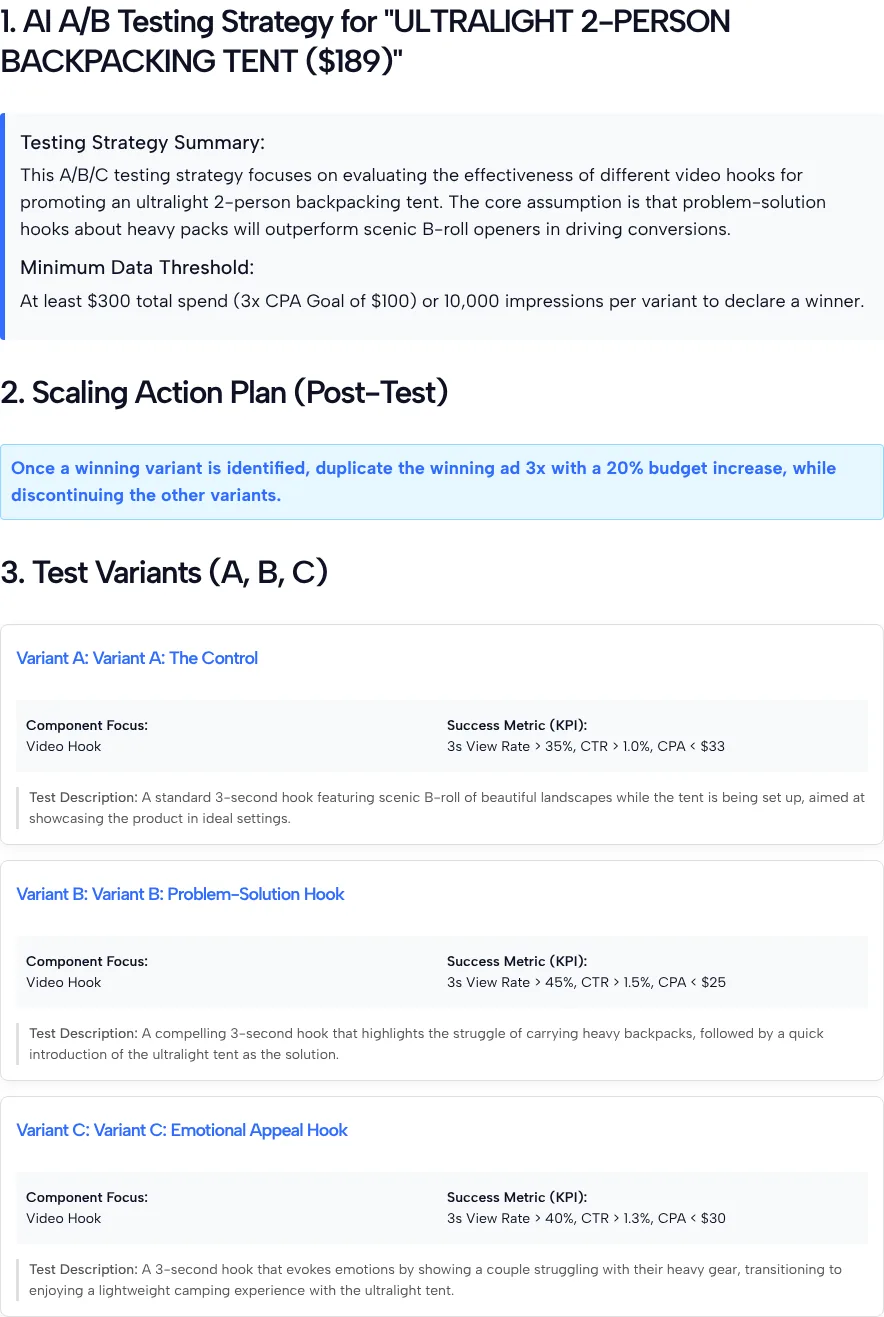
It wrote three hook variants, each with its own KPI targets:
- Variant A, the control: scenic B-roll of the tent going up. In our test the tool gave it 3s View Rate > 35%, CTR > 1.0% and CPA < $33.
- Variant B: the pain of a heavy pack, then the tent as the fix. The tool returned 3s View Rate > 45%, CTR > 1.5% and CPA < $25.
- Variant C: a couple tired of heavy gear, then an easy camp. The tool showed 3s View Rate > 40%, CTR > 1.3% and CPA < $30.
In our test, the threshold asked for at least $300 total spend (3x a CPA goal of $100) or 10,000 impressions per variant. The scaling plan in our test said to duplicate the winning ad 3x with a 20% budget increase and stop the others.
Check these parts before you spend
The variant ideas were useful, but the numbers around them need your judgment:
- The KPI targets are AI-written. They aren’t TikTok benchmarks, and the tool doesn’t say where they come from.
- The numbers disagree with each other. In our test, the threshold assumed a $100 CPA goal, while the variants aimed for a CPA under $25 to $33. We never entered a CPA goal, because the form has no field for one, so set your own.
- Variant C overlaps with B. Both open on the struggle of carrying heavy gear, so a test between them may not tell you much. We’d swap C for a clearly different hook.
- The scaling step is the AI’s advice. Duplicating a winner three times may not suit your budget, so decide how far to scale yourself.
- Two display bugs. Each variant label prints twice (“Variant A: Variant A: The Control”) and the product name comes back in capitals.
Running the plan in TikTok Ads Manager
Build each variant as its own ad, keep everything else the same, and set up a split test between two of them. TikTok’s split test setup guide asks for a test schedule of at least 7 days, and TikTok’s budget rules require an ad group daily budget above $20, so two ad groups need more than $280 over a week. If you picked the tool’s Low Budget option of under $100 total, that money wouldn’t cover it.
When the test ends, read the results against your own goal, not only the AI’s KPI lines:
- For a click goal, compare click-through rates with the TikTok CTR Calculator.
- For sales, check which variant paid back its spend with the TikTok Ads ROAS Calculator.
- For hooks, compare how many people kept watching past the opening seconds, using the video metrics in your report. Our guide to TikTok ads metrics explains what each one means.
A winning ad won’t stay fresh forever. Once it has run for a while, the TikTok Ad Frequency Calculator shows how many times the average person has seen it, which helps you decide when to start the next test.
Picking what to test first
Pick the component that most likely holds your ad back right now:
- Video Hook (First 3s) if people scroll past early. A hook test is often the cheapest place to start, since you only reshoot the opening.
- Creative Concept (Video) when you want to compare whole formats, such as a demo against a customer story.
- Ad Copy/Text or Call to Action (CTA) when people watch but don’t click.
- Landing Page Experience when people click but don’t buy. Judge this one by conversions, not clicks.
Keep each test to one change. If variant B has a new hook and a new offer, you won’t know which one made the difference.
Questions About Planning TikTok Ad Tests
Does the tool run the A/B test for me?
No. It writes the plan: three variants, KPI targets, a minimum data threshold and a scaling step. You build the ads and run the test yourself in TikTok Ads Manager.
Are the KPI targets TikTok benchmarks?
No. An AI model writes them for your product and goal, and the tool doesn’t show a source. In our test they ranged from a 35% to 45% 3-second view rate and a CPA under $25 to $33. Replace them with targets based on your own past ads.
What makes a good hypothesis for this tool?
Name one change and the result you expect from it. “Problem-solution hooks will beat scenic openers” is easy to test. “Better videos will sell more” is too vague to plan around.
Which budget option should I pick?
Pick the band that matches what you can spend across the whole test. The band goes into the AI’s plan, but the tool doesn’t check whether that money is enough to finish a test in Ads Manager.
Why does my plan say “Variant A: Variant A”?
A display bug in the tool prints each variant label twice, as it did on all three variants in our test. The plan text itself isn’t affected, so you can ignore the repeat.
What if none of the variants clearly wins?
Treat it as an answer too: the change you tested probably doesn’t matter much to your audience. Write a bolder hypothesis or test a different component, such as the offer or the landing page, in the next round.