
TikTok Ad Offer Analyzer
Describe your offer, price, checkout friction and ad focus, and an AI model returns an Offer Strength Score, the weakest part of the offer and three fixes to try before you spend on ads.
Grow your Business & Social Media Marketing
- Branded Link Shortener
- QR Code Generator
- Bio Page Builder
- Tracking & Analytics
- 16+ Integrations
Tools You May Also Need for TikTok Ads
What the offer analyzer scores
The TikTok Ad Offer Analyzer judges the deal in your ad, not the video. You describe the incentive, the price, how hard it is to buy and how clearly the ad states the offer, and an AI model rates the whole package with an Offer Strength Score.
Along with the score you get a one-line assessment, the weakest element, a short diagnosis and three fixes: one for the offer, one for clarity and one for friction. All of it is the AI’s reading of what you typed. It doesn’t see your ad, your landing page or any sales data.
Six inputs that shape the score
All six inputs are required, and two of the dropdowns start blank:
- Product/Industry Type. E-commerce (Physical Goods), Lead Gen (High Ticket), SaaS/Subscription, Financial Services or Info Product/Course.
- Current Offer Type. Percent Discount, Buy One Get One (BOGO), Free Gift/Bonus, Payment Plan, Free Trial/Freemium or None/Full Price.
- Price Point / AOV $. A number, such as 49.99. If the deal needs more than one item, enter what a buyer actually pays to get it.
- Conversion Step Friction. Low (1-Step Checkout / Simple Lead Form), Medium (2-Step Checkout / Complex Form) or High (Scheduling a Call / Waitlist / App Install).
- Ad Creative Primary Focus. Solution/Benefit, Problem Agitation, Testimonial/Social Proof, Direct Offer/Price Focus or Product Demonstration.
- Offer Clarity Summary. A few sentences on how and when the ad states the offer. The box asks for 300 characters at most.
Click Get Offer Strength Score for the report, or Clear to reset.
Our free-gift candle offer, scored
The test ran on November 4, 2026, for a fictional candle shop. In our test we chose E-commerce, Free Gift/Bonus, a $28 price, Low friction and Product Demonstration, and wrote that a free mini candle with any two candles “is shown as text on screen at second 3 and said again at the end.” The report came back in about 9.2 seconds.
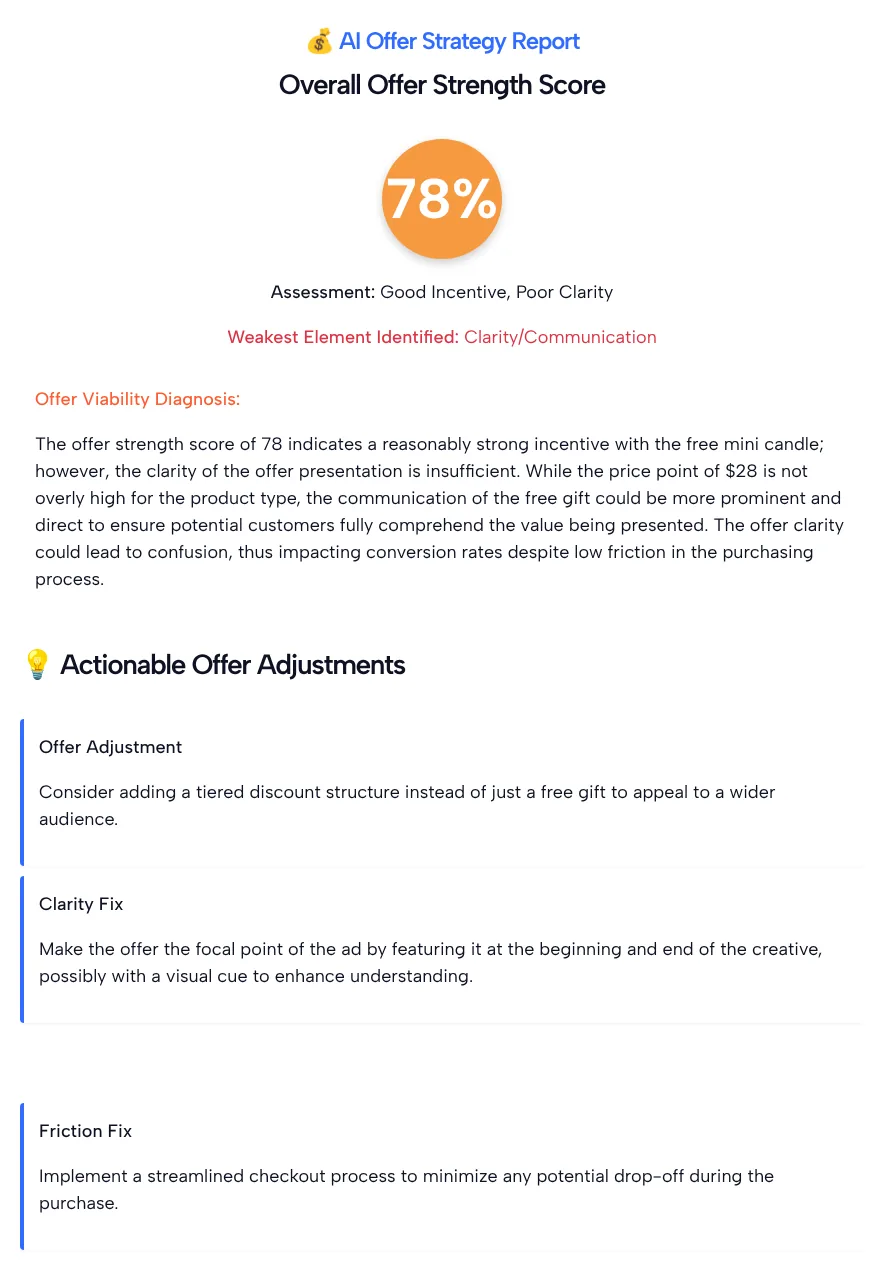
In our test the tool returned a score of 78%, with “Good Incentive, Poor Clarity” as the assessment and Clarity/Communication as the weakest element. The three fixes were:
- Offer: consider a tiered discount instead of only a free gift.
- Clarity: feature the offer at the beginning and end of the ad, with a visual cue.
- Friction: make checkout simpler to cut drop-off.
Where the report missed
The report missed in a few places where its advice didn’t match what we told it:
- The clarity fix asked for what we already had. Our summary said the offer appears on screen at second 3 and again at the end, and the tool still rated clarity as the weak point and told us to show the offer at the beginning and end.
- The friction fix ignored our answer. We picked Low friction (1-step checkout), and it still suggested a simpler checkout.
- Our price was too low for the deal. In our test the offer needed two candles, so a buyer pays at least $56, not the $28 we entered. The report never questioned it.
The useful part was the push to think about a second offer. Whether a tiered discount beats a free gift is a margin question the AI can’t answer for you, so price both before you test them.
Make the ad and the landing page say the same thing
An offer that’s clear in the ad still has to be clear after the click. TikTok’s Misleading and false content policy doesn’t allow ads and landing pages with mismatched or inconsistent information on the promotion, price or discount, including missing disclaimers or terms and conditions.
For our candle offer, that means the product page should show the free mini candle, the two-candle condition and when the deal ends, in the same words as the ad. The TikTok Landing Page Analyzer in the tools list above can review a written description of that page before launch, though it doesn’t open the URL itself.
Offers worth running through it
The analyzer is most helpful when you’re choosing between offer types or second-guessing one that isn’t converting:
- Discount or gift? Run the same product twice, once as Percent Discount and once as Free Gift/Bonus, and compare the diagnoses side by side.
- High-friction offers. If buyers must book a call or install an app, pick High friction and see whether the friction fix suggests a lighter first step.
- Full price. Pick None/Full Price to see what the AI thinks your ad has to prove without a deal.
- Payment plans. For higher-priced products, compare a payment plan against a straight discount.
Treat each run as a checklist of questions, then settle the answer with a split test. The TikTok Ad Testing Tool in the tools list above can draft that test plan.
Offer Strength Score Questions
Is the Offer Strength Score a conversion rate?
No. The score is an AI model’s grade for the offer you described, shown as a percentage. Nothing in it comes from real sales or ad data, so the 78% from our test doesn’t mean 78% of viewers will buy.
What should I enter as Price Point / AOV?
Enter what a buyer pays to get the deal. For a single-item offer, that’s the product price. For a bundle or a buy-two offer, use the total, or the AI will judge a cheaper purchase than the one your ad asks for.
Why did it call my offer unclear when the ad states it twice?
In our test the tool rated clarity as the weakest element even though our summary said the offer appears at second 3 and at the end. Try a more specific summary: the words on screen, how big they are and how long they stay up.
Should I switch to a discount if the report suggests one?
Only if your margin allows it. A tiered discount can cost more than a small free gift. Work out the cost of each version first, then test the two offers against each other in Ads Manager.
What counts as low, medium or high friction?
The form defines them: Low is a 1-step checkout or simple lead form, Medium is a 2-step checkout or complex form, and High is scheduling a call, a waitlist or an app install. Pick the path a new buyer actually takes.
Does the analyzer check my landing page?
The form has no field for a URL, so the analyzer never opens your page. Check yourself that the offer, price and terms on the landing page match your ad word for word before you launch.