
TikTok Ad Creative Analyzer
An AI tool that reviews your ad script or creative hook against your target audience and campaign objective, then scores the hook and the audience fit and gives you a prioritized list of fixes.
Get expert-style feedback on a creative before you put budget behind it. Find out if your hook is strong enough, whether the message fits the people you want to reach, and what to change first.
Grow your Business & Social Media Marketing
- Branded Link Shortener
- QR Code Generator
- Bio Page Builder
- Tracking & Analytics
- 16+ Integrations
Tools You May Also Need for TikTok Ads
An AI read on your script before you spend
The TikTok Ad Creative Analyzer is an AI ad analyzer for scripts: you describe the ad in words, name your audience and pick an objective, and it scores the hook and the audience fit. It reads only the text you type. It can’t watch a video, and it never sees your CTR, conversions or spend.
That makes it a pre-launch tool. Use it when a script is still cheap to change, then let real ad results settle what works.
What to type in each box
You type into three boxes, and all three are required:
- Ad Script or Creative Hook Description. Describe the ad shot by shot: what the viewer sees first, what’s said, any on-screen text and how it ends. The tool can only judge what you write, so a missing CTA in your description will show up as a missing CTA in the feedback.
- Target Audience Profile. Age, interests and what this group cares about. A line like “busy parents who meal prep on Sundays” gives the AI more to work with than “adults 25 to 45”.
- Campaign Objective. Conversion (Sales/Purchases), Lead Generation (Sign-ups/Emails), Awareness (Views/Brand Recognition) or Engagement (Comments/Shares). Pick the one you’ll choose in Ads Manager.
Click Analyze Creative to get the scorecard, or Clear to start over.
How it scored our candle hook
We ran the analyzer on November 4, 2026, for a fictional candle brand. The description we typed: a close-up of a candle being lit in a dark room, a voiceover saying “This is the only candle my roommate asks to borrow,” then a quick cut to the label and the price. The audience was US women 25 to 44 who buy candles and home decor as gifts, and the objective was Conversion.
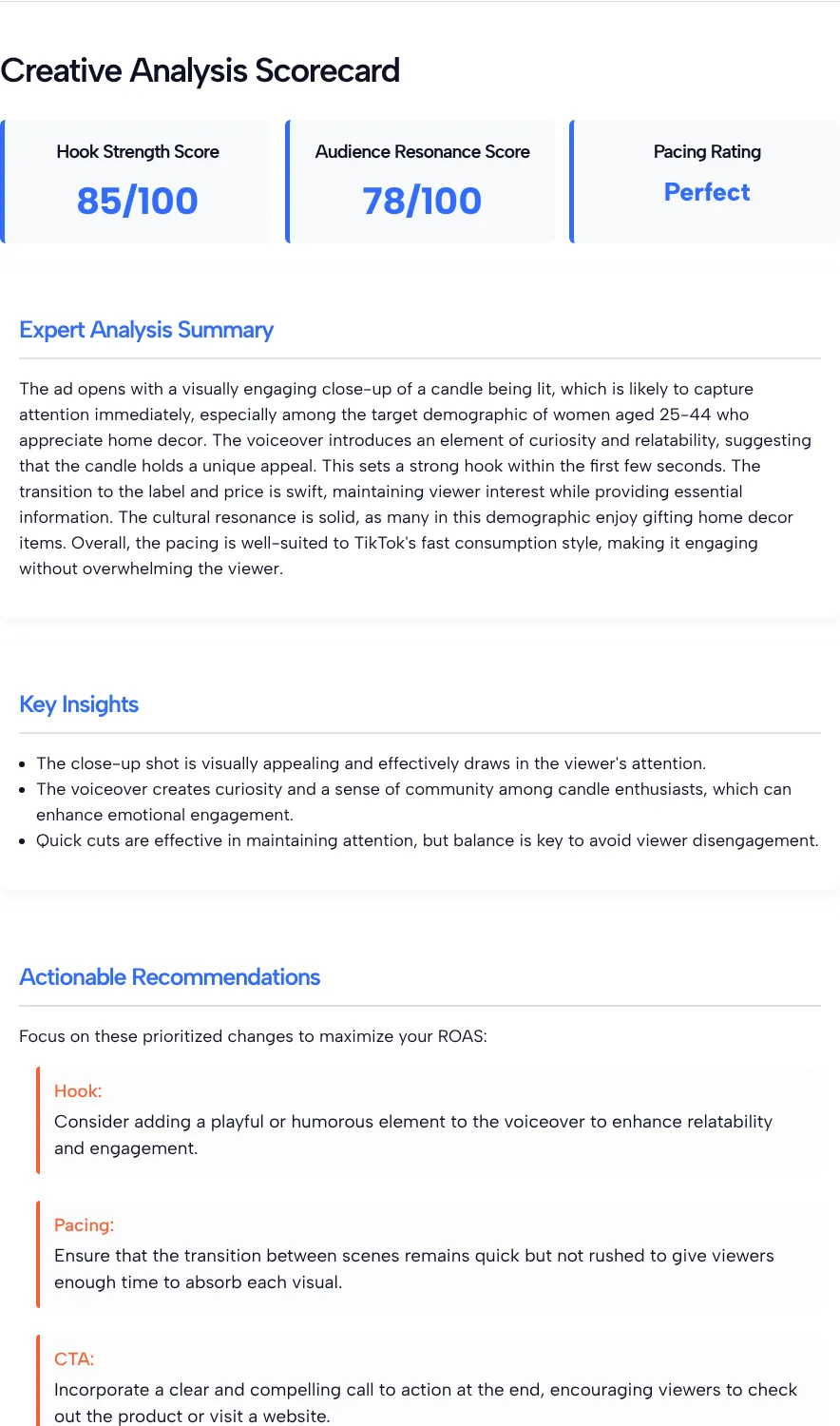
In our test the tool returned a Hook Strength Score of 85/100, an Audience Resonance Score of 78/100 and a Pacing Rating of “Perfect”, in about 8.2 seconds. The summary praised the close-up and the curiosity in the voiceover. It then gave three recommendations:
- Hook: add a playful or humorous touch to the voiceover.
- Pacing: keep the cuts quick but not rushed.
- CTA: add a clear call to action at the end.
The CTA note was fair. Our description really did stop at the price, with no ask.
Reading the scores without overrating them
Read the scores as one reviewer’s opinion, written by an AI model, with four limits:
- The scores aren’t predictions. An 85 isn’t a forecast of views or watch time, and it doesn’t promise the hook will beat a 78. The tool doesn’t say how it gets from your words to a number.
- Pacing is a guess from text. “Perfect” pacing came from a three-sentence description of a video that doesn’t exist yet. Real pacing depends on the edit.
- The ROAS line is boilerplate. The tool prints a fixed line about ROAS above its recommendations, but the form never asks for revenue or spend.
- We ran it once. We can’t tell you how much a score moves if you submit the same script again, so don’t read much into a gap of a few points.
The most useful part is the written feedback. If two of the three notes point at the same weak spot, fix that first.
Check the script against TikTok’s own creative advice
TikTok publishes its own checklist, and it’s a good second opinion next to the AI’s. TikTok’s creative best practices for performance ads recommend prioritizing the hook in the first 6 seconds, introducing your content proposition in the first 3 seconds, featuring people such as creators, employees or customers, showing 5 to 10 words per second when you use on-screen text, and guiding viewers with a strong CTA.
Run our candle script through that list and one gap shows up that the analyzer didn’t mention: nobody appears on camera. Showing a creator or customer lighting or holding the candle while the voiceover plays would cover it.
Proving it with real ad results
A better score is a reason to test, not a reason to scale. Once you’ve revised the script, run the old and new versions against each other. TikTok’s split testing guide explains how Ads Manager splits your audience into two equal groups, with each group seeing only one ad group, and picks a winner only when the results are statistically significant.
Judge the result by the metric that matches your objective. Our guide to TikTok ads metrics explains which numbers show whether a hook kept people watching.
Questions About the Creative Analyzer
Can I upload my video for analysis?
No. The analyzer has no upload option and reads only what you type into the three fields. Describe the video shot by shot, including the first seconds, the voiceover, any on-screen text and the ending, so the AI has something concrete to judge.
Is a Hook Strength Score of 85 good enough to launch?
Treat any score as an AI opinion, not a pass mark. Our candle hook got 85/100 in our test, but the only way to know whether a hook works is to run it and compare it with another version in Ads Manager.
Why do the recommendations mention ROAS?
The tool prints a fixed line about ROAS above its recommendations. The form never asks for revenue or spend, so the analyzer can’t measure or predict your return on ad spend from what you enter.
Which campaign objective should I choose?
Choose the one you’ll use in Ads Manager: Conversion, Lead Generation, Awareness or Engagement. The tool reviews your script against the objective you pick, so a mismatch with your real campaign makes the feedback less useful.
How detailed should my script description be?
Detailed enough that someone could storyboard it. Say what appears in the first second, who speaks, what text shows on screen and how the ad ends. Vague descriptions get vague feedback.
Can I use it to compare two hooks?
Yes. Run each hook with the same audience and objective, then compare the written notes, not only the scores. Take the stronger script into a real split test before you put a larger budget behind it.