
Instagram Note Generator
Type what you’re up to, pick a mood and a goal, and get 3, 5 or 7 Instagram Notes, each with a character count out of 60 and a Copy button.
Grow your Business & Social Media Marketing
- Branded Link Shortener
- QR Code Generator
- Bio Page Builder
- Tracking & Analytics
- 16+ Integrations
Tools You May Need for Instagram Content Ideas
What is the Instagram Note Generator?
The Instagram Note Generator writes short Instagram Notes from a topic you type, in the mood you pick, with or without a call to action. It returns 3, 5 or 7 options, each with a character count out of 60 and a Copy button, and you paste your favorite into Notes in the Instagram app.
It’s a writing helper, not a posting tool. The form has no sign-up field and no link to your account, so nothing goes live until you share a note yourself.
Why You Need This Instagram Note Generator
You need it when one update could be said five ways and you want to pick the best fit fast. Notes leave no room to ramble: as Instagram Help explains, a note can be up to 60 characters and stays at the top of the inbox and above your profile picture for up to 24 hours.
That short life is why a few drafts on hand help. A note about Saturday’s sale is stale by Sunday, so you’ll write new ones often, and comparing several options takes less time than rewriting one from scratch.
Four fields, one click
The form has one required field and three with defaults:
- Core Subject / Topic. Write what’s happening in plain words, with the detail that makes it yours. “Repotting 30 plants today before the weekend sale” works better than “busy day.”
- Mood / Vibe. Chill / Relaxed (the default), Focused / Grinding, Witty / Humorous, Mysterious / Teaser or Inspirational.
- Goal / Call-to-Action. No CTA (Just Status) is the default. Drive Traffic (Link in Bio) is meant to point people to your link, and Ask a Question (Maximize Replies) invites a reply.
- Number of Options. 3, 5 or 7 notes. The form starts at 5.
Click Generate Notes to see the options. Clear is there to reset the form for the next idea.
Five notes from one weekend-sale update
We tested the generator on November 3, 2026, for a made-up Portland plant shop with the topic “Repotting 30 plants today before the weekend sale,” the Focused / Grinding mood, the Drive Traffic (Link in Bio) goal and 5 options. The notes appeared in about 3.8 seconds, under a one-line “Expert Engagement Tip.”
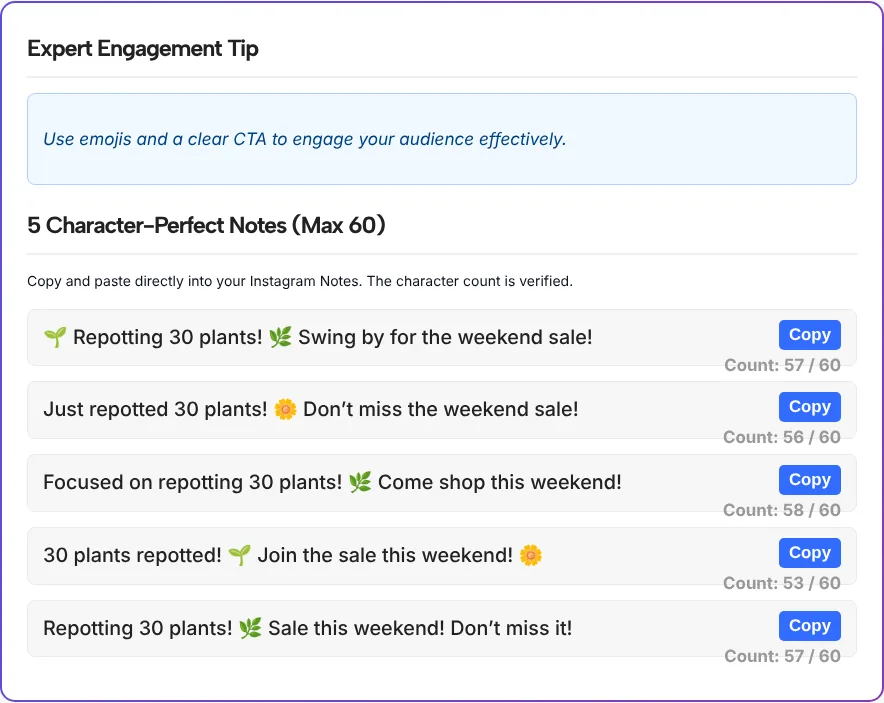
Two of the five, as the tool wrote them:
- “Focused on repotting 30 plants! 🌿 Come shop this weekend!”
- “Just repotted 30 plants! 🌼 Don’t miss the weekend sale!”
Here’s what to know before you copy one:
- All five fit. The counts ran from 53 to 58 out of 60.
- Emojis count double. The counter treats each emoji as two characters, so the tool’s first note showed 57 although it’s 55 characters long. Instagram’s note field has the final word if you’re close to the limit.
- The link-in-bio goal didn’t stick. We chose Drive Traffic (Link in Bio), but none of the five notes mentioned the link. They said “Come shop this weekend” or “Join the sale” instead, so add the link prompt yourself if that’s the point of the note.
- Copy worked on the first try. The button changed to “Copied!” and the note pasted exactly as shown.
When to use the Instagram notes generator
The Instagram notes generator is most useful for updates that have a shelf life of a day. These pairings of mood and goal are a good place to start:
| What you want to say | Mood / Vibe | Goal / Call-to-Action |
|---|---|---|
| A sale, drop or event happening today | Focused / Grinding | Drive Traffic (Link in Bio) |
| A teaser for a post or video coming soon | Mysterious / Teaser | No CTA (Just Status) |
| A quick poll-style question for followers | Witty / Humorous | Ask a Question (Maximize Replies) |
| What you’re working on right now | Chill / Relaxed | No CTA (Just Status) |
| A thank-you or milestone message | Inspirational | No CTA (Just Status) |
If you’re searching for an IG notes generator because you post notes every day, save the topics that worked and rerun them with a different mood. The same subject in a new mood reads like a new note.
Make the link-in-bio note pay off
A note that says “link in bio” asks people to go to your profile, so the link there has to match what the note promised. If the note is about a weekend sale, the tap should open the sale, not your home page.
When one link has to cover a sale, an event and your latest post at the same time, TLinky’s Link in Bio page holds all of them on one page you can update without editing your profile each time the note changes.
Edit the note so it sounds like you
Generated notes lean on exclamation points and emojis. A few small edits make them read like a person wrote them:
- Keep one exclamation point at most. Two in a short note can read like shouting.
- Swap a generic word for a specific one. “30 plants” beats “lots of plants,” and the name of the plant beats both.
- End with the action. If you want replies, finish with the question. If you want taps, finish with where to tap.
- Check the tone against your last few posts. A Witty / Humorous note from an account that’s usually calm can feel off.
Instagram Note Generator FAQ
What is the character limit for Instagram Notes?
A note can be up to 60 characters, according to Instagram Help. The generator shows a count out of 60 under every option and counts each emoji as two characters, so its number may run slightly high.
How long does an Instagram Note stay up?
Up to 24 hours, as Instagram Help says, after which it is no longer visible. You can also delete it earlier by tapping the note and choosing Delete note.
Can I use Notes to drive traffic to my link in bio?
You can pick the Drive Traffic (Link in Bio) goal, but check the results. In our test none of the five notes mentioned the link, so we would add a short prompt such as “sale link in bio” before posting.
Who can see my Instagram Note?
As Instagram Help explains, you can share a note with followers you follow back or with your Close Friends. Others can’t see who viewed or replied to it, and a reply starts a chat between you and that person only.
Which mood should I pick for a business account?
Focused / Grinding suited our sale announcement. For a question to customers, try Witty / Humorous with Ask a Question (Maximize Replies), and for a teaser, Mysterious / Teaser with No CTA (Just Status).
Does the Instagram Note Generator post the note for me?
No. It only writes options on this page. Copy the one you like, paste it into a new note in the Instagram app and share it yourself.