
AI Instagram Font Generator
This generator turns your text into dozens of Unicode letter styles, such as bold, script and bubble, that you can copy into an Instagram bio, caption or Story.
Grow your Business & Social Media Marketing
- Branded Link Shortener
- QR Code Generator
- Bio Page Builder
- Tracking & Analytics
- 16+ Integrations
Tools You May Need for Instagram Branding Tools
What this Instagram font generator does
The font generator swaps the letters you type for look-alike Unicode characters, so a plain line like “Fresh plants every Friday” comes back as bold, italic, script, bubble, gothic and other styles. You copy the version you like and paste it into your bio, a caption or a comment.
On top of the list of styles, the tool writes a short AI Styling Tip about how to use them with your text. It’s free, and there’s nothing to install or sign up for.
Unicode characters, not real fonts
None of these styles is a font file. What the generator does is replace each letter with a different character from the Unicode standard that happens to look like a styled letter. A bold 𝐅 and a regular F are two separate characters, the same way a letter and an emoji are.
That trick is why the text survives copy and paste, and it’s also its main drawback. Scope, the UK disability charity, explains that screen readers may skip these characters entirely or read out something irrelevant, such as “mathematical sans-serif script t” for a single letter.
So treat styled text as decoration. A name or a one-word heading in your bio is fine. Your prices, dates, opening hours and calls to action should stay in plain letters, so everyone can read them.
How to style your text
The form has one text box and three buttons:
- Type your text in the Enter Text for Conversion box. A short line works best, like a name, a heading or a short tagline.
- Preview it. The form includes an Instagram-style preview with a dropdown for choosing a style and a Copy Text from Mockup button.
- Click Generate Full 45+ Fonts. The full list loads under the form with the AI Styling Tip at the top.
- Click Copy under the style you want, then paste it into Instagram.
- Click Clear to empty the box and try another line.
Despite the button’s name, count on dozens of styles rather than a fixed number. Our test returned 43.
What “Fresh plants every Friday” looked like in our test
We tested the generator on November 3, 2026, with the tagline “Fresh plants every Friday” for a fictional houseplant shop. The list loaded in about 2.5 seconds under a heading that read “43 Ready-to-Use Aesthetic Fonts.” The Copy button worked: it turned to “Copied!” and the styled text was on our clipboard.
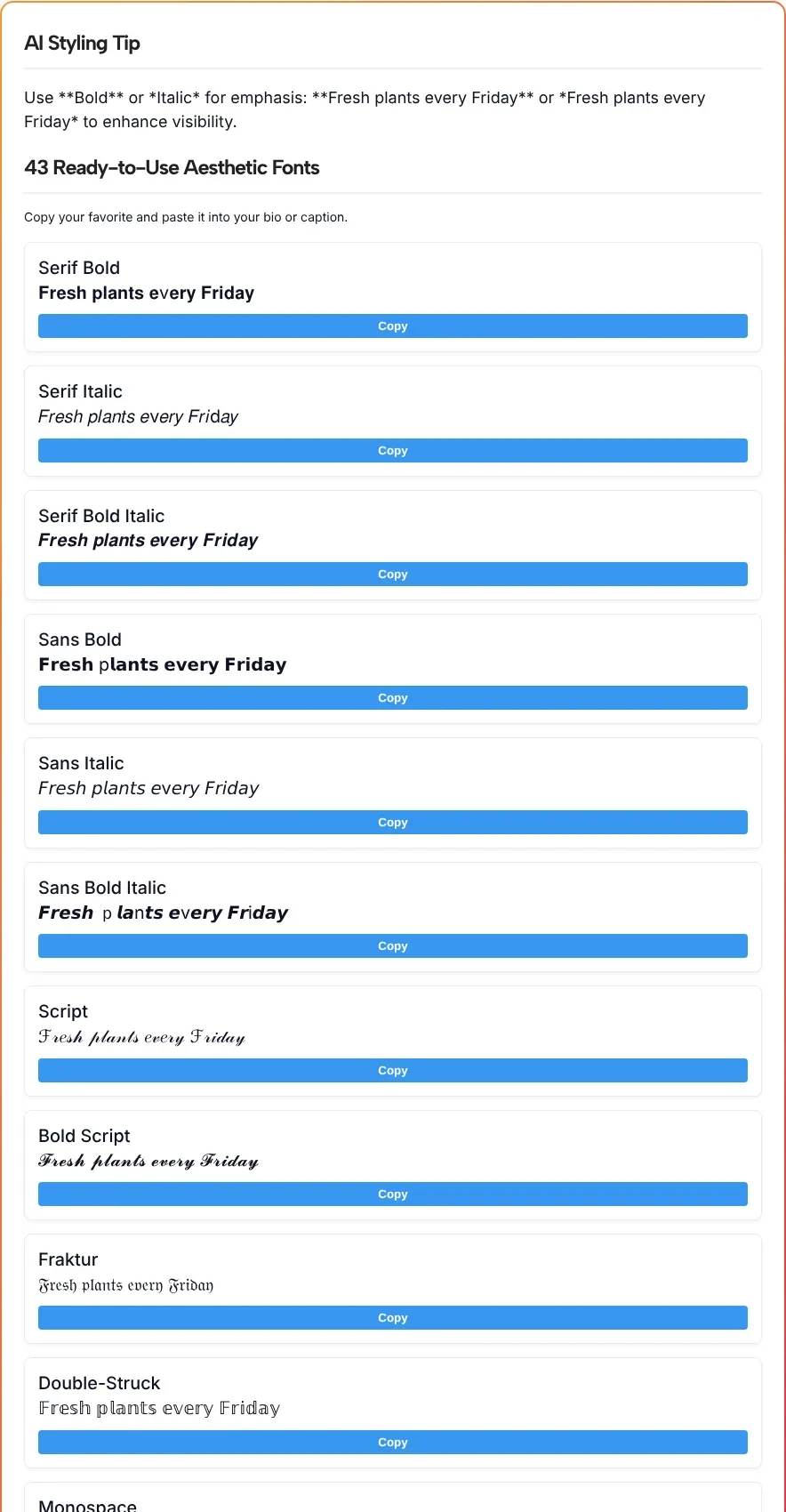
Many styles converted every letter cleanly:
| Style | Our text in that style |
|---|---|
| Serif Bold Italic | 𝑭𝒓𝒆𝒔𝒉 𝒑𝒍𝒂𝒏𝒕𝒔 𝒆𝒗𝒆𝒓𝒚 𝑭𝒓𝒊𝒅𝒂𝒚 |
| Bold Script | 𝓕𝓻𝓮𝓼𝓱 𝓹𝓵𝓪𝓷𝓽𝓼 𝓮𝓿𝓮𝓻𝔂 𝓕𝓻𝓲𝓭𝓪𝔂 |
| Fraktur | 𝔉𝔯𝔢𝔰𝔥 𝔭𝔩𝔞𝔫𝔱𝔰 𝔢𝔳𝔢𝔯𝔶 𝔉𝔯𝔦𝔡𝔞𝔶 |
| Double-Struck | 𝔽𝕣𝕖𝕤𝕙 𝕡𝕝𝕒𝕟𝕥𝕤 𝕖𝕧𝕖𝕣𝕪 𝔽𝕣𝕚𝕕𝕒𝕪 |
| Bubble | Ⓕⓡⓔⓢⓗ ⓟⓛⓐⓝⓣⓢ ⓔⓥⓔⓡⓨ Ⓕⓡⓘⓓⓐⓨ |
| Vaporwave | Fresh plants every Friday |
Others had gaps you’d notice once the text is on your profile:
- Plain letters left behind. Serif Bold kept a regular “v” in “every”, Serif Italic kept “v” and “d”, and Sans Bold kept a regular “p” in “plants.”
- Mixed styles. Monospace switched between three different letter shapes within one word.
- An emoji where a letter should be. The Circled style turned the “p” in “plants” into a pager emoji (📟).
- A duplicate. The style called Vaporwave Bubble came out identical to plain Vaporwave.
The AI Styling Tip was one sentence suggesting bold or italic to emphasize our tagline. So look closely at the style you picked before you paste it, and pick another if any letter looks off.
Where styled text works on Instagram
Styled letters work best in small doses, where they help a reader scan rather than slow them down:
| Where | Good use | Keep plain |
|---|---|---|
| Bio | Your name line or one short heading | Contact details, hours, the line that tells people where to click |
| Captions | A one-line title above the text | The body of the caption and any hashtags |
| Stories | A short label on a photo | Dates, prices and directions |
| Highlight titles | One word per highlight | Long phrases |
| Comments | A short thank-you | Anything longer than a few words |
If a styled bio line points people to your links, keep the link itself plain. A link in bio page lets you put all your links behind one simple address. For the Story itself, the Instagram Story generator can draft the text before you style a word or two of it.
Before you post, open your profile on your phone and check that the styled text reads the way you expect. We checked our results in a desktop browser only, so we can’t promise how every phone will show them.
Font generator questions, answered
Are these real fonts?
No. They are Unicode characters that look like bold, italic, script or other letter styles. That’s why you can paste them into a bio or caption like any other text.
Why do some letters stay normal in a style?
Not every style converts every letter. In our test, Serif Bold left the v in every unchanged and Sans Bold left the p in plants unchanged. Preview the style before you paste it and choose another if a letter looks out of place.
How many styles will I get?
The button says 45+, but our test returned 43 styles for one short line of text. Expect a few dozen, and expect some to look alike.
Can everyone read styled text?
Not always. As Scope explains, screen readers may skip these characters or read out something irrelevant, such as “mathematical sans-serif script t” for one letter. Keep important details in plain text.
Will my followers see the same thing I see?
Probably, but we can’t promise it. How the characters look depends on the device showing them, and we only checked our results in a desktop browser. Look at your profile on a phone after you paste.
What is the AI Styling Tip?
The AI Styling Tip is a one-sentence suggestion the tool writes for your text. In our test it suggested bold or italic for emphasis. Treat it as a hint, not a rule.