
Instagram Engagement Calculator
Enter your followers, the number of posts you checked, and their total likes and comments to get your average engagement rate per post, a grade and five tips.
Grow your Business & Social Media Marketing
- Branded Link Shortener
- QR Code Generator
- Bio Page Builder
- Tracking & Analytics
- 16+ Integrations
Tools You May Need for Instagram Analytics
The engagement rate formula this calculator uses
The Instagram Engagement Calculator measures engagement per post against your follower count: it adds your total likes and comments, divides by the number of posts you checked, divides again by your followers and shows the result as a percentage. Written out, that’s (likes + comments) / posts / followers x 100.
Next to the rate you get a status label, a short AI analysis and five tips. The tool only uses the four numbers you type. It doesn’t log in to Instagram or pull data from any account.
Gather your numbers before you start
You need four numbers, and it’s easiest to note them down while you scroll your profile:
- Total Followers. Your current follower count. It must be at least 1.
- Number of Posts Analyzed. How many recent posts you’re counting. We suggest at least your 10 most recent posts, so one unusually strong or weak post doesn’t swing the result.
- Total Likes (Across all analyzed posts). Add up the likes on every post you picked.
- Total Comments (Across all analyzed posts). Add up the comments on the same posts. Zero is allowed for both likes and comments.
Then click Get Engagement Report. Clear resets the form.
Pick posts in a row, starting from your newest, and skip pinned posts if they’re much older than the rest. Use the same number of posts each time you check, so this month’s rate is comparable with last month’s.
You can only total likes you can see. Instagram gave everyone the option to hide like counts on their own posts, so others can’t see how many likes those posts get, as Instagram announced in May 2021. For an account that hides its likes, this calculator won’t have the numbers it needs.
Our test: a 2.24% rate from ten posts
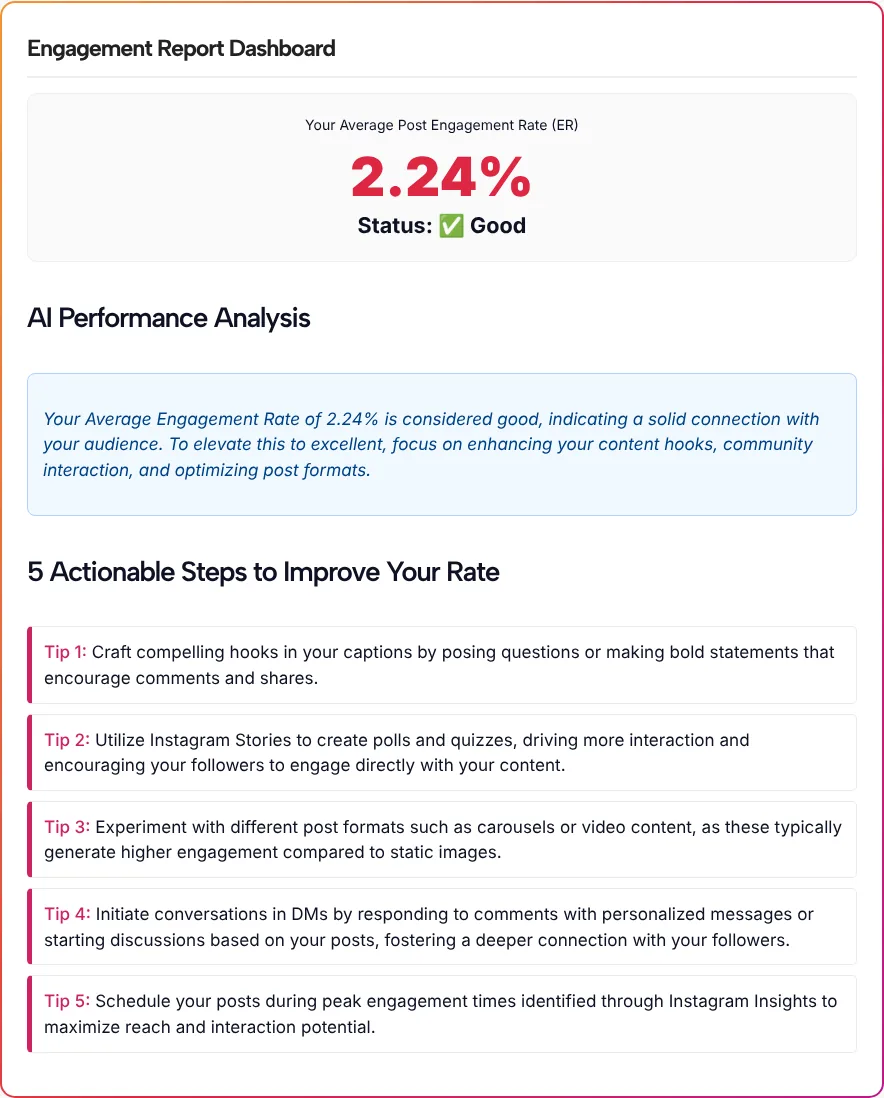
In our test on November 3, 2026, we entered 15,400 followers, 10 posts, 3,200 likes and 250 comments. The tool returned its report in about 4.3 seconds, with an average engagement rate of 2.24% and the status “Good”.
We redid the math by hand to make sure. In our test, 3,200 likes + 250 comments = 3,450 interactions, 3,450 / 10 posts = 345 per post, and 345 / 15,400 followers = 2.24%. The tool’s figure matched.
The AI Performance Analysis called the rate good and suggested work on hooks, community interaction and post formats. The five tips covered question-style hooks in captions, Story polls and quizzes, carousels or video, replying to comments in DMs, and posting when Instagram Insights shows your audience is most active. They work as a checklist, though none of them refers to your actual posts.
Reading the “Good” status
The status label is the calculator’s own grading. The report doesn’t say where its cutoffs sit or what they’re based on, so don’t treat “Good” as an official Instagram benchmark.
A more useful comparison is your own history. Run the same check every month with the same number of posts, and watch the direction. A rate that slips while your follower count climbs can mean new followers aren’t interacting as much as earlier ones did.
What likes and comments leave out
Likes and comments are only part of how Instagram sees a post. Instagram’s tips for improving your reach say ranking weighs how many people like, comment, share and save a post and how quickly, and that Insights can split Accounts Reached into followers and non-followers. This calculator counts likes and comments only, so a post people save and share a lot can look weaker here than it really is.
Dividing by followers is a simple yardstick, but it isn’t the same as dividing by the people who actually saw your posts. For that second view, look at your reach instead. Interactions divided by reach is a figure this tool doesn’t calculate.
Putting your rate to work
- Track a trend. Keep a simple log of each monthly result. The trend tells you more than any single number.
- Compare formats. Run your recent Reels and your carousels as two separate checks to see which gets more likes and comments per post for your account.
- Vet a collaboration. Before a partnership, check a creator’s recent public posts with the same method, as long as their like counts are visible.
- Work on what people can answer. A caption that ends with a real question gives followers something to reply to, and our Instagram caption generator can draft a few to start from. For quick interaction in Stories, the Instagram Story generator suggests poll, quiz and slider ideas.
- Price your work. Once you know your rate, the Instagram Money Calculator above turns followers and engagement into a rough monthly figure for brand deals.
Engagement rate questions
How does the calculator work out my engagement rate?
The calculator adds your total likes and comments, divides that by the number of posts you analyzed, then divides by your followers and shows the result as a percentage. In our test, 3,450 interactions over 10 posts and 15,400 followers came to 2.24%.
Why do other engagement calculators give me a different number?
Calculators use different formulas. Some add saves, shares or views, some divide by reach instead of followers, and some look at a single post. This one uses likes plus comments per post, divided by followers, so compare results only with the same method.
Can I check someone else’s Instagram account?
Yes, as long as you can see the like counts on their posts. Count their followers, likes and comments from the profile and enter them the same way. If the account hides its like counts, you won’t have the totals the form needs.
How many posts should I include?
We suggest at least your 10 most recent posts. Fewer posts let one outlier swing the rate, and very old posts reflect an audience you may no longer have. Whatever number you pick, stick with it so your monthly checks line up.
Does it need my Instagram password?
No. There’s no login. The calculator works only from the four numbers you type in, and it doesn’t read or store anything from your account.
Is a Good status the same as an industry benchmark?
No. Good, and any other status the tool shows, comes from the calculator’s own grading. The report doesn’t say where the cutoffs are, so use the label as a rough signal and judge progress against your own past results.