
Most advice on QR codes in email tells you to add one and move on. It skips a real question.
An email link is already one tap away. So what does a QR code actually add?
The answer depends on what happens after the click. A dynamic QR code earns its place when it bridges the reader to a physical object or a different device.
It earns nothing when it just repeats a link the reader could already tap.
The U.S. Department of Energy’s own communication standards recommend against QR codes on emails, social media, and websites. Readers there can already click a hyperlink directly. This guidance comes from the U.S. Department of Energy (2026).
For the bigger picture on how QR code adoption is trending across marketing channels, see TLinky’s QR code statistics for 2026.
In this article, you will learn:
- When a QR code in an email genuinely outperforms a plain link, and when it does not
- The specific email use cases where QR codes solve a real problem
- How to build, brand, and place a QR code so it survives inbox rendering and mobile scanning
- How to track scans by referrer, run an A/B test on a QR destination, and edit that destination after the email has already gone out
Unlock the Power of QR Codes! with 14+ different types of QR codes!
Elevate your marketing game with TLinky’s QR Code Generator. Create dynamic, eye-catching QR codes in seconds.
Key Takeaways
- A QR code adds value in email primarily when it moves the reader off-screen or into a physical space, not when it just duplicates an existing hyperlink.
- The U.S. Department of Energy advises against QR codes on emails, social platforms, and websites, since clickable links already exist there, according to the U.S. Department of Energy (2026).
- Dynamic QR codes let you swap the destination URL after an email has already been sent, without reprinting or resending anything.
- TLinky’s QR code analytics break scans down by referrer, which lets you isolate how many scans came from email versus print, social, or direct traffic.
- A/B testing a QR code’s destination works the same way as split-testing a landing page, and TLinky tracks the traffic split automatically.
Quick Answer
QR codes work best in email when the destination needs a second device or a physical action, such as saving a contact card or joining WiFi. For a reader already on their phone with the email open, a plain text link usually converts just as well, with less friction and no extra scanning step.
When a QR Code Actually Helps an Email Campaign
A QR code adds friction, not convenience, when the reader is already looking at your email on the device they would use to complete the action.
Scanning a code on your own screen means using a second device, or an awkward screenshot workaround. Neither is a smooth path to a click.
A QR code genuinely helps when the email is a bridge to something outside the inbox. The email is not the final destination.
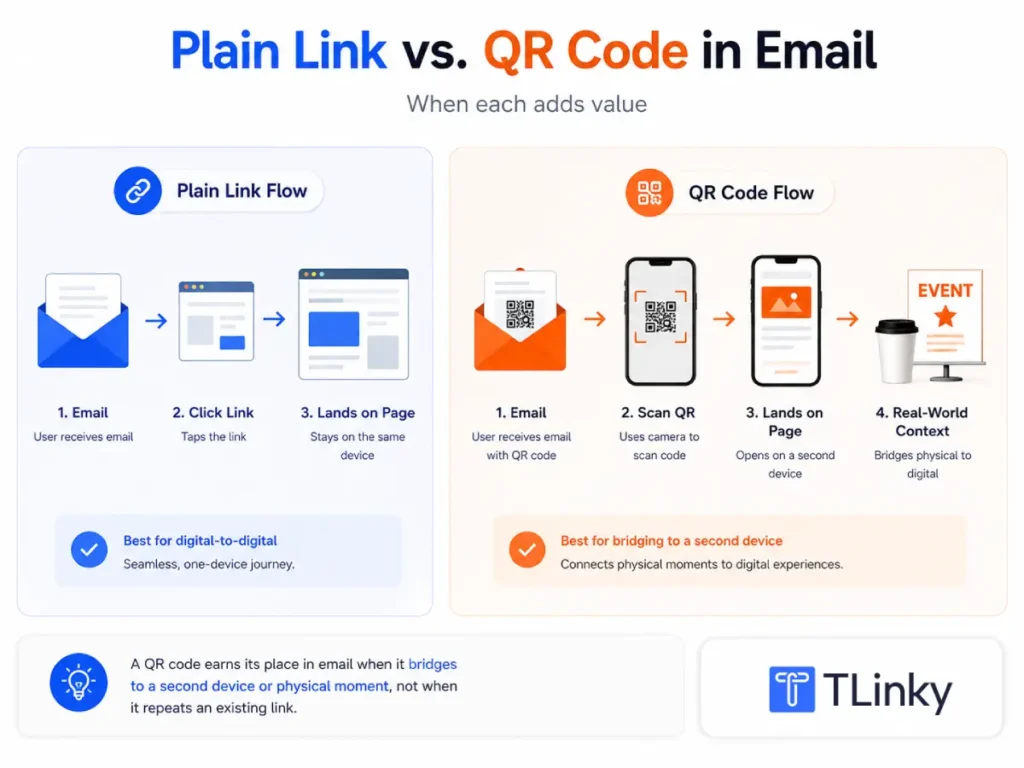
One example is directing a desktop email reader to a mobile-only app download. A phone user does not need this step, but a laptop user does.
Another is connecting a printed follow-up back to an email-linked destination. A receipt, an event badge, or a packing slip all count.
A third is letting someone save a vCard contact straight to their phone. That beats typing a name and number by hand.
Reviewing the general benefits of QR codes for business helps frame where they add value across channels, not just inside one email.
Email Use Cases Where QR Codes Solve a Real Problem
Not every promotional email needs a QR code. A handful of scenarios consistently justify one, because the action cannot happen cleanly through a tap alone.
- Desktop-to-mobile app installs: A reader checking email on a laptop cannot tap through to an app store, so a QR code closes that device gap in one scan.
- Digital business cards and event follow-ups: A dynamic QR code set to the vCard type lets a recipient save your contact details directly, without retyping anything.
- Print-to-email continuity: If a receipt or packaging insert already carries a QR code, repeating it in a follow-up email keeps the destination consistent.
- In-person event check-in: A QR code in a pre-event email can double as the check-in code attendees present at the door.
- WiFi or venue access at a hosted event: A dynamic WiFi QR type lets attendees join a network without hunting for a printed password card.
These same use cases show up across QR codes on social media too, since both channels share the same off-screen bridging logic.
Static and Dynamic QR Codes for Email Campaigns
A static QR code encodes its destination directly into the image. The link cannot be changed once the code is sent.
If a landing page moves or a promotion ends, a static code either breaks or sends traffic to an outdated offer. Neither outcome is fixable after the fact.
A dynamic QR code points to a redirect instead of the destination itself. The underlying URL can be swapped after the email has already gone out.
This matters more in email than almost anywhere else. A campaign cannot be recalled once it lands in thousands of inboxes.
TLinky’s QR code editor supports both types, along with dedicated Email, Link, and vCard formats built for these scenarios.
See the full breakdown of static versus dynamic QR codes for how each behaves after publishing.
How to Build a QR Code for an Email Campaign
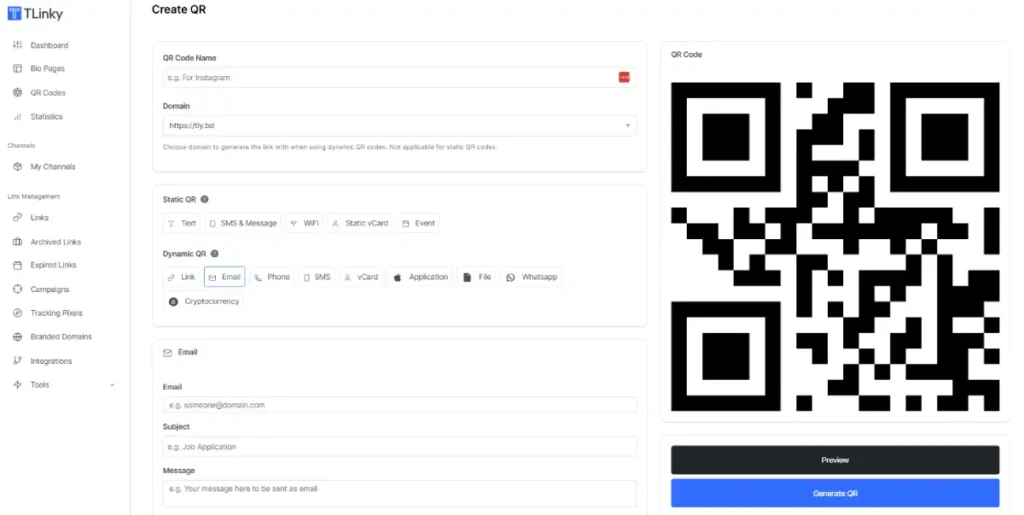
- In TLinky, open the QR Codes dashboard and click Create QR, then name the code something you can identify later, such as “March newsletter, app download CTA.”
- Choose a domain for the dynamic short link the QR code will redirect through.
- Select a dynamic QR type that matches the goal: Link for a landing page, Email for a pre-addressed message, or vCard for a contact card.
- Enter the destination data for that type, whether that is a URL, an email address and subject line, or contact fields.
- Apply brand colors, a logo, and a matrix or frame style so the code matches your email template. TLinky’s free QR code with logo walkthrough covers the branding steps in more detail.
- Increase the error correction setting if you added a logo or frame, since higher error correction keeps the code scannable with visual elements layered on top.
- Click Generate QR, review the preview, and save.
- Download the code as a PNG or SVG and drop it directly into your email template.
Designing a QR Code That Survives Inbox Rendering
An email inbox is a worse test environment for a QR code than print. Images can be blocked by default, and dark mode can invert colors unpredictably.
Keep the contrast between the foreground and background high. Low-contrast pairings that look fine on a bright screen often fail to scan in dark mode.
Size the code large enough to stay scannable even when an email client compresses images. Always place a visible text link alongside it as a fallback.
The Department of Energy’s accessibility guidance recommends including the destination URL or email address in text next to any QR code. This is confirmed in the U.S. Department of Energy (2026) standards.
That way, readers using a screen reader still have a path forward.
A trackable QR code generator that supports high error correction and logo embedding makes this easier to get right the first time.
Placement and Frequency Inside the Email
A QR code works best near the top third of the email, close to the offer it supports.
A code buried at the bottom competes with a reader who has already decided whether to keep scrolling.
Limit each email to one QR code tied to one clear action. Multiple codes force the reader to guess which one matters, and that hesitation often costs you the scan.
Tracking QR Code Performance from an Email Campaign
Every dynamic QR code in TLinky comes with a dedicated statistics page, separate from the analytics on the underlying short link.
The summary view shows total scans, unique scans, top country, and top referrer. The Referrers tab breaks scans down by source, including email, direct traffic, and social platforms.
Since the code lives inside the email itself, a spike attributed to that referrer category confirms the code is actually being used from within the message.
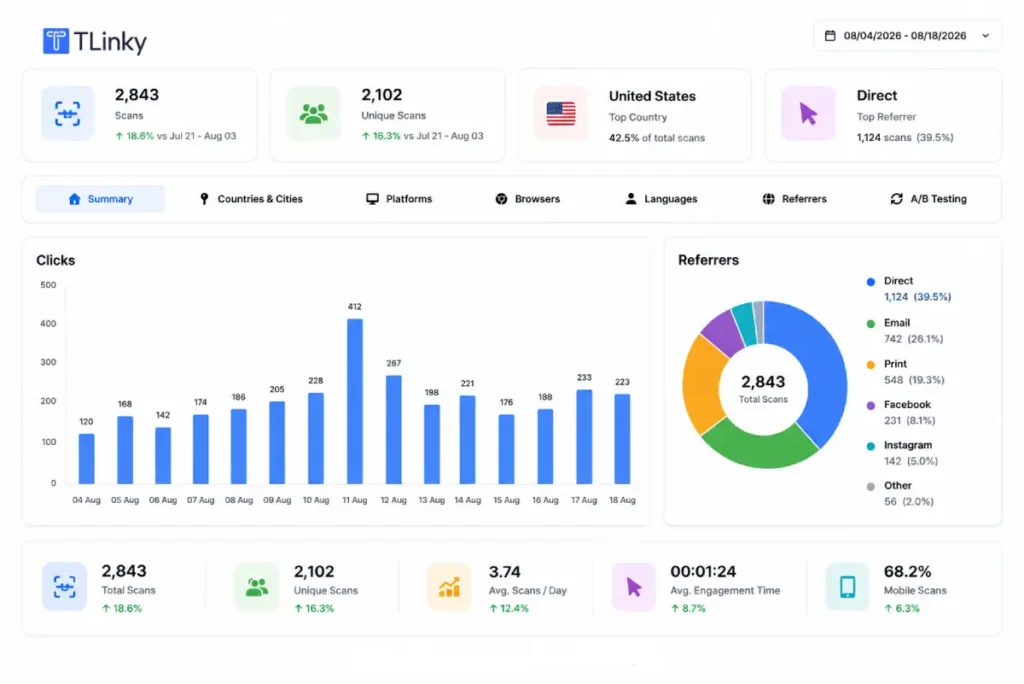
The Countries and Cities tab maps scans geographically. The Platforms and Browsers tabs show whether readers scanned from Android or iOS, and which browser opened afterward.
All of this updates in real time and covers a custom date range. You can isolate a single send instead of blending it into account-wide totals.
The same review process applies to free trackable QR codes used on any other channel.
Running an A/B Test on a QR Code Destination
Not sure whether an email QR code should point to a landing page or a product page? TLinky’s editor supports multiple destination URLs on the same code through its A/B Testing tab.
The URL Traffic Distribution view lists each destination, along with its click count and share of total scans. This lets you compare two landing pages without generating two separate codes.
Once a clear winner emerges, update the code to send all future scans to the stronger destination. The printed or embedded image never has to change.
Editing a QR Code After the Email Has Already Been Sent
This is where a dynamic QR code earns back the friction it added at the start.
If a landing page goes down or a typo makes it into the URL, the fix does not need a new image.
Edit the destination from the QR Codes dashboard. The image already sitting in a sent email never changes.
Anyone who scans the code after the fix goes live lands on the corrected destination automatically.
That flexibility does not exist with a static QR code. A broken link on a static code can only be fixed by generating a new code and resending the campaign.
Pairing this with a URL shortener for email marketing keeps every link and code in a campaign editable from the same dashboard.
Common QR Code Mistakes in Email Marketing
- Using a QR code as the only call to action: Some readers cannot or will not scan a code from inside an email client, so always include a text link as a backup path to the same destination.
- Skipping the mobile preview test: A code that looks fine on a desktop preview can shrink or lose contrast on a phone screen, so test the actual rendering before sending.
- Pointing the code at a page that is not mobile optimized: Since most scans happen on a phone, a destination page that is not responsive undoes the convenience the code was supposed to add.
- Reusing a static code across multiple campaigns: A static code locks in one destination permanently, so any update forces you to generate and redistribute an entirely new code.
- Adding a code without a clear reason: If the same action is one tap away as a hyperlink, the QR code is adding a scanning step for no real benefit.
Most of these mistakes also show up in broader QR code marketing strategy planning, not just inside email.
Frequently Asked Questions
Common questions readers ask about combining QR codes with email marketing, based on how these campaigns typically get set up and measured.
Do QR codes actually work in email marketing?
QR codes work in email specifically when the action requires a second device or a physical object, not as a general replacement for hyperlinks.
Most email opens happen on the same phone a reader would use to scan a code. The added scanning step often reduces conversions compared to a direct tap.
This is why the U.S. Department of Energy recommends against QR codes in email, according to the U.S. Department of Energy (2026).
Should I use a static or dynamic QR code in an email campaign?
Dynamic QR codes are almost always the better choice for email. The destination can be corrected or updated after the campaign has already been sent.
A static QR code locks its destination into the image permanently. A broken link or an ended promotion can only be fixed by creating an entirely new code.
Email campaigns cannot be recalled once delivered, so that limitation matters more here than elsewhere.
How do I track how many people scanned a QR code from my email?
TLinky’s QR code statistics include a Referrers tab that breaks scans down by source, including email, direct traffic, and social platforms.
This lets you separate scans from inside the email itself from scans on the same code elsewhere, such as print or social media.
The data updates in real time and can be filtered to a specific date range.
Can I change where a QR code points after I have already sent the email?
Yes, if the code is a dynamic type. Editing the destination URL in the dashboard updates where the existing code redirects, without changing the image already delivered.
Anyone who scans the code after the update automatically lands on the new destination. This is not possible with a static QR code, which requires an entirely new image to change its destination.
Where should I place a QR code inside a marketing email?
Place the code near the top third of the email, close to the specific offer it supports, rather than at the bottom after most readers have stopped scrolling.
Limit each email to a single QR code tied to one clear action. Multiple competing codes create hesitation that often costs you the scan, so always pair the code with a visible text link as a fallback.
Wrapping Up
QR codes are not a universal upgrade to an email hyperlink. They earn their place when the destination genuinely requires a second device or a physical moment.
Build any email QR code as a dynamic type so the destination can be corrected after the campaign is already live. Brand it to match your template, and pair it with a visible text link.
TLinky’s referrer breakdown and A/B testing tools tell you whether the code is actually earning scans. The same logic applies to a single newsletter or a full Black Friday campaign with short links and QR codes.
Open the QR code generator to build a branded, trackable code for your next email send.
For the channels beyond email, the benefits of QR codes in marketing rounds out the picture. Pairing that with a solid email marketing tool completes the stack.
Sources