
Most bio link tools are built for creators who want more followers, not for sellers who need a shopper to find a product, see the price, and check out.
If you run a TikTok Shop storefront, your bio link has a different job. It needs a product card with a real price and image.
It also needs a way to route traffic to your actual catalog, and a fee structure that does not quietly eat your margin.
TikTok Shop sellers already have TLinky’s own dropshipping tools for TikTok Shop sellers guide.
A general link in bio tools for TikTok creators roundup and a broader link in bio resource hub exist too.
Neither the dropshipping guide nor the creator roundup answers a narrower question.
Which bio link tools have real commerce features, and which ones only look like they do until you check the fine print?
Important: TikTok Shop’s own Seller Center policy on Avoiding Redirecting Traffic (US market) prohibits directing viewers to buy a TikTok-Shop-promoted product on another platform.
It names a bio link leading to an external store as an example of what to avoid.
This applies to products promoted through TikTok Shop’s own videos, LIVEs, and showcase features.
A Shopify or WooCommerce catalog sync in a bio link works best for a separate storefront, or for products not being promoted as TikTok Shop items.
Check the current seller policy for your market before routing TikTok Shop traffic to an external checkout.
Supercharge Your Social Media Presence with TLinky’s Link in Bio Builder!
Transform your social media bio into a dynamic hub of information. Create a captivating Link in Bio page that engages your audience and drives results.

Best Bio Link Tool for TikTok Shop Sellers
TLinky is the strongest pick if per-link pixel tracking and product-card routing matter most, since its Product Widget adds a price-and-image card at no extra cost. Beacons offers a real, documented Shopify integration. Beacons and Linktree also support native digital-product checkout, though each charges a fee until a higher-priced plan. Match the tool to whichever capability your storefront actually needs.
TikTok Shop Sellers Need a Different Bio Link Than Creators
A creator’s bio link exists to move traffic somewhere else, usually a video, a form, or an affiliate offer.
A seller’s bio link has to carry a catalog instead. That difference changes which features matter most.
A product widget that shows price and image without sending the shopper to a separate storefront is the baseline most seller-ready tools share.
Click or conversion tracking on the product links themselves, rather than just a total click count for the whole page, matters just as much.
For sellers with a larger catalog, a direct Shopify or WooCommerce integration can also cut down on manual product updates.
Other sellers may only need a product card, an external product link, or per-link tracking, without a catalog integration at all.
Seller fees matter just as much as features. A tool can have a shop block and still cost you money on every sale.
That cost comes through a percentage-based transaction fee, on top of whatever TikTok Shop itself already takes.
That fee structure is the first thing this comparison checks for every tool below.
Page speed matters more for this audience than for a typical creator page. A shopper who taps a TikTok bio link is already close to a buying decision.
A slow-loading product card or an unnecessary redirect adds friction worth avoiding when the path to purchase is this short.
Sellers who track products individually should also pair a bio link tool with a proper click analytics setup.
A single page-view count will not tell you which product a shopper actually tapped. A UTM builder can fill that gap for tools that lack per-product tracking.
TikTok Shop Bio Link Tools: Quick Comparison
These tools offer three different kinds of commerce capability, and they are not interchangeable.
A product widget displays a price and image, then sends the shopper elsewhere to buy. A catalog integration imports and syncs products from a connected store like Shopify.
A native checkout processes the payment on the tool’s own platform.
The Commerce Feature column below states which type each tool actually offers, and the fee column only applies to tools that process a sale directly.
TLinky and Later do not take a cut of a sale themselves, since neither processes payment on its own platform.
| Tool | Commerce Feature | Free Plan | Platform Fee on Native Sales | Starting Paid Price |
|---|---|---|---|---|
| TLinky | Product Widget, points to an external destination | Yes | No native checkout, so no platform sales fee | $9/mo (Starter) |
| Beacons | Native store + Shopify integration | Yes | 9% on Free and Creator; 0% on Creator Plus | $10/mo ($8.33/mo annually) |
| Linktree | Digital products and courses | Yes | 9% on Free and Starter; 0% on Premium | $6/mo annually ($8/mo monthly) |
| Milkshake | Stripe-based digital product sales | Yes | 12% on Free and Lite; 9% on Pro; 7% on Pro+ | $2.99/mo (Lite) |
| Taplink | Digital products, accept payments | Yes | 0% platform transaction fee | $3/mo (Pro) |
| Later Link in Bio | TikTok feed linking, click analytics, no confirmed catalog sync | No | No transaction fee stated | Paid plans only, price varies by tier |
How We Evaluated Each Tool
We compared TLinky, Beacons, Linktree, Milkshake, and Taplink using each company’s own pricing page, feature list, and product documentation.
For Later, we checked its current pricing page and its live Help Center directly rather than a free-plan signup, since Later’s Link in Bio has no free tier.
That check also found that a Shopify catalog integration once documented for Linkin.bio no longer appears in Later’s current Help Center.
It is also missing from Later’s official Partner Integrations page, so we did not credit Later with that feature.
We evaluated each tool specifically for TikTok Shop sellers: whether it has a working product or shop widget, and whether it connects to Shopify or WooCommerce.
We also checked what the platform charges when a sale happens through it, and whether click tracking goes beyond a single page-view total.
Ratings, rankings, and best-for placements below are editorial judgments built on these verified prices and features, not a separate scored lab test.
The 6 Best Bio Link Tools for TikTok Shop Sellers
Every tool below was checked for one thing first: does it help a seller move a TikTok viewer toward a purchase, not just toward a follow.
The list below runs from the most commerce-focused options to the ones that work but need a workaround.
1. TLinky
Best for: TikTok Shop sellers who want a product card, pixel tracking, and a shortened product link in one dashboard.
TLinky’s Bio Pages include a Product Widget with Name, Description, Amount, Image, and Link fields. That is a real product card, not a plain text link.
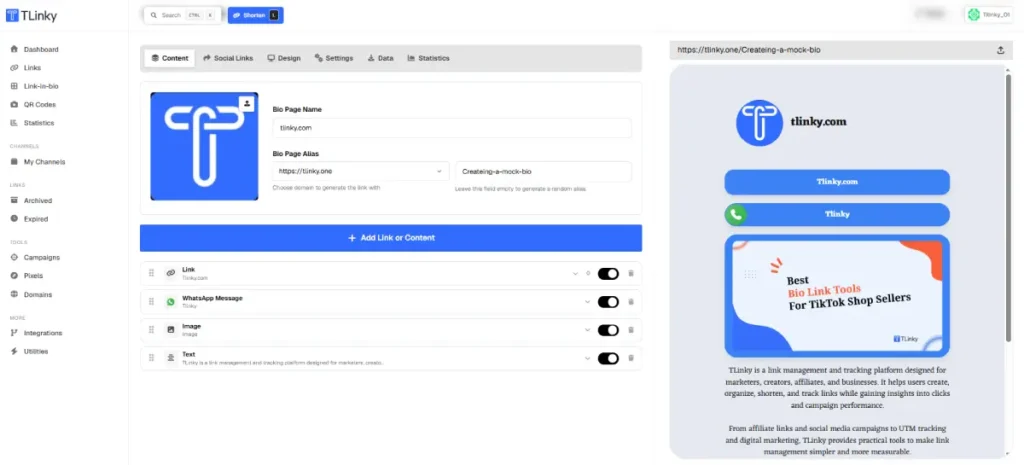
Sellers can point the Link field at a TikTok Shop listing, or at a Shopify product page for items sold outside TikTok Shop.
For a product actively promoted through TikTok Shop’s own videos, LIVEs, or showcase features, do not use an external Shopify page as a purchase route.
TikTok Shop’s redirecting-traffic policy applies.
Every short link on the page can also carry Facebook, Google Ads, and LinkedIn tracking pixels.
Key features
- Product Widget with Name, Description, Amount, Image, and Link fields for shoppable cards
- Tracking pixels for Google Tag Manager, Google Analytics, Facebook, Google Ads, and LinkedIn attached to any short link
- Parameter Templates to save and reuse UTM sets across every product link without retyping them
- Per-link click analytics broken down by country, device, browser, and referrer
- Geo, device, and language targeting so a single bio link can route international shoppers differently
- Countdown timer widget for flash sales or limited restocks
Pros
- Product Widget shows price and image directly on the bio page, not behind a second click
- Pixel tracking and Parameter Templates work per link, so a seller can track each product separately
- No transaction or seller fee taken on the short links or bio page itself
Cons
- No confirmed native checkout inside the Product Widget itself, so the Link field still needs to point to Shopify, WooCommerce, or TikTok Shop for payment
- No confirmed native TikTok ad pixel or TikTok Shop checkout integration at this time
Pricing
According to TLinky’s pricing page, the Free plan is $0/mo with 5 Link in Bio pages, 5 QR codes, and 1 event tracker.
Starter is $9/mo ($90/yr). Advanced is $29/mo ($290/yr) with unlimited link clicks and 10 event trackers.
Business is $89/mo ($699/yr) with 20 event trackers and a developer API.
See how the Product Widget compares to a manual affiliate link setup for tracking individual product clicks.
Not for: Sellers who want a single tool to handle payment processing without connecting an outside storefront like Shopify or WooCommerce.
Why we included this: TLinky is the only tool on this list built around a shortened link infrastructure first.
Every product link a TikTok Shop seller adds also gets pixel-level ad tracking, not just a bio-page click count.
2. Beacons
Best for: Sellers who want a Shopify integration bringing store products into their bio page alongside digital product sales.
Beacons lists an official Shopify integration that brings Shopify products into a Beacons page for what the company describes as a smoother shopping experience.

Every plan, including the free one, allows unlimited digital product sales, though the seller fee only drops to 0% on the top tier.
Key features
- Official Shopify integration to bring store products into a Beacons page
- Unlimited digital product sales on every plan, including Free
- Daily-updating media kit for brand partnership pitches
- Real-time analytics on the free plan
- Affiliate link tools with commission tracking
- Custom domain support starting on the Creator plan
Pros
- Free plan already supports unlimited digital product sales with no signup fee
- Official Shopify integration, through a dedicated Rye app connection, brings Shopify products into a Beacons page
- 0% seller fee tier exists for sellers ready to scale past occasional sales
Cons
- Both the Free and Creator plans still charge a 9% seller fee on every digital product sale
- Reaching 0% fees requires the $30/mo Creator Plus plan ($25/mo billed annually), triple the $10/mo Creator tier
Pricing
According to Beacons’ official pricing page, the Free plan is $0/mo with a 9% seller fee.
Creator plan is $10/mo ($8.33/mo billed annually), still at 9% fees. Creator Plus is $30/mo ($25/mo billed annually) and drops seller fees to 0%.
Not for: Sellers on a tight budget who cannot absorb a 9% fee on every sale before upgrading to the top plan.
Why we included this: Beacons is one of the few tools here with a named, official Shopify integration rather than a generic shop block.
That matters directly to a seller whose catalog already lives on Shopify.
3. Linktree
Best for: Sellers who already have a large following and want digital product sales layered onto an established bio link brand.
Linktree’s free plan supports selling products and courses and taking brand offers. The Starter plan adds a personalized Linktree and a 9% fee on digital product sales.
The seller fee only reaches 0% on the Premium plan, which also adds an affiliate shop feature.
Key features
- Sell digital products and courses directly from the bio page
- Linktree affiliate shop with commission tracking on Premium
- Custom themes, fonts, and layouts on Pro and above
- Mailing list integrations for capturing shopper emails
- Dynamic links and smart routing on Premium
- Basic analytics on Starter, advanced analytics with data export on Premium
Pros
- Free plan already allows selling products, courses, and brand offers
- Premium plan combines 0% seller fees with an affiliate shop that keeps 100% of commissions
- Wide brand recognition means the link-in-bio format is familiar to many shoppers
Cons
- Digital product sales carry a 9% fee on both Free and Starter, before any Pro-level features unlock
- Linktree’s Premium plan includes an affiliate shop and digital-product sales, not a confirmed native Shopify catalog sync for physical inventory
Pricing
Per Linktree’s pricing page, Starter is $8/mo billed monthly with a 9% fee on digital product sales.
Pro is $12/mo billed annually or $15/mo billed monthly. Premium is $30/mo billed annually or $35/mo billed monthly and drops seller fees to 0%.
Not for: TikTok Shop sellers who specifically need a physical-product Shopify catalog synced into the bio page rather than a digital-product or affiliate storefront.
Why we included this: Linktree is a widely recognized link-in-bio brand, which may make the format more familiar to some audiences even before comparing feature depth against smaller competitors.
4. Milkshake
Best for: Sellers who want to start selling digital products for free and only pay when they need branding or analytics upgrades.
Milkshake’s free plan already includes selling digital files through a connected Stripe account, with a 12% fee on that tier.
Upgrading to Pro drops the fee to 9% and adds a Meta pixel plus a campaign builder for UTM-tagged links. Pro+ drops the fee further, to 7%.
Key features
- Sell digital files through Stripe on every plan, including Free
- Meta pixel integration on Pro and Pro+ for Facebook and Instagram ad tracking
- Campaign builder that creates UTM-tagged links and tracks them inside Milkshake’s own Insights
- Mailing list sync to Google Sheets or Mailchimp on Pro and Pro+
- Custom domain support on Pro+ only
- Tiered selling fees that drop as the plan tier increases
Pros
- Free plan already supports Stripe-based digital product sales with no upfront cost
- Selling fee drops with each paid tier, from 12% down to 7% on Pro+
- Campaign builder gives sellers UTM tracking on product links without a separate tool
Cons
- Even the Lite plan at $2.99/mo only removes branding and does not lower the 12% selling fee
- Custom domain, the feature most sellers want for brand trust, is locked to the top Pro+ tier at $8.33/mo billed annually
Pricing
Milkshake’s pricing page confirms the Free plan carries a 12% selling fee. Lite is $2.99/mo (branding removal only, same fee).
Pro is $5/mo billed yearly at $59.99/yr, or $6.99/mo billed monthly, with a 9% fee.
Pro+ is $8.33/mo billed yearly at $99.99/yr, or $10/mo billed quarterly, with a 7% fee.
Not for: Sellers who need a Shopify or WooCommerce catalog sync, since Milkshake’s commerce features are built around Stripe-based digital file sales rather than external store integration.
Why we included this: Milkshake is one of the few tools here that lets a seller start taking payments on the free plan itself.
That matters for a TikTok Shop seller just testing whether a bio-link storefront is worth the effort.
5. Taplink
Best for: Sellers who want price-list style product blocks and payment acceptance without committing to a full storefront platform.
Taplink’s free Basic plan already includes digital products and payment acceptance according to its own pricing page.

That same page lists a 0% platform transaction fee on payments, alongside a dedicated price list block for showing multiple items with prices.
Standard payment-provider processing fees can still apply on top of that.
Paid tiers add professional templates, custom HTML, and social pixel support.
Key features
- Price list block for displaying multiple products with prices on one page
- Digital product sales and payment acceptance confirmed on the pricing table
- Social media pixel support on Pro and Business plans
- Custom domain and branding removal on paid plans
- QR code generation for the bio page
- Scheduled display of blocks for time-limited promotions
Pros
- Price list block is purpose-built for showing several products at once, closer to a mini catalog than a single link
- Digital products and payment acceptance are available even on the free Basic plan
- Business plan at $6/mo is inexpensive compared to most commerce-focused competitors
Cons
- Paid plans bill in three-month minimum blocks, so the $3/mo and $6/mo figures are not simple month-to-month charges
- No confirmed direct Shopify or WooCommerce catalog sync, so the price list has to be built and updated by hand
Pricing
Taplink’s pricing page lists a free Basic plan. Pro is $3/mo, Business is $6/mo, both billed at a three-month minimum with discounts available for 6 or 12-month terms.
Not for: Sellers who need their product list to update automatically whenever their Shopify or WooCommerce inventory changes.
Why we included this: Taplink’s price list block is one of the more literal shop-style layouts on this list.
It is built specifically to show several priced items rather than a single featured product.
6. Later Link in Bio
Best for: TikTok Shop sellers who already schedule posts through Later and want a bio page with built-in click tracking rather than a separate tool.
Later’s Linkin.bio lets a seller add up to five links to a single Instagram post and tag individual TikTok posts with their own links.
That comes from Later’s Link in Bio Features By Plan documentation.
That documentation, current as of this check, does not list a Shopify or product-catalog sync anywhere in its plan breakdown.
Later’s live Partner Integrations page also lists its confirmed product partners, and Shopify is not among them.
An older Later help article once described a direct Shopify connection for Linkin.bio, but that article no longer exists on Later’s live Help Center.
Searching Later’s current Help Center for Shopify also returns no results.
A seller who needs a confirmed, currently documented Shopify catalog sync should look at Beacons instead.
Key features
- Up to five links per Instagram post and dedicated TikTok post linking on Growth and Scale plans
- Button groups that collapse multiple links into one expandable block
- Custom UTM parameters for Google Analytics tracking on paid plans
- Up to one year of click data on Starter and up, versus three months on Free
- Bannerless page design on paid plans, removing Later’s own branding
- Location-based click tracking on Scale
Pros
- Click and visit data is built into the Link in Bio dashboard rather than requiring a separate analytics tool
- Familiar dashboard for sellers who already schedule TikTok and Instagram content through Later
- Custom UTM parameters make it possible to track bio traffic inside Google Analytics without a third-party link shortener
Cons
- No confirmed Shopify or other product-catalog sync exists in Later’s current documentation, so a seller has to add and update product links by hand
- Later’s Link in Bio has no free tier of its own, unlike several other tools on this list
Pricing
According to Later’s pricing page, plans start at $18.75/mo billed yearly for Starter, with Growth and Scale tiers above it.
Link in Bio features scale with plan tier, and the higher tiers add the button groups, custom UTM tracking, and location analytics described above.
Not for: Sellers who specifically need a documented, working Shopify catalog sync, since Later’s current documentation does not confirm one.
Why we included this: Later’s Link in Bio still gives TikTok Shop sellers real click tracking and multi-link support built around a scheduling tool many of them already use.
It just does not currently document the Shopify catalog sync some sellers may be expecting from it.
Which Tool Fits Your Situation
| You are a… | Start with… |
|---|---|
| Seller who wants pixel tracking on every product link | TLinky |
| Shopify seller who wants a confirmed, documented store integration | Beacons |
| Seller who wants to start selling digital products for free today | Milkshake or Beacons |
| Seller who wants a simple price-list style page | Taplink |
| Seller with a large following who values brand recognition | Linktree |
Sellers building out a full TikTok Shop storefront may also want to compare a WooCommerce QR code setup or a dedicated sourcing tool alongside whichever bio link tool they pick.
Product sourcing and bio link routing solve two different problems.
Anyone still deciding where to place the link can check how to add a link to a TikTok bio and the current TikTok bio character limit first.
Frequently Asked Questions
Sellers researching this topic tend to ask a narrower set of questions than general link-in-bio shoppers. The answers below focus on the commerce side specifically.
What is the best link in bio tool for TikTok Shop sellers?
TLinky is the strongest pick for per-link tracking and product-card routing. Its Product Widget shows a real price and image without an extra click.
Its pixel tracking also works per link rather than only at the page level.
Beacons and Linktree are close alternatives if a seller specifically wants built-in digital product checkout, though both carry a seller fee until reaching a higher-priced plan.
The right choice depends on whether fees or ad tracking matter more to that seller’s margin.
Can I sync my Shopify store to a link in bio page?
Yes, Beacons has a dedicated, currently documented Shopify integration that connects a store through its own app, free on every plan.
Later’s Linkin.bio once documented a similar Shopify connection, but that documentation no longer exists on Later’s live Help Center.
It should not be assumed to still work.
Neither integration replaces TikTok Shop’s own checkout.
Linking to an external Shopify page carries a policy risk if that product is also sold through TikTok Shop, per TikTok Shop’s own redirecting traffic policy.
Do bio link tools charge fees when I sell through TikTok Shop?
It depends on where the sale actually happens.
If a shopper buys through TikTok Shop’s own checkout after clicking a bio link, the bio link tool itself does not take a cut.
Fees only apply when a tool processes the transaction directly, such as Beacons, Linktree, Milkshake, or Taplink handling a digital product sale on their own platform.
Those fees range from 7% to 12% depending on the tool and plan tier.
Can I add product cards with prices to my TikTok bio link?
Yes, several tools on this list support a dedicated product or price list widget. TLinky’s Product Widget includes Name, Description, Amount, Image, and Link fields.
Taplink has a similar price list block for showing multiple items.
These widgets display the price directly on the bio page itself.
That saves a shopper an extra click compared to a plain text link pointing to an external product page.
Is Linktree good for TikTok Shop sellers?
Linktree works for TikTok Shop sellers who want brand recognition and digital product sales.
Its monetization features are built around digital products, courses, and affiliate commissions rather than a confirmed physical-product Shopify catalog sync.
Sellers with a Shopify-based physical product catalog should look at Beacons instead, since it is the only tool on this list with a currently documented Shopify integration.
Check Beacons’ own setup documentation before committing, since integration steps can change.
Wrapping Up
A creator-focused bio link tool can still technically hold a TikTok Shop link.
But it was not built to show a price, sync a catalog, or track which product a shopper clicked.
The tools on this list were chosen because each one does at least one of those three things in a documented, verifiable way.
Start by matching the tool to the one feature your storefront actually needs most.
That might be TLinky’s per-link pixel tracking, a documented Shopify store integration through Beacons, or a free way to start selling today through Milkshake.
Then confirm the current seller fee at the tool’s own pricing page before you build your page around it.
Those percentages are the kind of detail that changes without much notice.
Sources
- TikTok Shop Seller Center: Avoid Redirecting Traffic
- Beacons Pricing
- Linktree Pricing
- Milkshake Pricing
- Taplink Pricing
- Later Pricing
- Later Help Center: Link in Bio Features By Plan
- Beacons Help Center: Shopify Integration