
AI Business Name Generator
Describe your business, pick a naming style, and get 8 to 20 name ideas, each with a live DNS check on the domain extensions you choose and a link to check the trademark.
TLinky uses affiliate links. We may earn a commission if you purchase through them, at no extra cost to you.
AppSumo Bundle
80% OFF
- Hostinger Cloud
- Bolt.new
- Reclaim AI
- Emergent AI
- Pica
Hostinger
Web Hosting
95% OFF
More Tools for Business Branding
What the AI business name generator does
This AI business name generator turns a one-line description of your business into a list of name ideas, and it checks each name’s domain while it writes them. You get 8 to 20 names, a one-sentence reason for each, and a live DNS status for every domain extension you ticked.
It doesn’t check trademarks, and it says so on the results page. Each card gives you a Check Trademark link instead, so the legal check stays with you. It’s free, and you don’t need an account to use it.
How to Use the AI Business Name Generator
Only the first field is required. The rest have defaults you can leave alone on your first run:
- What Does Your Business Do? Write one specific sentence: what you sell, who buys it, and where. “A Portland houseplant shop that sells rare tropical plants” gives the tool far more to work with than “plant store.”
- Keywords to Consider (Optional). Add a few words you’d like built into the names, separated by commas, such as “roast, origin, ritual” for a coffee brand.
- Industry (Optional). A short label like “retail, plants” or “B2B software.”
- Naming Style. Pick one of six: Short & Brandable (the default), Keyword-Based, Compound / Portmanteau, Professional / Corporate, Playful / Quirky or Evocative / Abstract.
- Number of Names. Choose 8, 10, 15 or 20. The form starts at 10.
- Domain Extensions to Check. .com is ticked by default. You can add .io, .co, .net and .org, and every name gets checked against each one you tick.
Click Generate Business Names to get the list. Clear Form empties the fields when you want to start over with a different brief.
What our test returned for a plant shop
We ran the generator on November 3, 2026, for a made-up Portland houseplant shop that sells rare tropical plants and offers local pickup and repotting. We added the keywords “fern, leaf, green” and the industry “retail, plants,” kept Short & Brandable, asked for 8 names and checked .com only. The list came back in about 13 seconds.
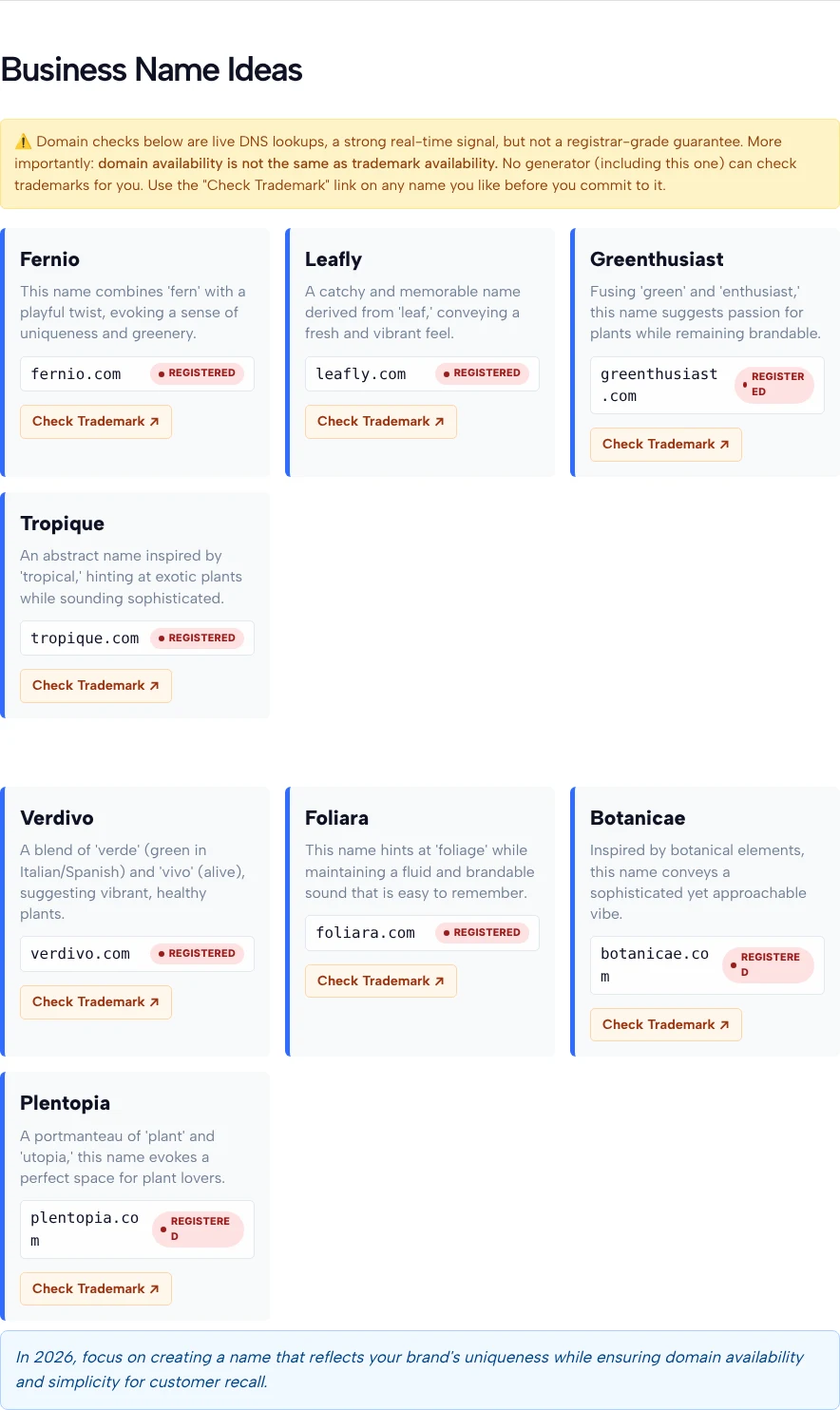
The eight names were Fernio, Leafly, Greenthusiast, Tropique, Verdivo, Foliara, Botanicae and Plentopia. Each card explains its name in one sentence. Verdivo, for example, is “a blend of ‘verde’ (green in Italian/Spanish) and ‘vivo’ (alive),” and Plentopia is “a portmanteau of ‘plant’ and ‘utopia.’” A short naming tip closes the list, and each card also has buttons to buy the domain at Hostinger or Namecheap.
Keep two things in mind before you run your own brief:
- Most short .com names came back taken. All eight .com domains in this run showed Registered. An earlier run with the same inputs gave a different list, with seven Registered and one, foliageo.com, Likely Available. Results change from run to run, so expect to generate more than once.
- The keywords shape the names a lot. Fern, leaf and green each turned up as the root of at least one name. If you’d rather not see your keywords spelled out, leave that field empty or switch to Evocative / Abstract.
What Likely Available, Registered and Unverified mean
Each status is the result of a live DNS lookup on that exact domain, done when you click Generate. Registered means the lookup found the domain in use. Likely Available means it found nothing, which is a good sign but not proof. Unverified means the check didn’t give a clear answer.
The tool’s own warning sums it up: a DNS lookup is “a strong real-time signal, but not a registrar-grade guarantee.” A domain can be registered and still have no records pointing anywhere, so a Likely Available name can turn out to be taken when you try to buy it.
How to write a brief that gets better names
The generator only knows what you put in the form, so the brief does most of the work.
- Name the customer, not just the product. “Meal prep for busy nurses on night shifts” points the names somewhere. “Meal prep” gets you generic food words.
- Use keywords as raw material. Short, concrete words (fern, roast, anchor) blend into names more easily than abstract ones like “quality” or “solutions.”
- Change one setting per run. If Short & Brandable gives you invented words you can’t spell, run the same brief with Keyword-Based or Professional / Corporate and compare.
- Tick more extensions when .com is crowded. Our test showed how often short .com names are taken. Adding .co, .io or .net gives each name more chances to come back Likely Available.
- Ask for 15 or 20 names once you like a direction. A bigger list makes it easier to spot the one or two that feel right.
How to judge a name before you commit
A good name is easy to say, easy to spell after hearing it once, and still fits if the business grows. Run your shortlist through a few quick tests:
- The phone test. Say the name out loud to someone and ask them to type it. Foliara and Botanicae look fine on screen but can be spelled several ways when spoken.
- The growth test. Tropique suits a shop built on tropical plants. If you might add succulents or garden tools later, a broader name ages better.
- The meaning test. Blended names often borrow from other languages, like Verdivo. Look up each part so you know what it says to people who speak that language.
- The handle test. Check that the name works on social media too. Our Instagram username generator builds handle ideas from your business name, and its Check Live button opens each one on Instagram so you can see whether it’s taken.
How to check a domain yourself
Confirm any name you like with a registrar before you build around it. As ICANN’s domain name FAQ explains, domain names are registered through many competing companies called registrars, and ICANN is the body that accredits them. Search the exact domain on a registrar’s site: if it lets you add the domain to your cart, it’s open to register.
If a domain shows Registered, you can see who holds it and when it was registered with ICANN Lookup, which looks up the current registration data for domain names. Then open the domain in your browser to see whether it runs a real business or just a parked page.
How to check a trademark and your state’s name rules
A free domain says nothing about whether you can legally use the name. The USPTO describes its Trademark Search system as the search you do before applying, to make sure no other trademark conflicts with yours.
Search for close variations and sound-alikes, not just the exact spelling. The USPTO’s guidance on clearance searches says to look for marks that are confusingly similar to yours and used on goods and services the same as or related to yours, and notes that an attorney can run a clearance search and interpret the results.
Your state matters too. According to the SBA’s guide to choosing a business name, most states don’t let you register a name someone else has already registered, a DBA doesn’t give you legal protection, and your domain doesn’t have to match your legal business name.
Who gets the most from this tool
It’s most useful at the start, when you need a wide list of options quickly:
- New business owners who have a clear idea of what they sell but no name yet.
- Founders naming an app or product who want short invented words, using Short & Brandable or Compound / Portmanteau.
- Agencies and freelancers pitching names to a client, where 20 names across a few styles make a good first round.
- Local service businesses that want people to understand the name at a glance, with Keyword-Based.
If you’re launching on social media first, your new name also becomes the account people follow and the profile link they tap. TLinky’s Link in Bio gives that one link a page with your site, shop and contact details.
Business name generator FAQ
Is the AI Business Name Generator free?
Yes. It’s free, and you don’t need an account. Fill in the description, click Generate Business Names, and the list appears on the same page.
Does Likely Available mean I can register the domain?
Not always. Likely Available means a live DNS lookup found no records for that domain, and the tool itself says this is not a registrar-grade guarantee. A domain can be registered without pointing anywhere, so search it at a registrar before you count on it.
Does the tool check trademarks?
No. The results page says plainly that no generator, including this one, can check trademarks for you. Each name card has a Check Trademark link so you can start that search yourself, and an attorney can do a full clearance search.
Why did every .com come back Registered?
Short, pronounceable .com names are often already taken. In our test, all eight .com domains came back Registered, while an earlier run with the same inputs found one Likely Available. Run it again, try a different naming style, or tick .co, .io, .net or .org as well.
Which naming style should I pick?
Start with the default, Short & Brandable, if you want an invented word you can own. Pick Keyword-Based if customers need to understand what you do from the name alone, Professional / Corporate for B2B or formal fields, and Playful / Quirky or Evocative / Abstract when personality matters more than clarity.
How many names can I get at once?
You can ask for 8, 10, 15 or 20 names per run, and the form starts at 10. Each name is checked against every domain extension you tick.
Can I change the names it suggests?
Yes, and you often should. Treat the list as raw material: shorten a name, swap a syllable or combine two ideas. The domain status only covers the exact spelling shown, so check your edited version again.
Can AI create a business name for me?
AI can give you a long list of good starting points in seconds, built from your own description and keywords. Choosing the name, confirming the domain with a registrar and clearing the trademark are still up to you.