
Instagram Giveaway Generator
This tool writes one complete Instagram giveaway caption and a hashtag block from your prize, niche, audience, tone and entry steps, but it does not pick winners.
Grow your Business & Social Media Marketing
- Branded Link Shortener
- QR Code Generator
- Bio Page Builder
- Tracking & Analytics
- 16+ Integrations
Tools You May Need for Instagram Marketing Tools
A giveaway post writer, not a winner picker
The Instagram Giveaway Generator writes the announcement post for your giveaway: one full caption with numbered entry steps, an end-date line and a closing disclaimer, plus a separate block of hashtags. You give it the prize, your niche, who you want to reach, a tone and the entry steps, and it drafts the rest.
If you searched for a giveaway picker for Instagram, this isn’t one. It doesn’t read comments, check entries, filter fake accounts or draw a winner. Use it before the giveaway starts, to write the post people will enter through.
Filling in the giveaway form
The form has four fields, five entry checkboxes and two buttons:
- Prize Name. Say exactly what the winner gets, including value or size if it matters, for example “A store gift card and a canvas tote bag.”
- Niche / Industry. Your field, such as “Houseplant shop” or “Fitness coaching.” The hashtags lean heavily on this.
- Target Audience. Who should enter, as specifically as you can: a city, an interest, an age group.
- Content Tone/Style. Professional & Clear, Quirky & Fun, Urgent & Aggressive, or Heartfelt & Community.
- Required Actions for Entry. Tick what entrants must do: Follow Us/Partner, Like the Post, Tag Friends in Comments, Share to Story (Bonus) and Save the Post. Follow and Tag are ticked when the page loads.
- Generate Complete Giveaway. The caption and hashtag block appear under the form, each with its own copy button. Clear Form resets everything.
A houseplant shop giveaway from our test
In our test on November 3, 2026, we played a fictional Portland, Oregon houseplant shop giving away a $75 gift card and a potted Pothos to local plant lovers, in the Heartfelt tone. We left the entry boxes at their defaults, Follow and Tag. The result showed up in about 3.8 seconds.
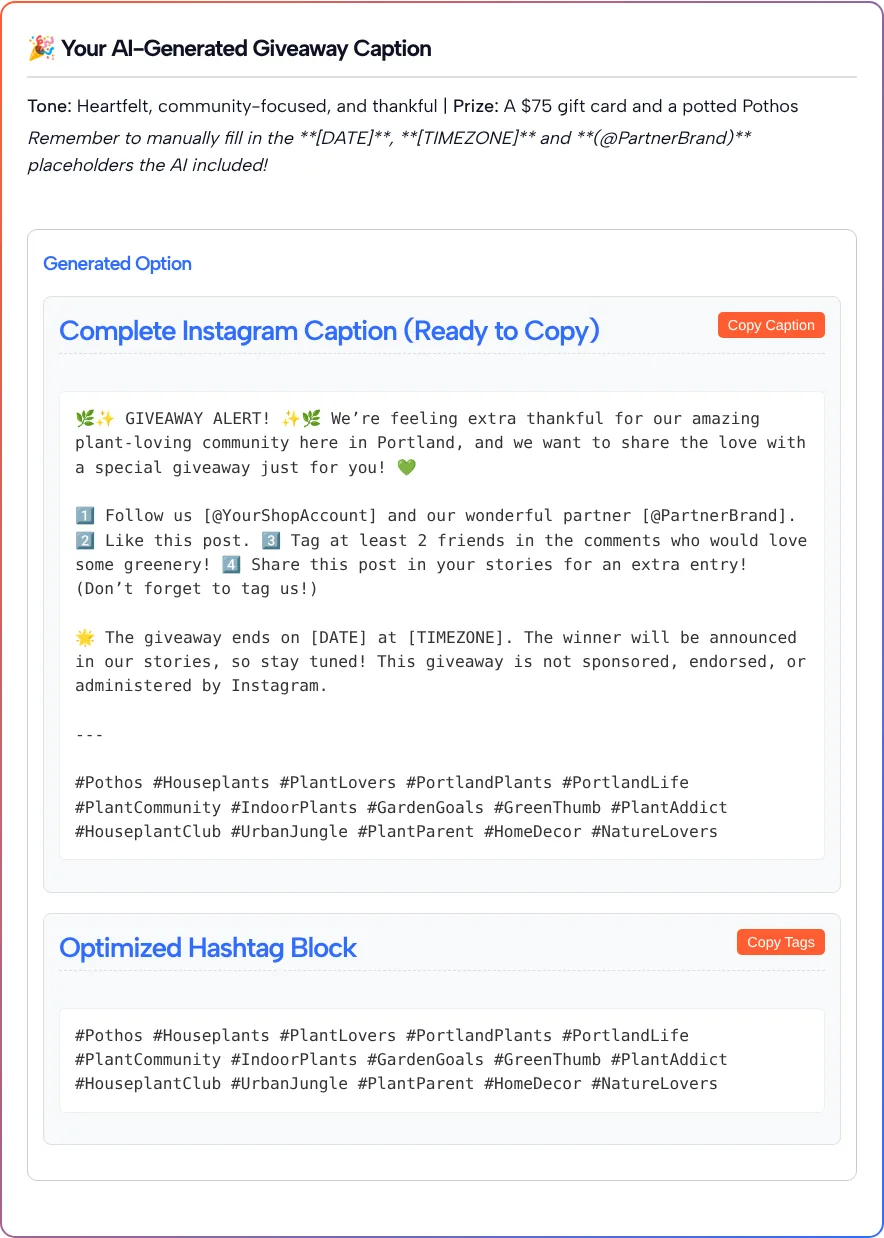
The middle of the caption, with the entry steps, read like this:
1️⃣ Follow us [@YourShopAccount] and our wonderful partner [@PartnerBrand]. 2️⃣ Like this post. 3️⃣ Tag at least 2 friends in the comments who would love some greenery! 4️⃣ Share this post in your stories for an extra entry! (Don’t forget to tag us!)
Things to check before you copy yours:
- Steps you didn’t tick can show up. We only had Follow and Tag ticked, yet the caption also asked people to like the post and share it to their Story. Read the steps and delete any you don’t want to enforce.
- Placeholders need real values. The draft left [@YourShopAccount], [@PartnerBrand], [DATE] and [TIMEZONE] for us to fill. If you have no partner, remove that part of step one.
- The disclaimer was there. The caption ended with a line saying the giveaway is not sponsored, endorsed or administered by Instagram.
- It gave a lot of hashtags. We got 15, once at the end of the caption and again in the separate Copy Tags box, so paste only one set.
What Instagram’s promotion guidelines ask of you
Instagram leaves the running of a giveaway to you. Instagram’s Promotion Guidelines say that if you use Instagram to run a contest or sweepstakes, you are responsible for running it lawfully, including the official rules, the offer terms and eligibility requirements such as age and residency limits, and following the rules that apply to the promotion and its prizes.
Instagram’s Promotion Guidelines also list what every promotion must include, and the generated caption only covers part of it:
| Requirement in Instagram’s guidelines | Covered by the generated caption? |
|---|---|
| Acknowledgement that the promotion is not sponsored, endorsed or administered by, or associated with, Instagram | Yes, in our test |
| A complete release of Instagram by each entrant | No, add it to your official rules |
| Official rules, offer terms and eligibility | No, write these yourself |
| No encouraging people to tag content inaccurately, like tagging themselves in a photo they aren’t in | Check your entry steps |
Instagram’s Promotion Guidelines also say Instagram won’t help you administer a promotion. Your full rules usually won’t fit in a caption, so put them on a web page and point to it from the post.
The hashtag count matters too. Social Media Today reported on December 18, 2025, that Instagram would gradually limit the hashtags in a post or Reel caption to five. The 15 tags from our test would need trimming, and our Instagram hashtag generator can help you find the few that fit your post best.
Finishing the post before it goes live
A few edits turn the draft into a giveaway you can actually run:
- Set a real end time. Replace [DATE] and [TIMEZONE] with a date, hour and time zone, and say when and where you’ll announce the winner.
- Match the steps to what you’ll check. If you won’t verify Story shares, don’t make them a requirement.
- Add your own voice. Mention why you’re running the giveaway, like an anniversary or a new product, in a sentence only you could write.
- Link the rules. Put the address of your rules page in your bio, or on a link in bio page if you already use one, and write “Full rules: link in bio” in the caption.
- Track the link. A short link to the rules page is easier to read in Stories and tells you how many people opened it.
When it’s time to pick a winner
Once entries close, you’ll need a separate method to choose the winner, because this tool stops at the post. Whatever you use, a few habits keep the draw fair:
- Write the method into your rules before the giveaway starts, for example a random draw from comments that met every step.
- Remove entries that broke the rules before you draw, not after.
- Check the winner actually completed the steps you required.
- Keep a record of the draw, like a screen recording, in case anyone asks how the winner was chosen.
- Contact the winner from your own account and never ask them to pay or share card details to claim a prize.
Giveaways this generator fits
The form suits giveaways where the main job is a clear announcement post:
- Local shops giving away a product or gift card to nearby customers.
- Creators marking a follower milestone or thanking their community.
- Brand and creator collabs, where the Follow Us/Partner step names both accounts.
- Seasonal promotions around a holiday or a store anniversary.
- Product launches, where the prize is the new item itself.
Questions about the giveaway generator
Can this tool pick a winner from my Instagram comments?
No. It only writes the giveaway post and hashtags. It has no field for a post link and doesn’t read comments, so you’ll need a separate method or tool to draw the winner once entries close.
Does it check entries or spot fake accounts?
No. The tool has no feature for checking entries or accounts. Checking that entrants followed your steps is up to you, or to whatever tool you use for the draw.
Does the caption follow Instagram’s giveaway rules?
Partly. In our test it included the line saying the giveaway is not sponsored, endorsed or administered by Instagram. It did not write official rules, eligibility terms or an entrant release, which you still need to add yourself.
Why does my caption include an entry step I didn’t tick?
The AI can add steps on its own. In our test it added Like the Post and Share to Story even though only Follow and Tag were ticked. Delete any step you don’t plan to check.
Can I use it to make a fake giveaway post?
Only post it for a prize you will actually award. The tool writes a real giveaway announcement, so if you just need a sample for a mockup or a class, label it clearly so nobody mistakes it for a live giveaway.
Do I need to connect my Instagram account?
No. The form only asks about your prize, niche, audience, tone and entry steps. Nothing is posted for you; you copy the caption and publish it from Instagram yourself.