
TikTok Ad Retargeting Builder
Enter your daily top-of-funnel spend, a CPA or ROAS target, the audience your ads already build and your price range, and an AI model drafts a hot, warm and cold retargeting plan with windows, a budget share and creative ideas.
Grow your Business & Social Media Marketing
- Branded Link Shortener
- QR Code Generator
- Bio Page Builder
- Tracking & Analytics
- 16+ Integrations
Tools You May Also Need for TikTok Ads
A retargeting plan drafted from five answers
The TikTok Ad Retargeting Builder turns five answers about your funnel into a written retargeting plan. An AI model splits your warm traffic into hot, warm and cold segments, gives each one a time window, an objective and a creative idea, and suggests what share of your spend to put behind them.
It’s a planning aid. The builder doesn’t create audiences, read your pixel or touch your ad account, and every window and percentage in the plan is the AI’s suggestion, not a TikTok setting.
Entering your funnel numbers
Your funnel numbers go into five fields: two take typed text, two are dropdowns with a default already picked, and the last one is optional:
- Average Daily TOF (Top of Funnel) Spend (Required). What you spend per day on prospecting, for example “$1,000”.
- Target CPA or ROAS (Required). Your goal as text, for example “$15 CPA” or “3.5 ROAS”.
- Primary TOF Audience Behavior (Required). You pick Landing Page Viewers (the default), High Video Viewers (75% or 95%), Add to Cart / Initiated Checkout, or Custom Event (e.g., Search, Quiz Complete).
- Product Price Point (Required). You choose Low Ticket ($50 or Less), the default, or Mid Ticket ($50-$200), High Ticket ($200-$500) or Very High Ticket ($500+).
- Customer Lifetime Value (LTV) (Optional). A dollar figure, or “Not applicable”.
Click Build Retargeting Funnel for the plan, or Clear to reset.
The plan it built for a $120-a-day candle shop
Our test on November 4, 2026, used a fictional candle brand selling a $28 candle. In our test we entered $120 a day, a $20 CPA target, Add to Cart / Initiated Checkout, Low Ticket and an LTV of $70. The plan loaded in about 6.4 seconds.
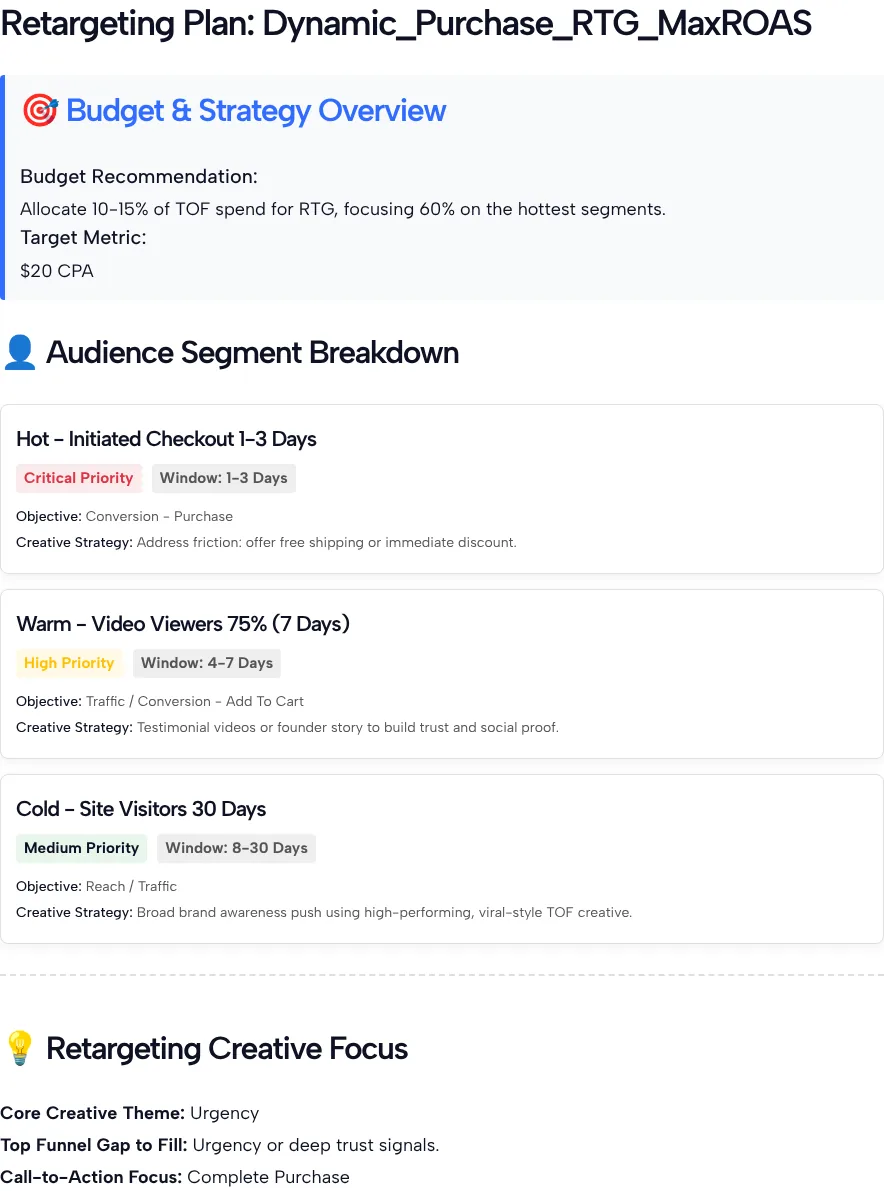
In our test the budget note said to put 10-15% of top-of-funnel spend into retargeting, with 60% of that on the hottest segments. It then laid out three segments:
- Hot: Initiated Checkout, 1 to 3 days. Critical priority, a purchase objective, and a free shipping or instant discount offer.
- Warm: Video Viewers 75%. High priority, a traffic or add-to-cart objective, and testimonial or founder-story videos.
- Cold: Site Visitors, 8 to 30 days. Medium priority, a reach or traffic objective, and your best prospecting creative.
The creative focus was urgency, with “Complete Purchase” as the call to action. In our test the plan never mentioned the $70 LTV.
Check the plan against TikTok’s audience rules
Before you build anything, check the plan against what Ads Manager actually allows. Three parts of ours needed a second look.
The windows. In our test the warm card was titled “Video Viewers 75% (7 Days)” but labeled “Window: 4-7 Days”. TikTok’s guide to engagement audiences lists lookback windows of 7, 14, 30, 60, 90 or 180 days for video ad viewers, so a 4-to-7-day slice isn’t an option there. A 7-day audience is the closest match.
The budget. In our test, 10% to 15% of $120 works out to $12 to $18 a day for all retargeting. TikTok’s budget rules require an ad group daily budget above $20, so that amount can’t fund even one ad group, let alone three. At a small spend, start with one hot segment and give it a budget that clears the minimum.
Audience size. A 1-to-3-day checkout audience from a small shop may be tiny. TikTok’s Custom Audiences overview says a Custom Audience needs 1,000 total matched users before you can use it in an ad group. If yours falls short, widen the window or merge the hot and warm segments.
Turning the segments into ad groups
Turn the segments into ad groups once the plan fits your account, in this order:
- Set up tracking first. TikTok’s steps for a Website Traffic audience require the TikTok Pixel with the event already defined, then let you pick the event, a lookback window and people to exclude.
- Exclude buyers. Leave recent purchasers out of every retargeting audience, so you don’t pay to show a discount to someone who already bought.
- Match creative to the segment. Keep the plan’s split: an offer for checkout abandoners, proof such as reviews for video viewers and your strongest prospecting ad for site visitors.
- Launch in Ads Manager. Our TikTok Ads Manager guide walks through creating campaigns and ad groups.
Give each segment a week of data before you judge it against your CPA target, and shift budget toward the one that hits it.
TikTok Retargeting Plan Questions
Does the builder create the audiences in my ad account?
No. The builder writes a plan as text and never connects to TikTok Ads Manager or your pixel. You build each audience, ad group and exclusion yourself, using the windows TikTok offers rather than the ones written in the plan.
Is 10-15% of my spend the right retargeting budget?
Treat the split as the AI’s suggestion, not a rule. In our test, 10-15% of $120 a day came to $12 to $18, which is too little to fund three ad groups. Set retargeting budgets from what each ad group needs to run.
Why does the warm segment show two different windows?
In our test the warm card was titled 7 days but labeled 4-7 days. Read the label as the AI’s idea of which visitors to focus on, then pick the closest lookback window Ads Manager offers when you build the audience.
Does the LTV field change the plan?
Not visibly. In our test we entered a $70 LTV, and the plan didn’t mention it anywhere. Leave the field blank if you don’t track lifetime value, and use your own numbers when you set a CPA target.
Which audience behavior should I pick?
Pick the deepest action your prospecting ads produce in real volume. If few people reach checkout, choose Landing Page Viewers or High Video Viewers so the plan is built around an audience big enough to use.
What if my retargeting audience is too small to run?
Widen the lookback window, merge two segments into one ad group, or run more prospecting first to fill the pool. With a small budget, start with a single retargeting ad group and split it later.