
TikTok CTR Calculator
The TikTok CTR Calculator divides your ad’s clicks by its impressions to give your click-through rate (CTR), or forecasts clicks, impressions and cost per click from a budget, a CPM and a target CTR. CTR is one of several core TikTok ads metrics to read together.
Grow your Business & Social Media Marketing
- Branded Link Shortener
- QR Code Generator
- Bio Page Builder
- Tracking & Analytics
- 16+ Integrations
Tools You May Also Need for TikTok Ads
What CTR means on a TikTok ad
CTR, or click-through rate, is the share of ad impressions that ended in a click. TikTok’s ads metrics help page defines it as the percentage of impressions that resulted in a destination click, meaning a click that takes someone to the place your ad points to.
That detail matters when you copy numbers out of Ads Manager. TikTok’s basic metrics page lists two click counts: Clicks (all), which includes social interactions, and Clicks (destination), which counts only clicks to the destination you set. For a CTR that matches TikTok’s own definition, enter destination clicks.
Two tabs, two different questions
The calculator has two tabs. The first checks a CTR you already have, and the second works backward from a budget to the clicks you might get.
Calculate Actual CTR (the default tab) asks for three things, all required:
- Total Impressions, how many times the ad was shown.
- Total Clicks, ideally destination clicks.
- Industry / Niche, such as skincare or mobile apps.
Click Analyze CTR. You get your Calculated CTR, a Performance label, your Total Clicks, a short Expert Analysis Summary and three Actionable Recommendations.
Forecast Campaign Traffic asks for four things, also all required:
- Ad Budget ($), what you plan to spend.
- Target CPM ($), what you expect to pay for 1,000 impressions.
- Target CTR (%), the click-through rate you’re aiming for.
- Industry / Niche.
Click Forecast Clicks to see Est. Clicks, Est. Impressions, Target CPC and a Target Feasibility label. Each tab has a Clear button.
A coffee shop test on both tabs
We tested both tabs on November 3, 2026, with a fictional U.S. specialty coffee shop. On the first tab we entered 40,000 impressions and 520 clicks, and the scorecard came back in about 5.9 seconds.
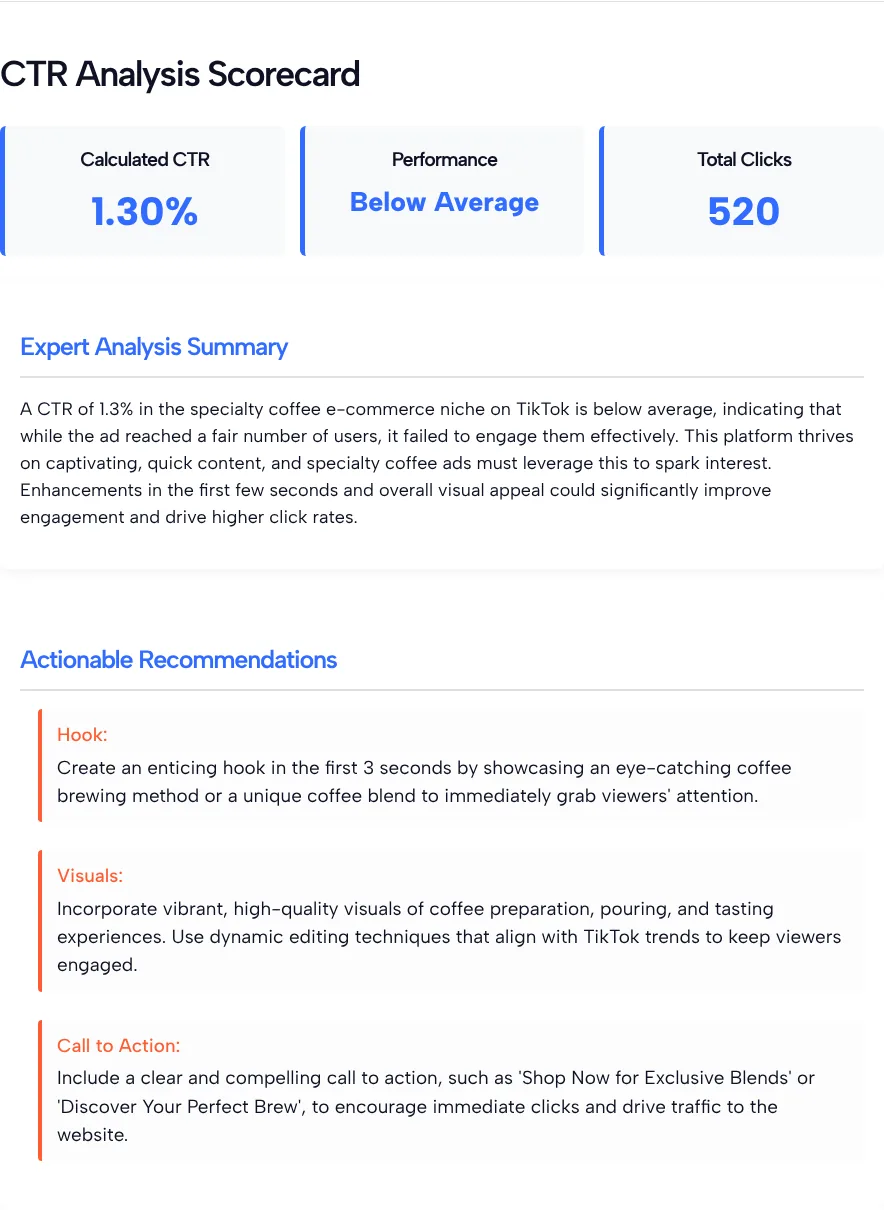
The tool returned a CTR of 1.30% and rated it Below Average. Its three recommendations covered the hook in the opening seconds, the visuals and the call to action, which are fair reminders for any ad.
In our test of the forecast tab, we entered a $1,500 budget, a $6 CPM and a 1.2% target CTR. In about 5.1 seconds it returned:
| Forecast line | Our test |
|---|---|
| Est. Impressions | 250,000 |
| Est. Clicks | 3,000 |
| Target CPC | $0.50 |
| Target Feasibility | Challenging |
The math behind both tabs
Both tabs run plain arithmetic, and we checked each step of our test by hand:
- CTR: clicks divided by impressions. In our test, 520 divided by 40,000 is 0.013, which is 1.30%.
- Impressions: budget divided by CPM, times 1,000. In our test, $1,500 at a $6 CPM buys 250,000 impressions.
- Clicks: impressions times your target CTR. In our test, 1.2% of 250,000 impressions is 3,000 clicks.
- Cost per click: budget divided by clicks. In our test, $1,500 spread over 3,000 clicks is $0.50 each.
The labels are a different story. Below Average, Challenging and the analysis text are written by an AI model. The page doesn’t show the benchmark behind them, so treat them as opinions, not as TikTok industry averages.
How to judge your TikTok CTR
Judge your TikTok CTR against your own earlier ads and against the cost per click your margins can carry. We couldn’t find a single CTR benchmark from TikTok, and the calculator’s label doesn’t come from one either. Our guide on what a good CTR for TikTok ads looks like goes deeper into the question.
TikTok’s own success stories show how wide the range can be for campaigns TikTok chose to feature. TikTok’s Princess Polly story reports a 1.05% click-through rate on a traffic campaign built around a discount code. TikTok’s Tailor Brands story reports an average click-through rate of 0.66% for Spark Ads, alongside a 10.5% conversion rate from visit to registration.
Neither page gives a campaign date. Still, both CTRs sit below the 1.30% that the tool called Below Average in our test, which is a good reason to judge your CTR against your own history and your conversion rate, not against a label.
Reading CTR next to CPM and cost per click
CTR is what links your CPM to your cost per click. At the same CPM, a higher CTR spreads the cost over more clicks, so each click costs less.
You can see it with the forecast tab’s own math. If you pay a $6 CPM, a 1.2% CTR works out to $0.50 a click, a 2.4% CTR to $0.25, and a 0.6% CTR to $1.00. Doubling the CTR halves the cost per click.
Not sure what CPM to type? The TikTok Ad Cost Estimator by Country gives an AI-estimated CPM range for a market and niche. Your own Ads Manager history is better if you have it. Once the clicks turn into sales, the TikTok Ads ROAS calculator shows whether they paid for themselves.
Limits to keep in mind
The calculator has limits worth knowing before you share its output:
- No ROI. It doesn’t ask for revenue or product costs, so it can’t tell you how many clicks you need to break even.
- No account data. It never connects to TikTok, so the numbers are only as good as the ones you type.
- AI labels and tips. The Performance and Target Feasibility labels and the recommendations are AI text. The industry box feeds that wording, while the math uses only your numbers.
- One CTR per run. To compare two ads, run each one separately and write the results down.
When each tab earns its place
Use the Calculate Actual CTR tab after a test has run: compare two creatives on the same budget, check whether a refreshed ad holds its click rate, or put one clear number in a client report.
Use the Forecast Campaign Traffic tab before you launch: test what happens to clicks and cost per click if your CTR comes in at half your target, or if your CPM is higher than you hoped. Running a pessimistic forecast next to an optimistic one gives you a range to plan around.
TikTok CTR Calculator FAQ
How do I work out TikTok CTR by hand?
Divide clicks by impressions and multiply by 100. In our test, 520 clicks on 40,000 impressions gave 0.013, which is a CTR of 1.30%, the same figure the calculator returned.
Should I enter all clicks or destination clicks?
Enter destination clicks if you want your result to match TikTok’s CTR. TikTok’s basic metrics page also lists Clicks (all), which include social interactions, so using that number makes your CTR look higher than TikTok’s own CTR.
Why did my CTR get a Below Average rating?
The Performance label is written by an AI model and the page doesn’t show what benchmark it uses. In our test it called 1.30% Below Average for a coffee shop. Compare your CTR with your own past ads before you change anything.
Does the forecast tab use my real TikTok data?
No. It only uses the budget, CPM and target CTR you type. It doesn’t connect to Ads Manager, so the forecast is as realistic as the numbers you give it.
What CPM should I put in the forecast tab?
Use the average CPM from your own past TikTok campaigns if you have one. If you don’t, start from an estimate for your market, then run the forecast again with a higher CPM to see how much it cuts your clicks.
Can a low CTR still be profitable?
Yes, if enough of those clicks buy. A low CTR raises your cost per click, so the question is whether your conversion rate and order value cover that cost. Check it by putting your spend and revenue into a ROAS calculator.