
YouTube Video Downloader
TLinky’s free YouTube video downloader saves a YouTube video to your phone or computer. Paste the video link, pick a format and quality from the list, and download. It runs in your browser, so there’s nothing to install and no account to create. That makes it a simple YouTube download option on any device.
YT Video Downloader
Paste a YouTube video URL below to download instantly.
Legal disclaimer: This tool is intended for downloading videos you own or have permission to download. Downloading copyrighted content without authorization may violate YouTube’s Terms of Service and applicable laws.
👉 Claim Up to $6000 Free TikTok Ad Credit
TLinky uses affiliate links. We may earn a commission if you purchase through them, at no extra cost to you.
More YouTube Creator Tools
What is YouTube Video Downloader?
A YouTube video downloader is an online tool that saves a copy of a YouTube video as a file, usually MP4, so you can watch it without an internet connection. The formats and quality you can pick depend on what the original upload offers. A video uploaded at a low resolution won’t come out sharper.
Why Use Our Free YouTube Video Downloader?
With the TLinky yt video downloader, you get:
- Free YouTube video download: no payment and no sign-up.
- Pick your format: choose from the formats and qualities the tool finds for that video.
- Nothing to install: it’s a web page, so there’s no app or browser extension.
- Works on any device: phone, tablet or computer, in the browser you already use.
How to Download YouTube Videos (3 Easy Steps)
- Copy the YouTube Video Link from your browser or YouTube app.
- Paste the Link into our Online YouTube Video Downloader input box.
- Click “Download Now”, finish the quick human check if it appears, then save the video in the format and resolution you want.
On a phone? In the YouTube app, tap Share under the video, then Copy link, and paste it here.
Key Features of TLinky’s Free YouTube Downloader
- Online YouTube video downloader: no software and no installation.
- Three result tabs: Video gives picture and sound in one file, Video-Only can list higher resolutions without sound, and Audio gives just the sound at several bitrates.
- HD when the video has it: in our test, the Video-Only tab listed 1080p and 720p files, while the Video tab offered 360p with sound.
- Cross-device: works in browsers on Windows, Mac, Android and iOS.
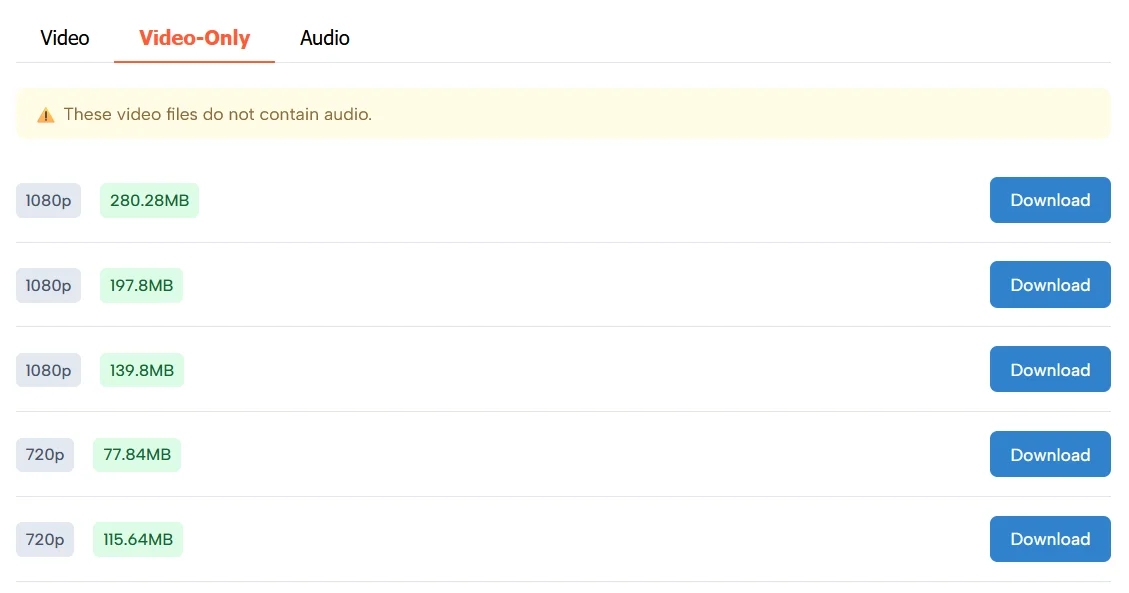
Need HD with sound? Check the Video tab first. If it only lists a low resolution, download the best Video-Only file and the best Audio file, then put the two together in a free video editor.
Need to download a YouTube Short? Use our YouTube Shorts Downloader to download Shorts videos from YouTube.
Who Can Use This Tool?
- Creators: back up your own uploads or keep a copy of a clip you have permission to reuse.
- Teachers and students: save a lesson or lecture to play in class where the Wi-Fi is unreliable.
- Travelers: download before a flight or a long trip with no signal.
- Marketers: keep reference copies of your brand’s own videos and ads.
Is It Safe?
Using it doesn’t put your accounts at risk: there’s nothing to install and no login, so it never asks for your Google account or any personal details.
Two things to know before you start. A quick Cloudflare check may appear before the download, to stop bots from abusing the tool. And like most free downloaders, the page shows ads; clicking Download can open an ad in a new tab. Close that tab and come back to this page to finish your download.
Only download files from the result list on this page, and skip any “install” or “update your player” pop-up you see elsewhere.
Is It Legal to Download YouTube Videos?
Downloading a YouTube video is legal when you have the right to copy it, and that depends on the video. YouTube’s Terms of Service (dated December 15, 2023) say you may not download content unless YouTube’s own service allows it or you have prior written permission from YouTube and, where it applies, the rights holder.
In practice, use this tool for videos you made yourself or videos whose owner gave you permission. YouTube’s Terms still apply to every download. For everything else, YouTube’s own offline feature in YouTube Premium is the safe route.
Frequently Asked Questions (FAQ)
How to download YouTube videos for free?
Copy the YouTube video URL, paste it into the box at the top of this page and click Download Now. Finish the quick check if it appears, pick a format and quality from the list, and save the file to your device.
Can I download YouTube videos in HD or 4K?
Yes for the picture. The Video-Only tab lists HD files when the video has them (1080p and 720p in our test), but those files have no sound. The Video tab gives picture and sound together, sometimes at a lower resolution (360p in our test).
Is YouTube Video Downloader safe?
Yes, if you only download from the result list on this page. The tool needs no install and no login. The page shows ads and may open one in a new tab when you click Download; close it and return here.
Can I download YouTube Shorts?
Yes. Use the TLinky YouTube Shorts Downloader, which is built for Shorts links.
Is it legal to download YouTube videos?
YouTube’s Terms of Service only allow downloads through YouTube’s own features or with permission from YouTube and the rights holder. Download your own videos or ones you have permission to save.
Can I download only the audio from a YouTube video?
Yes. Open the Audio tab on the result screen and pick a file. It lists the sound at several bitrates (from 55kbps to 131kbps in our test); a higher bitrate means better sound and a bigger file.
Stop buffering. Start YouTube video download free.
AppSumo Hostinger Bundle
85% OFF
- Hostinger Unlimited Plan
- AI Automation Apps
- Email Marketing Plan
- 1 year access
- OpenClaw, Hermes Agent, or n8n
Hostinger
Web Hosting
95% OFF