
YouTube Title Generator
Turn your video topic into YouTube title ideas you can edit and use. Pick an audience, tone, video type and how many ideas you want, and the free AI tool suggests titles with matching thumbnail text and a layout idea for the thumbnail.
TLinky uses affiliate links. We may earn a commission if you purchase through them, at no extra cost to you.
AppSumo Bundle
80% OFF
- Hostinger Cloud
- Bolt.new
- Reclaim AI
- Emergent AI
- Pica
Hostinger
Web Hosting
95% OFF
More Tools for YouTube Titles
Generate YouTube Title Ideas with AI
A YouTube title tells viewers what they’ll get before they click. A good one makes the video sound worth watching and still describes it honestly.
The TLinky YouTube Title Generator uses AI to suggest title ideas based on your video topic, target audience, style and tone, video category, and the number of ideas you want. The more detail you give it, the closer the ideas fit your video.
Whether you’re publishing tutorials, educational videos, product reviews, documentaries, gaming content, podcasts, travel vlogs, or business videos, you get a list of ideas to edit and pick from.
Free to use. No registration required.
How the YouTube Title Generator Works
The generator works only from what you type into the form, so each field below shapes the ideas you get back.

Enter Your Core Video Topic
Start by describing your video’s main subject or primary keyword.
Examples:
- Beginner Python Tutorial
- Inside Tesla Factory
- Best AI Tools for Students
- Healthy Meal Prep Ideas
- DSLR Photography Tips
The more specific your topic is, the more relevant your title suggestions will be.
Define Your Target Audience (Optional)
Tell the generator who your video is intended for.
Examples:
- Small business owners
- Beginners
- College students
- Digital marketers
- Software developers
- Parents
- Fitness enthusiasts
Naming an audience lets the AI pitch its ideas at the people you expect to watch.
Select Your Preferred Style & Tone
Choose the tone that best matches your video’s purpose.
Available styles include:
- Compelling & Insightful: for educational and thought-provoking content.
- High Energy Focus: for entertainment, gaming, challenges, and fast-paced videos.
- Professional / Informative: for business, tutorials, reviews, and educational topics.
- Dramatic & Artistic: for documentaries, storytelling, cinematic videos, and creative projects.
The tone you pick sets the voice of the titles.
Pick a Video Category
Tell the tool what kind of video it is: How To, Review, Tutorial, Tips, Beginner, Advanced, Comparison or Shorts. A comparison video and a beginner tutorial usually call for different titles, so the category gives the AI that context.
Choose the Number of Title Variations
Generate multiple ideas in one click.
Available options include:
- 3 title ideas
- 4 title ideas
- 5 title ideas
- 7 title ideas
- 10 title ideas
Compare different approaches and choose the title that best fits your video.

What You Get: Our Test Result
Each title comes with a character count, an SEO score, suggested thumbnail text and a Copy button. In our test on November 2, 2026, we asked for titles about “how to make a QR code for a restaurant menu.”
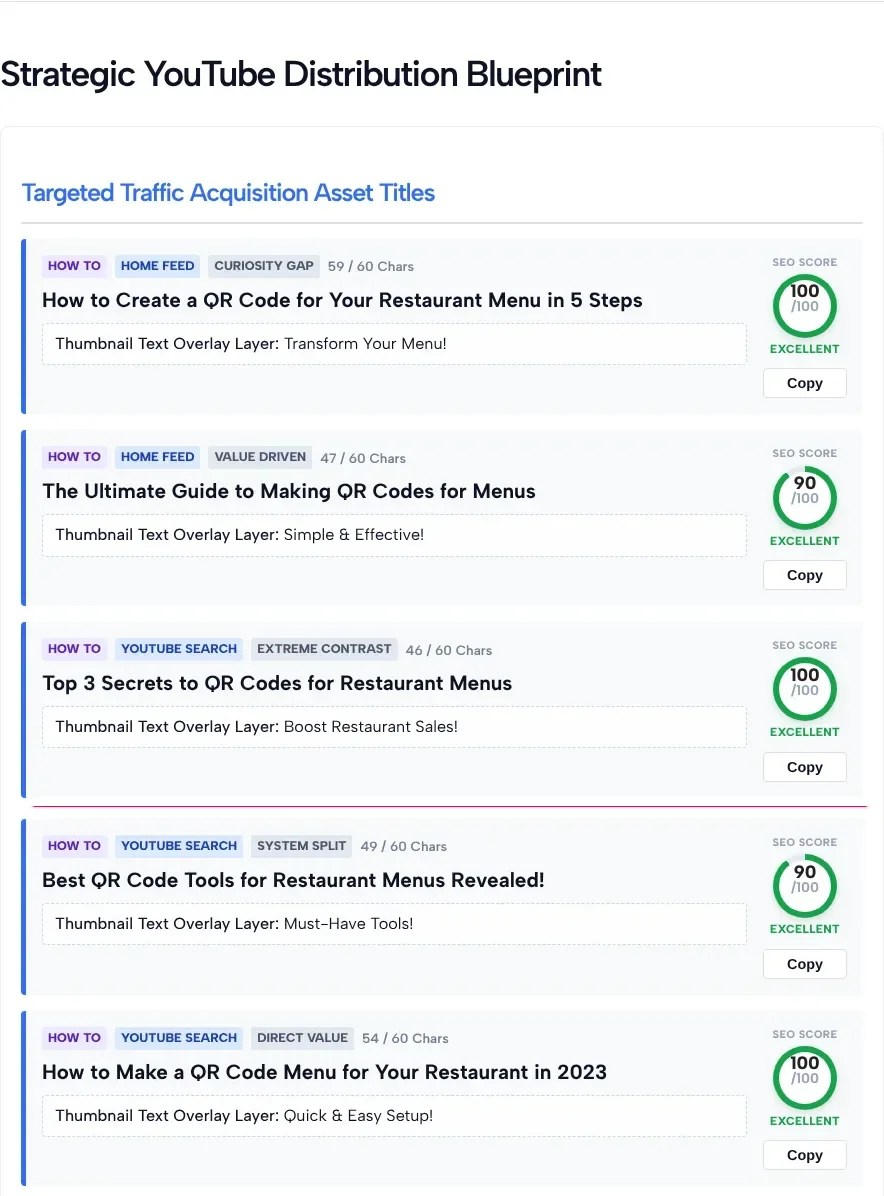
In our test, every title had tags for its format (such as How To), where it fits (Home Feed or YouTube Search) and its angle (such as Curiosity Gap). The character count was shown out of 60, and the SEO score out of 100. Below the titles, the tool added a thumbnail A/B test matrix and a layout idea for the thumbnail.
The SEO score is the tool’s own estimate, not a YouTube or Google metric. Also check years and facts before you use a title: one idea in our test said “in 2023.”
Features
The TLinky YouTube Title Generator gives you a batch of title ideas to work from. Here’s what it does.
- Generate several title variations in one run
- Create titles based on your video topic
- Tailor suggestions for a specific audience
- Choose from four styles and tones and eight video categories
- Generate up to 10 title ideas at once
- See a character count, an SEO score and thumbnail text for each title
- Short form: topic, audience, tone, category and number of ideas
- Free to use with no sign-up required
Why Use This YouTube Title Generator?
Titles are easy to overthink. A good one says what the video covers and makes people want to click, without misleading them.
This tool gives you several ideas to react to instead of a blank page, built from your topic, audience, tone, and the number of variations you choose. Compare the angles, keep what works, and rewrite the rest in your channel’s voice.
Best Practices for Writing YouTube Titles
AI ideas are a starting point. These basics help keep the title you pick clear and honest.
Keep Your Title Clear
Make it immediately obvious what viewers will learn or experience.
Include Your Primary Topic Naturally
Use your main keyword where it fits naturally without keyword stuffing.
Match Viewer Intent
Think about what your audience is searching for and what they expect from the video.
Avoid Misleading Titles
Write titles that accurately represent your content instead of relying on clickbait.
Pair Your Title with a Strong Thumbnail
Viewers see the title and thumbnail together, so make them tell the same story.
Test Different Formats
Experiment with tutorials, questions, comparisons, lists, and curiosity-driven titles to see what your viewers respond to.
Perfect For
This tool is useful for:
- YouTube creators
- Content marketers
- Businesses
- Agencies
- Educators
- Coaches
- Bloggers
- Technology reviewers
- Gaming channels
- Travel vloggers
- Product reviewers
- Podcast creators
- Documentary creators
- Small businesses
- Anyone creating YouTube videos
Frequently Asked Questions
Is this YouTube Title Generator free?
Yes. The tool is free to use and doesn’t require creating an account.
How are the titles generated?
AI writes the title ideas from the information you provide: your video topic, target audience, selected style and tone, video category, and the number of ideas you request.
Can I generate multiple title ideas?
Yes. You can generate 3, 4, 5, 7, or 10 title ideas with a single click.
Should I include my target audience?
It’s optional, but providing your target audience helps create more relevant title suggestions.
Which writing style should I choose?
Choose the style that best matches your content. Educational videos often work well with Professional / Informative, while entertainment and gaming videos may benefit from High Energy Focus.
Can I edit the generated titles?
Yes. The generated titles are starting points that you can modify, shorten, or combine to better fit your video and brand.
Will this tool improve my YouTube rankings?
Not on its own. A clear and relevant title helps viewers understand your video, and it works best with a strong thumbnail and a video that delivers. How a video performs depends on many factors, including content quality, viewer engagement, watch time, and YouTube’s recommendation system.
What does the SEO score mean?
It’s the tool’s own rating of each title, shown out of 100. It gives points for a length of 45 to 65 characters, a number in the title, and words such as How, Best or Why. It isn’t a YouTube or Google metric, so use it to compare ideas, then pick the title that describes your video best.
Related YouTube Tools
Continue working on your videos with these free tools from TLinky:
- YouTube Description Generator
- YouTube Tags Generator
- YouTube Channel Name Generator
- Hashtag Generator
Generate Better YouTube Titles Today
Enter your video topic, add your target audience, choose a style and category, and get a set of YouTube title ideas to compare. Read each one before you use it, and fix any year, number or claim that doesn’t match your video.
Whatever kind of video you make, the TLinky YouTube Title Generator gives you a head start on brainstorming so you can spend more time on the video itself.