
We recently redeemed a five-tool AppSumo bundle covering AI development, scheduling, hosting, and content automation. Every single code activated cleanly.
The process looked different for almost every tool, though. AppSumo’s own instructions describe one general flow.
What actually happens on the vendor’s side varies tool by tool, and nobody tells you that before you buy.
This walkthrough covers the real steps, including the three different redemption patterns we hit inside a single bundle.
It also covers what to do when a code will not apply.
A failed redemption eats into the same clock as AppSumo’s refund and shutdown-protection windows, so the two are worth understanding together.

How Do You Redeem an AppSumo Code?
Go to the Products page in your AppSumo account, open the Actions dropdown next to the deal, and select Redemption Information. That page gives you a redemption link and instructions specific to that product. Follow the link to the vendor’s site, apply the code where prompted, and mark it as redeemed in your AppSumo account once it activates.
What You Need Before You Start
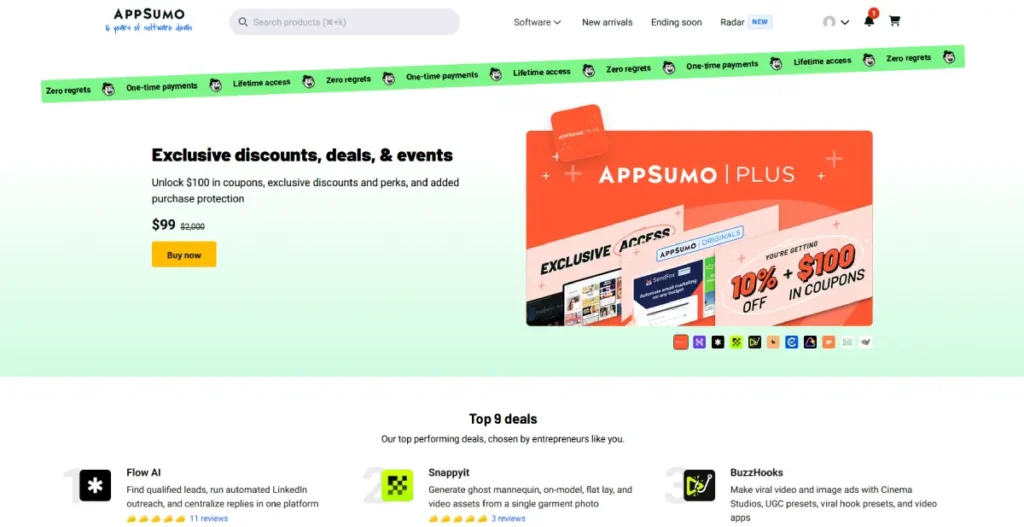
You need an active AppSumo account with the deal already purchased. Redemption instructions only appear on the Products page after checkout, not before.
Have an email address ready for the vendor’s own signup. Most redemptions require creating an account separate from your AppSumo login.
Set aside 10 to 15 minutes per tool if you are redeeming a bundle. Rushing through multiple codes back to back is exactly how a failed redemption goes unnoticed.
This applies whether the bundle covers AI writing tools, lead generation software, or general productivity apps. The redemption mechanics stay the same regardless of category.
Step 1: Find Your Redemption Instructions
Log into your AppSumo account and go to the Products page. Every deal you have purchased appears here as its own line item.
Click the Actions dropdown next to the product you want to redeem. Select Redemption Information.
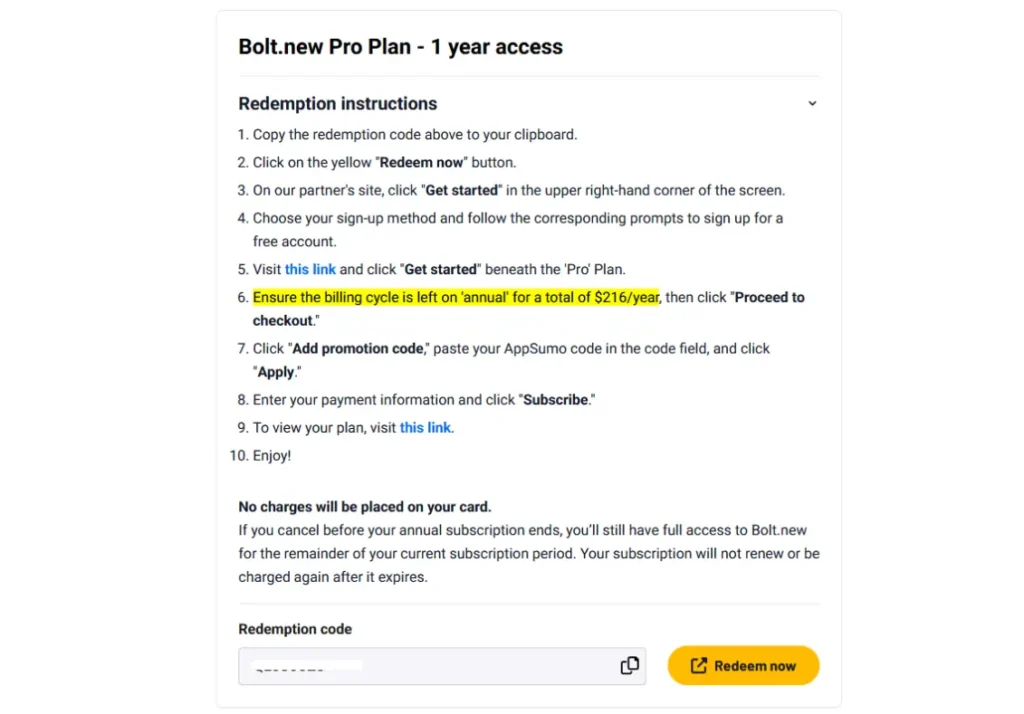
This confirms the exact process AppSumo publishes in its own Codes and Redemption Instructions guide.
That page shows your redemption or activation link, along with instructions written specifically for that vendor.
If you bought more than one code for the same deal, each one appears as a separate row.
Step 2: Redeem the Code on the Vendor’s Site
This is where the process actually diverges. Across our own bundle, we hit three distinct patterns.
Some tools activated automatically the moment we clicked through the redemption link. The code applied itself, and an upgraded plan appeared on our existing account with no further action.
Other tools required creating a brand-new account directly on the vendor’s site. The redemption code had to be entered during that signup flow, not afterward.
A few tools needed the code pasted into a specific field inside account settings, after signup was already complete. This pattern was the easiest one to miss.
Nothing on the initial screen prompted for a code at all.
None of these patterns is more common than another. Read the vendor-specific instructions on your Redemption Information page before assuming your last redemption’s process will repeat.
Step 3: Confirm the Code Activated
Check the vendor’s own dashboard or plan settings to confirm the upgrade actually applied before moving on.
A code that appears to have gone through can still fail silently on the vendor’s side.
Once you have confirmed activation, return to your AppSumo Products page. Use the Mark as Redeemed option.
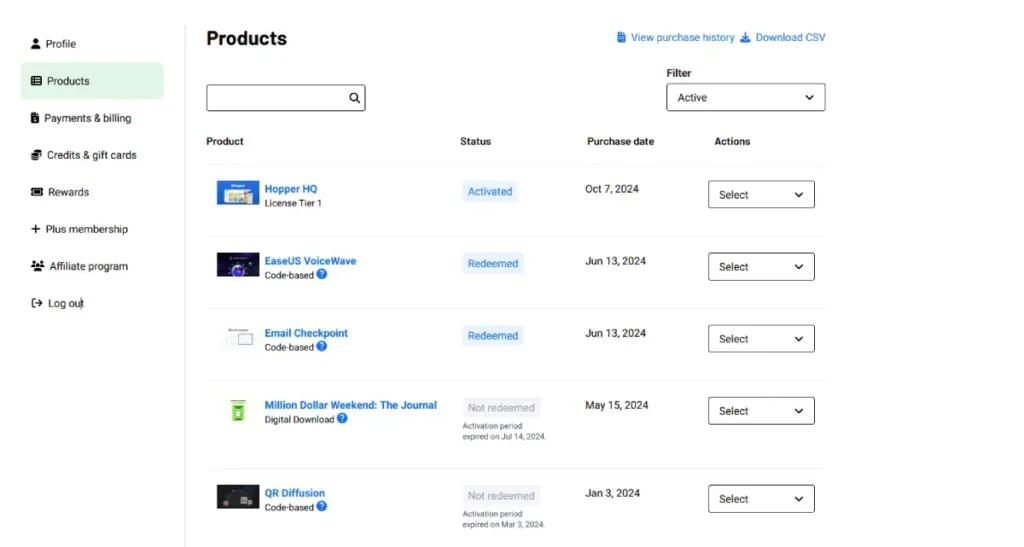
AppSumo does not automatically track redemption status, since the process happens entirely on partner sites, according to its own redemption instructions page.
Marking it manually keeps your Products page filter useful later.
That matters most when a bundle includes social media scheduling tools alongside everything else you are tracking.
Redeeming a Multi-Tool Bundle
Bundles compound the redemption problem. You are running through this entire process multiple times in one sitting.
In our own experience redeeming a five-tool bundle, every code worked, but no two tools redeemed the exact same way.
Redeem every code the same day you buy the bundle, not spread across a week.
A code that fails silently on day one is easy to catch immediately. It is much harder to catch after the refund window has narrowed.
Work through the tools Fone at a time rather than opening every redemption link in separate tabs. Confusing which tab belongs to which vendor account is a common, avoidable mistake.
Keep a simple checklist of which tools are confirmed active and which are still pending. A five-tool bundle means five separate accounts to track.
Bundles mixing email marketing tools with scheduling apps are especially easy to lose track of. Each vendor’s dashboard looks nothing like the last.
Common Redemption Problems
- Code says invalid or already used. Double check you copied the exact code from the Redemption Information page rather than a screenshot or email. A single mistyped character invalidates it, and if the exact code still fails, contact AppSumo support before the refund window closes.
- The vendor account already exists. This happens if you have used the tool before under a different plan. Contact the vendor’s support directly, since AppSumo cannot merge or transfer an existing account on your behalf.
- Redeeming past the standard window. AppSumo states plainly that it is not responsible for assisting with late redemption or activation requests, according to its own Help Center. Redeem every code well inside your refund window, not after it.
- No confirmation the code worked. If the vendor’s site gives no clear success message, log out and back into the vendor’s dashboard to confirm the plan actually changed. This is especially common with AI video generator tools and graphic design tools, where the upgraded plan sometimes only shows up after a page refresh.
Frequently Asked Questions
These are the questions we get asked most often about the AppSumo redemption process itself.
How long do I have to redeem an AppSumo code?
AppSumo does not publish one fixed redemption deadline that applies to every deal. Redeem your code as soon as possible after purchase, ideally the same day.
Waiting matters because AppSumo’s refund window runs from your purchase date, not your redemption date. A code redeemed late still counts against that same clock.
Can I redeem an AppSumo code after the refund window closes?
Technically the code may still work on the vendor’s site. AppSumo will not assist if something goes wrong at that point, though.
Its own Help Center states plainly that late redemption and activation issues fall outside AppSumo’s responsibility.
Treat the refund window as your real deadline for redemption, not just for requesting a refund.
What if my AppSumo code will not apply?
First confirm you copied the exact code from the Redemption Information page on your Products tab, not from a receipt email or screenshot.
A single extra space or dropped character is the most common cause.
If the exact code still fails on the vendor’s site, contact AppSumo support before your refund window closes. They can verify the code on their end.
Can I redeem multiple AppSumo codes for the same tool?
Yes, if you purchased more than one code for the same deal. Each code appears as its own line item on your Products page.
AppSumo issues codes as unique, single-use identifiers.
Whether those codes stack into higher usage limits on one account, or need to run as separate accounts, depends on the vendor.
Check that deal’s own Redemption Information page before assuming either way.
The Bottom Line
The redemption step is where AppSumo’s own instructions run out and the vendor’s own process takes over. That handoff is exactly where problems slip through unnoticed.
Redeem every code the same day you buy it. Confirm activation on the vendor’s own dashboard, and mark it redeemed in your AppSumo account.
For a full breakdown of AppSumo’s refund policy and what happens when a vendor shuts down, see our complete AppSumo review.
If you are buying enough deals a year to consider a membership, our AppSumo Plus break-even math shows exactly when that fee pays for itself.
If you are shopping for your first bundle, browse current AppSumo deals here and redeem each code the moment it lands in your account.
Our best AppSumo deals roundup and TLinky’s own link in bio and URL shortener tools are worth checking too while you are stacking savings on your marketing stack.
Sources