
YouTube Thumbnail Downloader
Stop settling for blurry, broken, or half-downloaded thumbnails. Our intelligent Free YouTube Thumbnail Downloader detects every resolution that’s actually available for a video and saves it to your device in one click, no guessing, no dead links, no “right-click and hope.”
TLinky uses affiliate links. We may earn a commission if you purchase through them, at no extra cost to you.
AppSumo Bundle
80% OFF
- Hostinger Cloud
- Bolt.new
- Reclaim AI
- Emergent AI
- Pica
Hostinger
Web Hosing
95% OFF
More Tools for YouTube Descriptions
Download YouTube Thumbnails in Any Available Resolution
Every YouTube video has multiple thumbnail versions stored on YouTube’s servers, from a tiny 120×90 preview up to full HD. Finding the exact file you need, in a resolution that actually exists for that video, usually means guessing at URLs or downloading a blurry image by accident.
The TLinky YouTube Thumbnail Downloader finds every resolution that’s genuinely available for a video, shows you a live preview of each one, and downloads the file you pick with a single click, no random file-sharing sites, no browser tricks, no guessing.
Free to use. No registration required.
How the YouTube Thumbnail Downloader Works
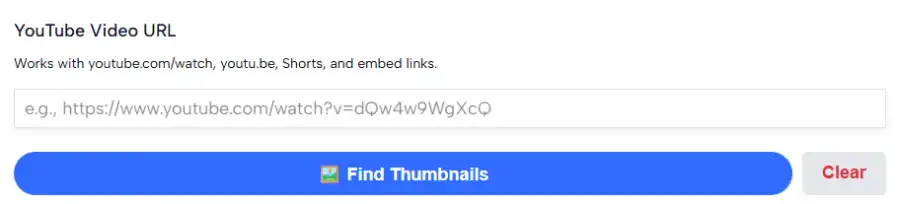
Paste a link, get every real resolution back, download the one you need.
Paste Your YouTube Video URL
Works with any standard YouTube link format.
Examples:
- https://www.youtube.com/watch?v=dQw4w9WgXcQ
- https://youtu.be/dQw4w9WgXcQ
- https://www.youtube.com/shorts/dQw4w9WgXcQ
- https://www.youtube.com/embed/dQw4w9WgXcQ
The tool extracts the video ID automatically, so you can paste the link exactly as it appears in your browser’s address bar or a share menu.
Review the Available Resolutions
Click Find Thumbnails and the tool checks every resolution YouTube stores for that specific video:
- Max Resolution (HD) – 1280×720 or higher
- Standard Definition – 640×480
- High Quality – 480×360
- Medium Quality – 320×180
- Default (Small) – 120×90
Not every video has every size. Older videos, low-resolution uploads, and videos without a custom thumbnail often don’t have a Max Resolution version, so the tool checks the real file for each size rather than assuming it exists. Resolutions that aren’t available for that video are shown grayed out instead of handing you a broken or blurry download.
Download the Resolution You Choose
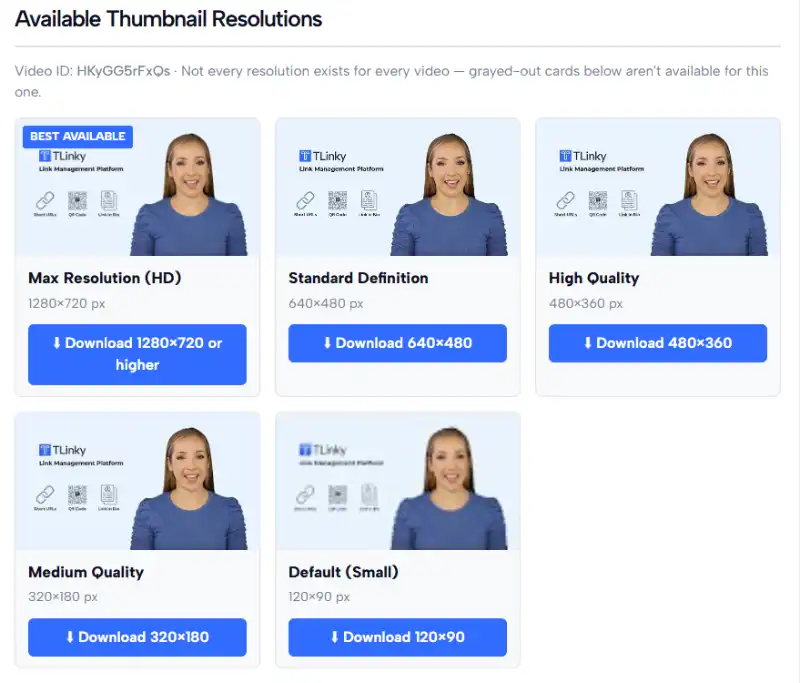
Each available resolution shows a live preview and its exact pixel dimensions, so you know precisely what you’re getting before you download. Pick any resolution card and click Download; the file saves directly to your device as a .jpg.
Features
- Detects every thumbnail resolution that actually exists for a video
- Live preview of each available resolution before downloading
- Highlights the best available quality automatically
- Supports standard links, youtu.be links, Shorts, and embed URLs
- Reliable one-click download that saves the file instead of just opening it
- No blurry or broken downloads from guessed resolution URLs
- Beginner-friendly interface
- Works on desktop and mobile
- Free to use with no sign-up required
Why Use This YouTube Thumbnail Downloader?
Thumbnail URLs follow a predictable pattern, but not every resolution exists for every video, and pasting a guessed URL directly into your browser often either downloads a tiny placeholder image or just opens the picture in a new tab instead of saving it.
This tool checks the real file for each resolution before offering it to you, so you’re never stuck with a broken or undersized download. It also handles the file transfer properly, so clicking Download reliably saves the image to your device across different browsers, instead of leaving you to right-click and “Save As” manually.
Common Uses
- Competitor and niche research — quickly review how top videos in your niche package their thumbnails
- Design reference — study framing, text placement, and color choices at full resolution
- Content audits — pull your own channel’s thumbnails for a brand or style review
- Presentations and reports — grab a clean, high-resolution still for a slide or write-up
- Backups — save a copy of your own thumbnail before replacing it
A Note on Usage Rights
Thumbnails are original artwork created by the video’s owner. Use downloaded thumbnails for personal reference, research, critique, or with the creator’s permission, rather than republishing them as your own content.
Perfect For
- YouTube creators
- Content marketers
- Designers
- Agencies
- Educators
- Researchers and analysts
- Bloggers
- Technology reviewers
- Social media managers
- Anyone studying YouTube content
Frequently Asked Questions
Is this YouTube Thumbnail Downloader free?
Yes. The tool is completely free to use and doesn’t require creating an account.
Why don’t all resolutions show as available?
Not every video has every thumbnail size. Max Resolution (HD) in particular only exists if the creator uploaded a custom thumbnail at that size, or if YouTube auto-generated one for that upload. Older videos and lower-resolution uploads often max out at High Quality or Standard Definition. This tool checks the actual file for each size and only offers resolutions that are genuinely available.
What if my video URL doesn’t work?
Make sure you’re pasting a full YouTube link (standard watch link, youtu.be link, Shorts link, or embed link). If the video is private, deleted, or region-restricted, its thumbnail may not be accessible.
Why does the download sometimes fail on other thumbnail tools but not here?
Many thumbnail downloaders link straight to YouTube’s image servers, which some browsers open in a new tab instead of downloading, since the file isn’t coming from that tool’s own domain. This tool routes the download through its own server first, so your browser reliably saves the file instead of just displaying it.
What resolution should I choose?
For design work, presentations, or print, choose the highest available resolution (Max Resolution or Standard Definition). For quick reference or research where file size matters less, High Quality or Medium Quality is usually enough.
Can I use downloaded thumbnails commercially?
Thumbnails are the creator’s original artwork. Use them for personal reference, research, or critique, or get permission from the creator before using one commercially.
Does this work for YouTube Shorts?
Yes. Paste a Shorts link and the tool will extract the video ID and check available resolutions the same way it does for standard videos.