
Most social media tools charge extra the moment your team grows past a handful of profiles. Vista Social markets itself as the budget-friendly alternative to Hootsuite and Sprout Social.
But budget only tells you the sticker price. Vista Social bundles publishing, a unified inbox, reporting, and a link in bio tool called Vista Page into one dashboard.
It holds a 4.8 out of 5 rating from 1,128 reviews on G2’s Vista Social review page, checked directly at the source.
What most reviews leave out is what happens once you add the pieces missing from the base price.
That includes what already happened to Vista Social’s earliest customers when it changed what a lifetime deal covered.
In this article, you will learn:
- What Vista Social’s core features actually do, verified directly from its own pricing page
- The 2026 pricing for all four plans, including the add-ons most reviews bury in fine print
- What changed for Vista Social’s AppSumo lifetime deal buyers after purchase, and why it matters even if you never bought that deal
- Which plan fits an occasional poster versus an agency managing multiple clients
- Whether Vista Social is worth it compared to Hootsuite or Sprout Social
Key Takeaways
- Vista Social’s Professional plan starts at $79 a month, or $758 a year with annual billing, and includes 15 social profiles and 2 users.
- X (formerly Twitter) is not included in any plan by default. Publishing, boosting, automations, and analytics for X cost $29 a month as an add-on, confirmed directly on Vista Social’s pricing page.
- Vista Social removed X posting access for its AppSumo lifetime deal buyers and moved it to the same $29 add-on, and separately capped its top lifetime tier at 3,100 posts a month, down from the unlimited posting it originally sold, according to two verified purchaser reviews posted directly on AppSumo’s review platform.
- Vista Social holds a 4.8 out of 5 rating from 1,128 reviews on G2, ahead of Hootsuite’s 4.3 out of 5 from 7,388 reviews on the same platform.
- Review monitoring on the entry-level Professional plan only covers Facebook and Google Business. Yelp, TripAdvisor, OpenTable, TrustPilot, and app store reviews require the Advanced plan or higher.
- Vista Page, Vista Social’s built-in link in bio tool, is included on every plan, though custom domains for it require Advanced or higher.
- The most common G2 complaint, appearing in 80 reviews, is a learning curve tied to how many features the platform packs in.
Quick Answer
Vista Social is worth it if you want publishing, a unified inbox, and reporting in one dashboard at a lower starting price than Hootsuite or Sprout Social. Watch two things first: X access is a $29 a month add-on on every plan, and verified purchaser reviews report AppSumo lifetime deal buyers had that access pulled after purchase. The $79 a month Professional plan covers small teams; agencies need Advanced or Scale.
What Vista Social’s Features Actually Do
Vista Social’s own site lists a long feature set. Here is what each core piece actually does, based on what is confirmed directly on Vista Social’s pricing and product pages.
Publishing to 13 networks from a single calendar
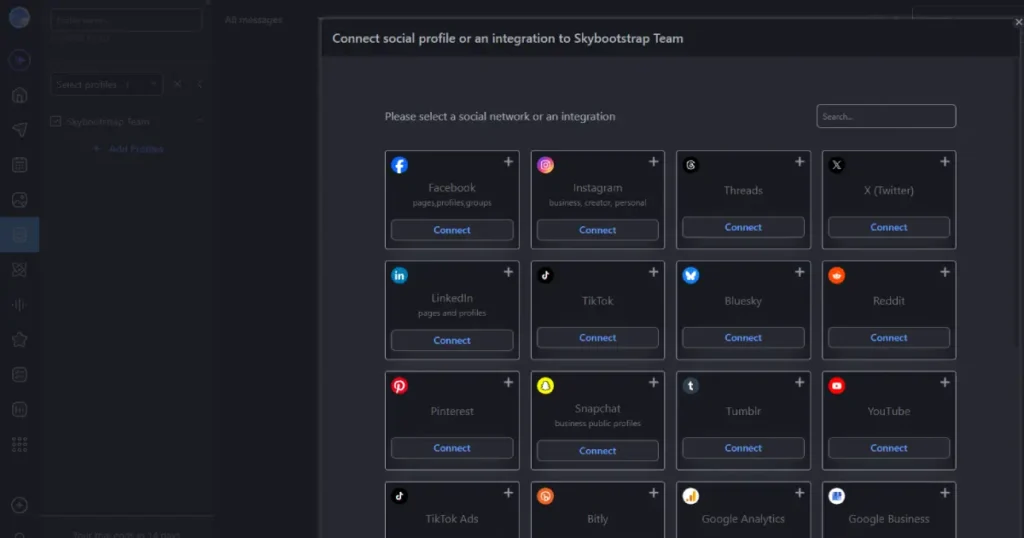
Vista Social connects to Facebook, Instagram, LinkedIn, Google Business, YouTube, TikTok, Reddit, Pinterest, Snapchat, Tumblr, Threads, Bluesky, and X.
Posts can be scheduled in bulk, previewed visually before publishing, and routed through an approval workflow before anything goes live.
Every plan includes unlimited post scheduling, so the profile count and user count are what actually separate the tiers, not how many posts you can queue.
Managing every reply from one unified inbox
The unified inbox pulls in comments, direct messages, and reviews from every connected network into a single feed.
Teams can assign messages, leave internal notes, and reply without opening each platform separately. AI credits included on every plan can draft replies to save time on repetitive responses.
Turning follower questions into a documented decision trail
Reports track post performance, follower growth, and engagement across every connected profile, and can be scheduled to send automatically.
The Professional plan includes standard social and post performance reports. Advanced and higher unlock custom report building and competitor reports.
Those extras matter most for client reporting, where the polish and detail actually count.
Watching what people say about your brand across the web
Vista Social’s listening tools track brand mentions. Listening on your own connected profiles is included free with every plan.
Listening across the wider web, social platforms, and news requires a $75 a month add-on, confirmed directly on the pricing page.
That distinction matters because listening sounds like one feature until you realize the free version only watches the accounts you already manage.
Managing review sites the way a local business actually needs
Review monitoring pulls in ratings and comments so you can respond without visiting each site individually.
The Professional plan covers Facebook and Google Business only. Advanced, Scale, and Enterprise expand that to Yelp, TripAdvisor, OpenTable, TrustPilot, the Apple App Store, and Google Play.
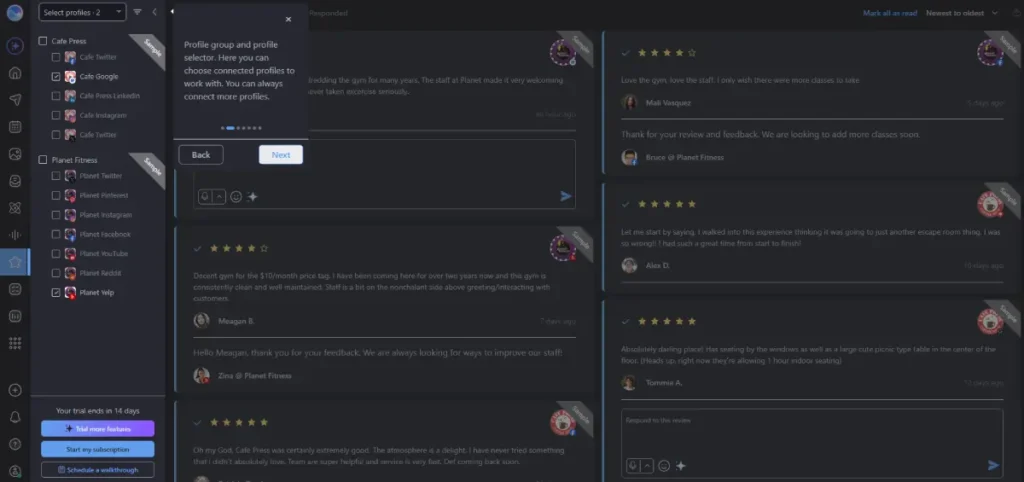
A restaurant or multi-location brand relying on Yelp and TripAdvisor reviews needs at least the Advanced plan for meaningful coverage.
Building a link in bio page without a separate subscription
Vista Page, Vista Social’s link in bio and micro-site builder, is included on every plan starting at Professional.
Custom domains for Vista Page, along with payment and calendar integrations through Google Tag Manager, are limited to Advanced and higher.
This matters for readers weighing link in bio tools built for that job. Vista Page is a bundled extra, not a dedicated link in bio product.
That means its customization ceiling is lower than a tool built around that single purpose.
Replying to comments and DMs automatically before a lead goes cold
DM Automations let you set up rules that respond to comments and direct messages without a person at the keyboard.
The Professional plan handles basic automations. Advanced plans add lead-collection features built specifically for capturing prospects from those automated conversations, and can manage up to 25,000 contacts compared to Professional’s 10,000.
Paying separately for the network most teams assume is included
X (formerly Twitter) publishing, boosting, automations, and analytics cost $29 a month on top of any plan, Professional through Enterprise. It applies at every level, including Scale and Enterprise.
Anyone comparing Vista Social’s advertised starting price against a competitor that bundles X access needs to add that $29 before the comparison is fair.
Vista Social Pricing in 2026, Verified Directly
Vista Social sells four tiers. The figures below are confirmed directly from Vista Social’s own pricing page.
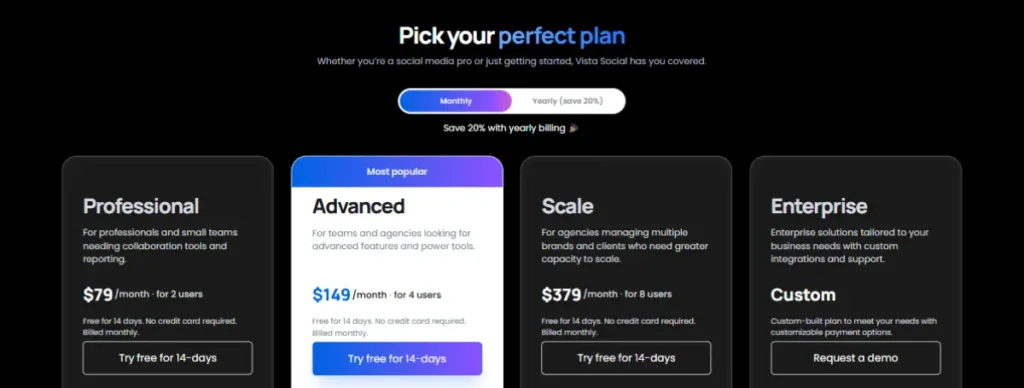
Professional: $79 a month
Covers 15 social profiles and 2 users, with 10,000 DM contacts and 1,000 AI credits a month for captions and replies.
Includes standard reporting, basic DM automations, and review monitoring limited to Facebook and Google Business.
Annual billing brings the cost to $758 a year, a 20 percent discount over paying monthly.
Advanced: $149 a month
Vista Social’s own pricing page marks this as the most popular tier. It covers 30 profiles and 4 users, with 25,000 DM contacts and 2,000 AI credits a month.
Adds custom and competitor reporting, expanded review monitoring across Yelp, TripAdvisor, OpenTable, TrustPilot, and app stores, plus integrations with Zapier, Make.com, and MCP.
Annual billing runs $1,430 a year.
Scale: $349 a month
Built for agencies managing multiple brands. Covers 70 profiles and 8 users, with 100,000 DM contacts and 3,500 AI credits a month.
Adds white-label reporting and dashboards, along with the ability for clients to connect their own profiles directly.
Annual billing runs $3,638 a year.
Enterprise: custom pricing
Unlimited profiles and users, with sentiment detection, industry benchmarking, single sign-on, a dedicated account manager, and custom integrations built around your existing systems.
What actually changes your bill
- X access costs $29 a month as an add-on on every single plan, so factor that in before comparing Vista Social’s sticker price to a competitor that includes it.
- Web-wide listening, beyond your own connected profiles, adds $75 a month on every plan tier.
- Employee Advocacy is free to try with 3 advocates, then $199 a month for 25 employees, again on every tier.
- Every plan includes a 14-day free trial with no credit card required, so the add-on costs are worth testing against your actual usage before committing to a year of billing.
If you want to see how your own team size maps to a plan, start Vista Social’s free trial before committing to annual billing.
The AppSumo Lifetime Deal Change Most Reviews Skip
Vista Social sold a lifetime deal through AppSumo that early buyers understood to include full access to all current and future social networks, including X.
The top lifetime tier also came with no stated posting limits, according to the original deal terms.
A verified purchaser review on AppSumo’s platform describes X posting being disabled for lifetime deal holders. It was moved to the same $29 a month add-on that applies to every regular plan.
The buyer, who purchased the deal in November 2023, wrote that support did not offer a resolution that preserved the original value of the purchase.
A separate verified purchaser review describes the top lifetime tier as originally sold with unlimited posting on 50 accounts.
The reviewer confirms a retroactive Fair Use limit of 3,100 posts a month, or 100 a day, now applies.
The reviewer noted this brings the top tier close to the posting limit of the tier below it.
This matters even if you never bought the AppSumo deal. It shows that Vista Social has, according to its own customers, changed the terms of an existing plan after the fact.
Which Vista Social Plan Fits Your Situation
| Your situation | Start with |
|---|---|
| A solo marketer or small team posting to a handful of networks | Professional, $79 a month |
| A local business or restaurant needing Yelp and TripAdvisor review monitoring | Advanced, $149 a month |
| A team that wants automated lead capture from DM conversations | Advanced, $149 a month |
| An agency managing multiple client brands under one dashboard | Scale, $349 a month |
| A large organization needing SSO and a dedicated account manager | Enterprise, custom pricing |
Is Vista Social Worth It Compared to Hootsuite or Sprout Social
Vista Social’s Professional plan at $79 a month undercuts Hootsuite’s and Sprout Social’s entry-level pricing for a comparable profile count, which is the core of its budget-alternative pitch.
The ratings back that pitch up. Vista Social holds a 4.8 out of 5 rating from 1,128 G2 reviews, versus Hootsuite’s 4.3 out of 5 from 7,422 reviews on the same platform.
What the price comparison misses is the add-on structure.
Add X access, expanded listening, and employee advocacy, and a Vista Social plan lands closer to a competitor’s all-inclusive tier than the base price suggests.
For a small business already tracking performance through social media metrics elsewhere in its stack, the unified reporting is a genuine time saver regardless of which platform wins on price.
Teams that already rely on short links for social posts to track clicks should check whether Vista Social’s analytics duplicate that tracking, or leave a gap that still needs a separate shortener.
If your team runs a broader social media marketing tool stack, Vista Social’s scheduling and inbox features are strong enough to anchor that stack on their own.
Who Vista Social Is Really For
A solo creator or small business posting to 3 to 5 networks fits the Professional plan comfortably. Just factor in the $29 X add-on if that channel is required.
A local business chain or multi-location brand needing review monitoring across Yelp, TripAdvisor, and OpenTable should plan for Advanced at minimum, since Professional only covers Facebook and Google Business.
Agencies juggling multiple client brands get the clearest case for Scale, mainly for the white label reporting and the ability to let clients connect their own profiles.
Teams already running TikTok marketing campaigns alongside other platforms benefit from having TikTok scheduling sit inside the same dashboard as Instagram and Facebook.
Anyone who bought the AppSumo lifetime deal expecting unbounded X access and unlimited posting should read the purchaser reviews closely. That plan may no longer cover what it did at purchase.
If your team already tracks campaigns with a UTM builder, applying that same tagging to Vista Social’s scheduled posts closes the loop between what gets posted and what drives traffic.
Frequently Asked Questions
These are the questions that come up most once people get past Vista Social’s advertised starting price and start comparing it to what they currently use.
Does Vista Social include X (Twitter) in its base price?
No. X publishing, boosting, automations, and analytics cost $29 a month as an add-on on every plan, from Professional through Enterprise.
This applies regardless of which tier you choose, so it should be added to any price comparison against a competitor that includes X by default.
What happened to Vista Social’s AppSumo lifetime deal?
One verified purchaser review on AppSumo’s platform reports Vista Social removed X posting access for lifetime deal buyers, moving it to the same $29 add-on that applies to regular plans.
A second verified purchaser review reports a retroactive Fair Use posting cap of 3,100 posts a month applied to the top lifetime tier.
Buyers had understood the original deal to include unlimited posting and access to all current and future networks at the time of purchase.
How does Vista Social compare to Hootsuite on price?
Vista Social’s Professional plan starts at $79 a month for 15 profiles and 2 users, generally undercutting Hootsuite’s comparable entry-level pricing.
Vista Social also holds a higher G2 rating, 4.8 out of 5 from 1,128 reviews, compared to Hootsuite’s 4.3 out of 5 from 7,388 reviews on the same platform.
Does Vista Social have a free plan?
No, but every plan includes a 14-day free trial with no credit card required, which is enough time to test the unified inbox and scheduling tools against your actual posting volume.
Add-on costs like X access and expanded listening are worth testing during the trial period before committing to annual billing.
What is the most common complaint about Vista Social?
The most frequent issue reported on G2, appearing in 80 reviews, is a learning curve tied to how many features the platform packs into one dashboard.
Users also report occasional message sync delays and some limitations with Instagram account integration, though most reviewers note that support resolves issues quickly.
Is Vista Page a good replacement for a dedicated link in bio tool?
Vista Page is included free on every Vista Social plan and covers the basics of a link in bio page, but custom domains require the Advanced plan or higher.
For a creator whose link in bio page is a primary conversion point, a tool built specifically around that job typically offers deeper customization than a bundled add-on.
Wrapping Up
Vista Social’s core pitch holds up on price and on G2’s own ratings, but the full cost only becomes clear once X access and expanded listening get added to the base plan.
The change to its AppSumo lifetime deal, reported directly by its own purchasers, is the detail most reviews skip. It matters for anyone weighing a long annual commitment.
Start with the 14-day free trial, add the X and listening costs your team actually needs, and compare that real total against what you are paying today before switching.
If social media management is one piece of a wider marketing stack, our roundup of social media marketing tools covers where a platform like Vista Social fits alongside the rest.
For teams building a link in bio strategy separately, our guide on using link in bio pages to drive sales covers what a dedicated tool adds beyond a bundled feature.
Sources
- Vista Social Pricing
- Vista Social Reviews on G2
- Hootsuite Reviews on G2
- Vista Social AppSumo Review: X Access Removed
- Vista Social AppSumo Review: Retroactive Posting Cap