
Print your QR code at least 2 cm (0.8 in) wide, and about one tenth as wide as the distance people will scan it from. That works for ordinary links. Long URLs and contact cards fill the code with more, smaller squares, so give them about a seventh of the distance instead.
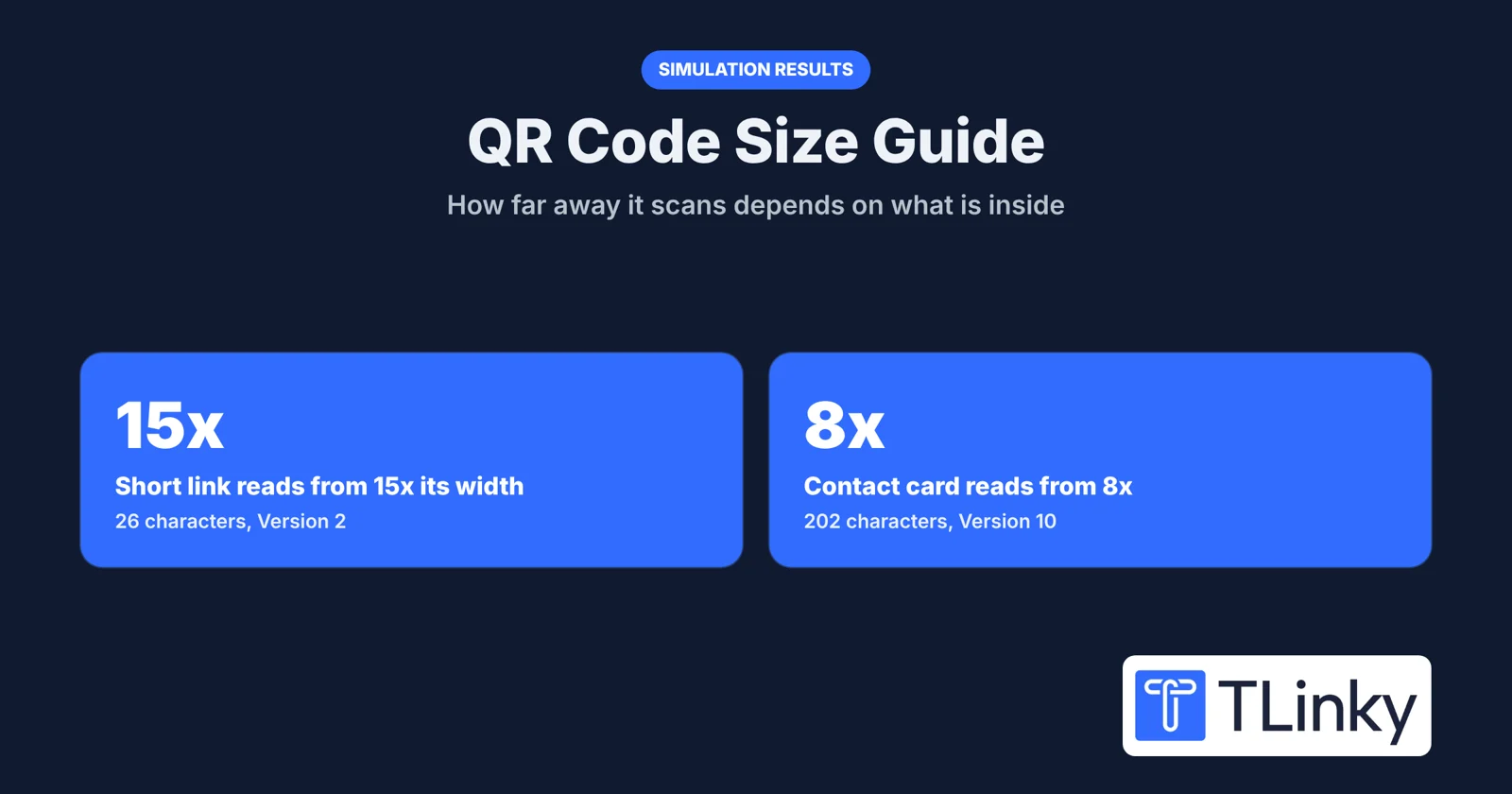
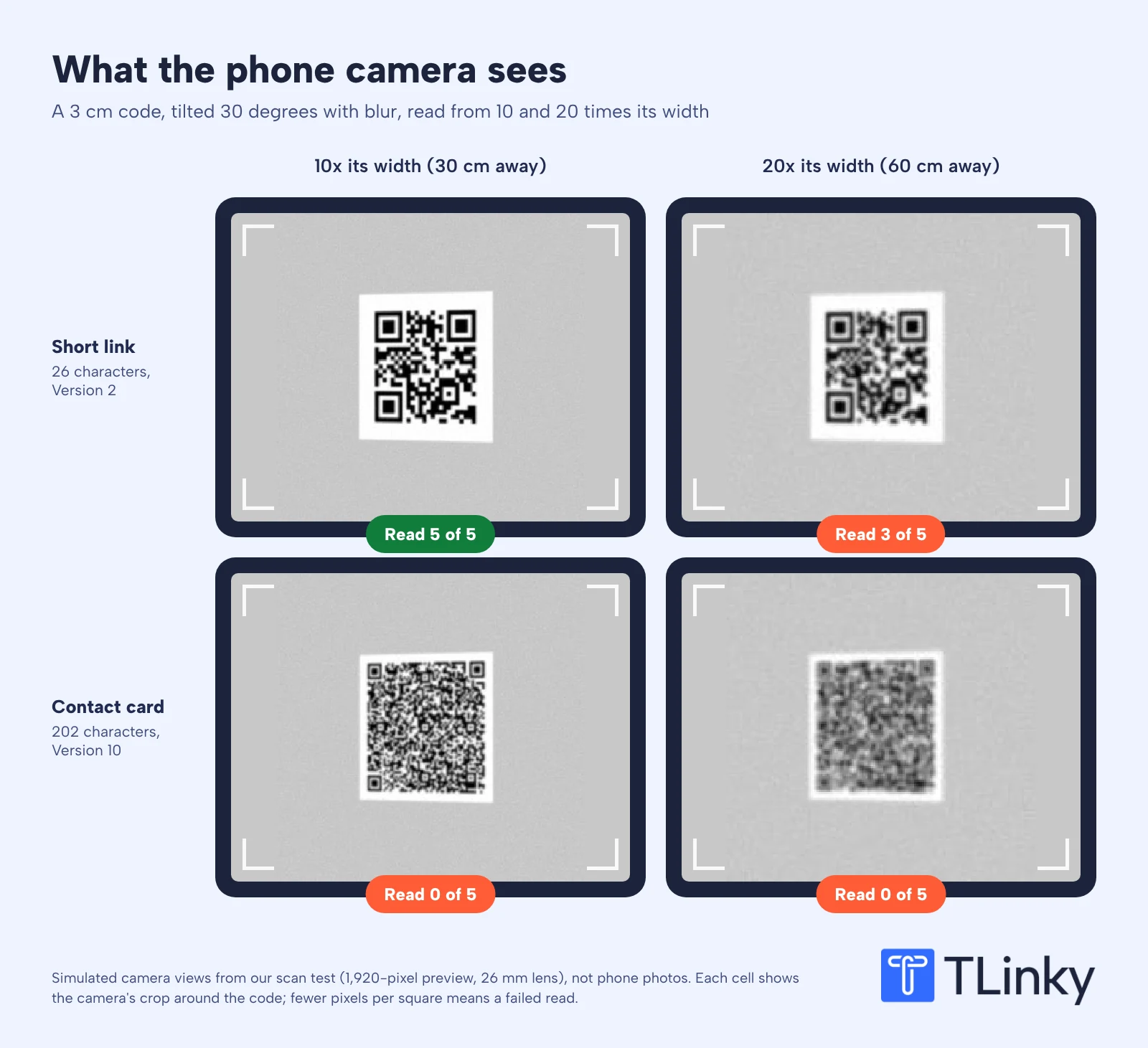
We ran a camera simulation of four codes printed at the same width. A 26-character short link read from 15 times its width, while a 202-character contact card stopped reading past 8 times.
Below you’ll find a size calculator and the reason the usual rules disagree. You’ll also see how content changes the size, the margin a code needs, sizes for common print jobs and pixel numbers.
What size should a QR code be?
A QR code should be about one tenth of the scan distance for a normal link. For a long URL or a contact card, use about one seventh. Measure where the phone will be, divide, and don’t go below 0.8 inch for anything held in the hand.
| Scan distance | Link up to 120 characters | Long URL or vCard |
|---|---|---|
| 6 in (15 cm) | 0.8 in, the floor | 0.9 in (2.2 cm) |
| 10 in (25 cm) | 1 in (2.5 cm) | 1.4 in (3.6 cm) |
| 1 ft (30 cm) | 1.2 in (3 cm) | 1.7 in (4.3 cm) |
| 2 ft (60 cm) | 2.4 in (6 cm) | 3.4 in (8.6 cm) |
| 3 ft (90 cm) | 3.6 in (9 cm) | 5.1 in (13 cm) |
| 5 ft (1.5 m) | 6 in (15 cm) | 8.6 in (21 cm) |
| 10 ft (3 m) | 12 in (30 cm) | 17 in (43 cm) |
| 20 ft (6 m) | 24 in (60 cm) | 34 in (86 cm) |
How we got these widths: the left column divides the distance by 10, the common rule of thumb. Our simulation backs it for content up to Version 7 (explained below). The right column divides by 7, one step inside the point where our longest codes stopped reading. Widths are for the code itself; the blank margin comes on top.
Two habits matter more than any table. Print one copy at full size and scan it from the real spot with an older phone. And if the code lands near the right column, shorten what’s inside it before you make it bigger. You can make and download the code in TLinky’s free QR code generator and test it the same day.
Why do QR code size rules disagree?
QR code size rules disagree because each was written for a different reader. One assumes an industrial scanner, one a phone at arm’s length, one a person across a room. The number that really decides a scan is how big one square (a module) looks to the camera.
Here’s where the common numbers come from:
- A centimeter minimum, twice that in practice. The Nielsen Norman Group’s QR code usability guidelines call a one-centimeter code the official minimum but warn it can be too small; they suggest twice that, and at least 5 cm for a code scanned from about 50 cm.
- Under a centimeter. Denso Wave’s code area guide, from the company that created the QR code, works an example that ends at 9.398 mm square with its margin. It assumes a 400 dpi printer putting 4 dots in every module. That suits a barcode reader on a production line, not a shopper’s phone.
- A size set by the ISO standard. People often say ISO/IEC 18004 fixes a minimum print size. Denso Wave’s standardization page describes the symbol only in modules, from 21 x 21 to 177 x 177. The standard defines the grid; the printed size is up to you.
- 1 inch per 10 feet. Sign shops repeat this one. It works out to a code 120 times smaller than the distance. In the simulation we ran for our sign page, nothing decoded at that ratio. Not even at 60 times, short link or long.
So treat any single number as a starting point. The camera needs enough pixels on each module, and that depends on distance and on how many modules the code has.
How far away can a QR code be scanned?
How far a phone can scan a QR code depends on what the code holds. Short content reads from farther away because each square is bigger. A packed code needs your phone close.
We tested this on November 27, 2026 with a modeled phone camera (a 1,920-pixel-wide preview and a 26 mm equivalent lens). Four codes were rendered as 3 cm wide prints at 300 dpi, error correction M, and read at 8 to 30 times their width. Each case ran five times with a sharp shot, a blurred shot and a 30-degree tilt with blur. It’s a simulation, not a test on real phones.
| Content | Version | Reads every time up to | First misses at |
|---|---|---|---|
| Short link, 26 characters | 2 (25 x 25) | 15x width (18 in for a 3 cm code) | 20x (tilted: read 3 of 5) |
| Menu URL, 53 characters | 4 (33 x 33) | 15x | 20x (blurred: read 0 of 5) |
| Tagged URL, 144 characters | 8 (49 x 49) | 8x (about 9.5 in) | 10x (tilted: read 3 of 5) |
| vCard, 202 characters | 10 (57 x 57) | 8x | 10x (blurred: read 0 of 5) |
The line between reading and failing sat near 3 camera pixels per module. That gives you a handy estimate. The farthest reliable distance, in code widths, is about 450 divided by the number of modules across the code. According to Denso Wave’s version table, a Version 7 code has 45 modules, so the estimate comes out at 10. That’s why dividing by 10 holds for most links and falls apart for big contact cards.
A steady, perfectly sharp shot read every code from farther away than that. Real people scan with one hand, at an angle, often in poor light, so the blurred and tilted results are the ones to plan around.
How does the amount of data change QR code size?
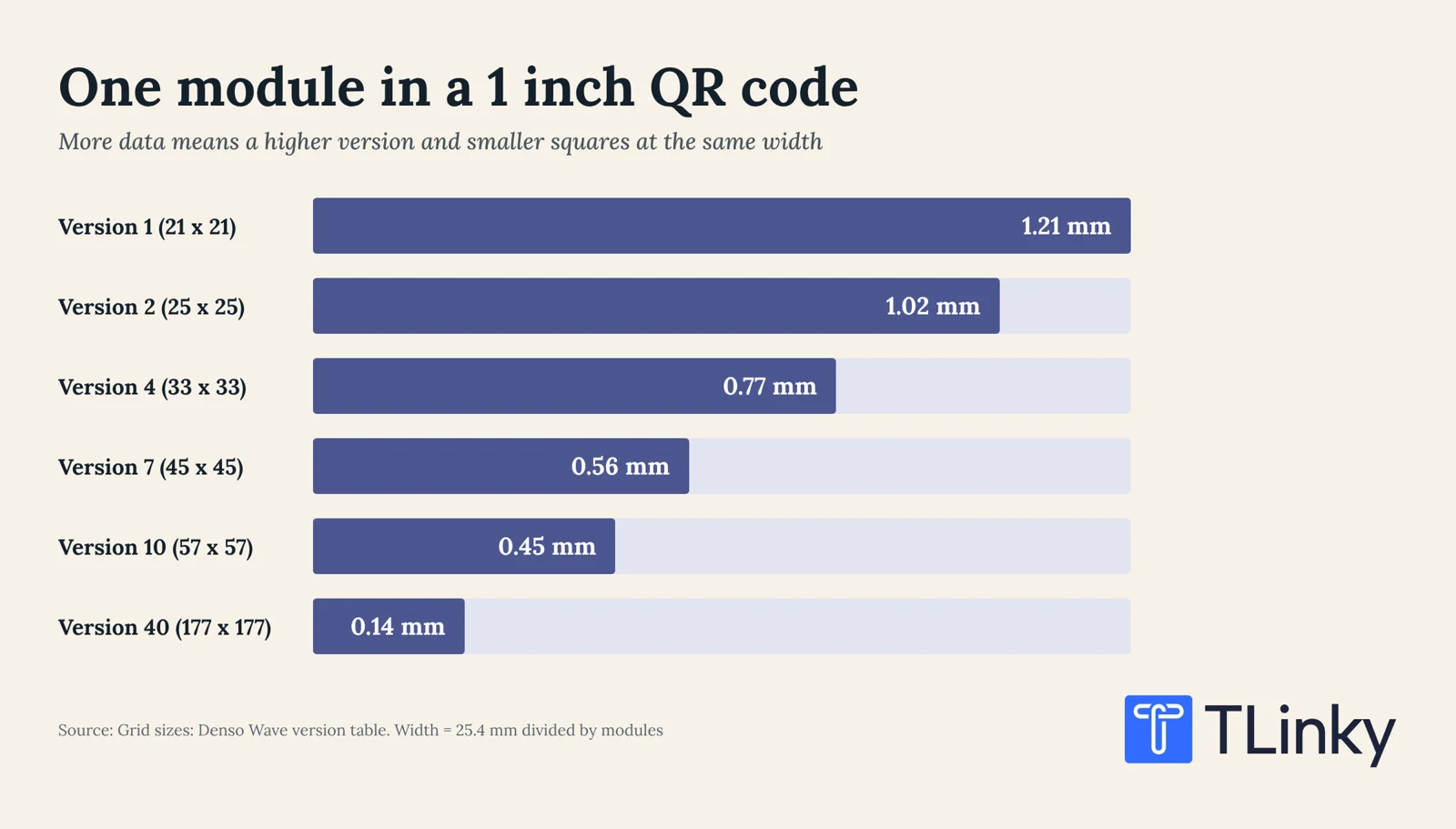
More data means more modules, so at the same printed width each module gets smaller and the code needs to be bigger or closer. QR codes come in 40 versions. Denso Wave’s version table starts at Version 1 (21 x 21 modules) and adds 4 modules per side with each step, up to Version 40.
| Version (grid) | Characters at level M | Fits | Module at 1 in |
|---|---|---|---|
| 1 (21 x 21) | 14 | a short code | 1.21 mm |
| 2 (25 x 25) | 26 | a short link | 1.02 mm |
| 3 (29 x 29) | 42 | a page address | 0.88 mm |
| 4 (33 x 33) | 62 | a menu link | 0.77 mm |
| 7 (45 x 45) | 122 | a long product URL | 0.56 mm |
| 8 (49 x 49) | 152 | a tagged URL | 0.52 mm |
| 10 (57 x 57) | 213 | a full contact card | 0.45 mm |
Characters are counted as bytes (letters, symbols and digits mixed), the way a web address is stored. A tagged URL here means a product link with tracking tags added, like the one in our simulation.
The easiest way to shrink a code is to shrink what’s in it. A short link or a dynamic QR code replaces a long address with a few characters, so your code stays at Version 2 or 3 and can print smaller or be scanned from farther away.
Error correction pushes the version up too. Denso Wave’s error correction page says a higher level makes the code larger and that level M is the one most often picked. In our earlier poster simulation, a 113-character URL at level H grew to 57 modules. It failed blurred and tilted reads at 10 times its width, while the same URL at level M read in every case. Use H only when the surface may get dirty or damaged.
How big is the quiet zone around a QR code?
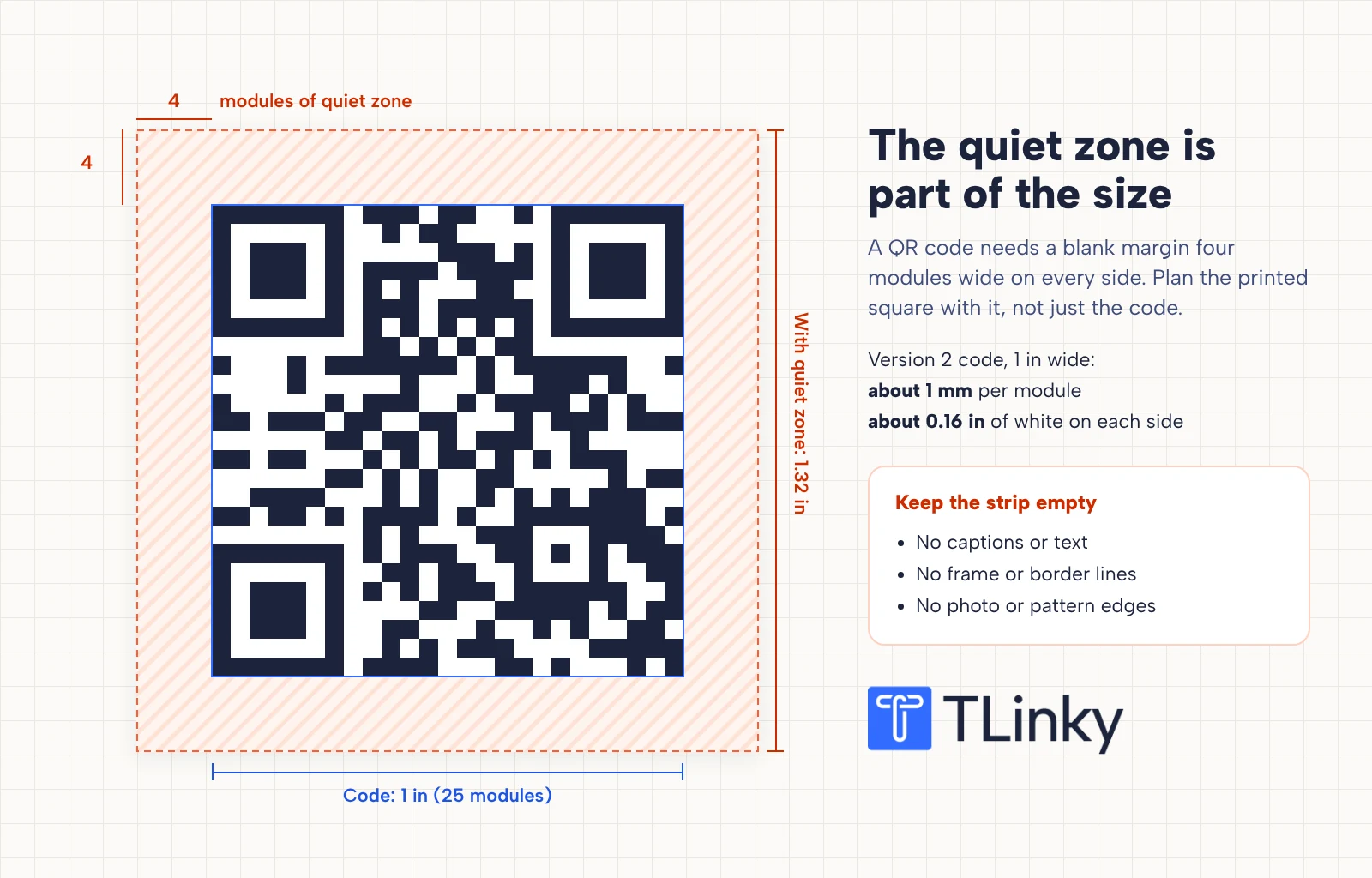
The quiet zone is a blank margin four modules wide on every side of the code. It’s part of the space you need to plan. Denso Wave’s code area guide asks for those four modules all round, with nothing printed in them.
In real units, an inch-wide Version 2 code has modules about 1 mm wide. So it needs about 0.16 inch of white space on each side, and fills a 1.32 inch square in total. The GS1 guideline for 2D barcodes at retail checkout gives the same rule with its own example: a 0.495 mm module means a 1.98 mm margin.
TLinky’s free generator downloads the code with no margin around it, so leave the white space in your layout. Text, a frame or a photo running into that strip is a common reason your code looks fine on screen but won’t scan on paper.
QR code size by where it goes
QR code size by placement falls in a narrow range for most print jobs. Things held in the hand need under an inch, walls and counters a few inches, and sidewalk signs a foot or more. Each row below links to a page with the full detail for that job.
| Where it goes | Scan distance | Code width | Watch for |
|---|---|---|---|
| Business card | 6 to 10 in | 0.8 to 1 in | vCards need a closer phone |
| Sticker or label | about 6 in | 0.4 to 1 in | printer dpi |
| Flyer | about 10 in | 1 in | folds |
| Book page | about 1 ft | 1 to 1.2 in | gutter and trim |
| Poster | about 3 ft | 3.6 in | glare |
| Sign | 5 to 10 ft | 6 to 12 in | where people stand |
| Pet tag | a few inches | about 0.5 in on a 1 in tag | engraved finish |
For stickers, the printer can be the limit before the camera is. In our label printer simulation, a short-link code read at 10 mm wide on a 203 dpi thermal printer and failed at 8 mm, with only about two printer dots per module.
What size is a QR code in pixels and dpi?
For print, multiply the code’s width in inches by 300 to get the pixels you need. That’s 300 px per inch, so 600 px for a 2-inch code and 1,200 px for a 4-inch one. The SAIC Service Bureau’s artwork guidelines ask for images at 300 dpi or higher, a common print-shop standard.
TLinky’s free generator gives you a 256 x 256 pixel PNG and an SVG file. At 300 dpi the PNG covers about 0.85 inch, so use it for small items and switch to the SVG for anything larger. SVG is a vector file: it stays sharp at any size, from a sticker to a banner.
On screens, the physical size on the display is what counts, and the same distance rule applies. A code on a laptop read from 2 feet needs to be about 2.4 inches wide on that screen. When you export a PNG for a slide or a web page, use a whole number of pixels per module so the edges stay crisp. A Version 2 code with its margin is 33 modules, so 330 or 660 pixels work well.
Frequently asked questions
What is the smallest QR code size that will scan?
There’s no fixed smallest size, because the real limit is how large each square looks to the camera. A short link printed sharply can scan at well under an inch from a few inches away, but tiny codes fail with shaky hands or rough paper. For anything people hold, plan on 0.8 inch or more.
What is the standard size of a QR code?
QR codes have no standard print size. The ISO/IEC 18004 standard defines them as grids from 21 x 21 to 177 x 177 squares and leaves the physical size to the designer. In everyday print, about an inch suits close-up items like cards and labels, and wall or sign codes scale with distance.
What is the maximum size of a QR code?
The largest QR code is Version 40, a grid of 177 x 177 squares. According to Denso Wave, it holds up to 7,089 digits, 4,296 letters and numbers, or 2,953 bytes at the lowest error correction level. There’s no upper limit on printed size: a billboard code just needs to fit inside the camera’s view.
What size is a Micro QR code?
Micro QR codes run from 11 x 11 squares (M1) to 17 x 17 (M4) and use one corner finder pattern instead of three. Denso Wave says they need only a two-square margin and hold at most 35 digits, less than a regular Version 1 code, so they rarely fit a full web address.
What size should a QR code be on a business card?
Aim for roughly an inch on a standard 3.5 x 2 inch card. Cards get scanned up close, so a code that opens a short link can go a little smaller. A contact card code holds far more data, so give it the full width and expect people to bring the phone nearer.
How do I make a QR code smaller for printing?
Put less inside it. Swap a long address for a short or dynamic link, keep error correction at M unless the surface gets dirty, and print from an SVG on matte stock. Fewer, larger squares let the same code shrink while staying readable, and a sharp print edge helps the camera at small sizes.
What should I do if a QR code is too small to scan?
Move the phone closer, hold it steady and add light, since blur and dim light shrink the usable distance fast. If it still fails, the squares are too small for the camera. For printed pieces, reprint the code larger or place a bigger sticker code over it that opens the same page.
How much of a QR code needs to be visible?
The whole code and its blank border should be visible, especially the three large corner squares the camera uses to find it. Error correction can rebuild missing data, up to about 30% of it at level H according to Denso Wave, but covering a corner square can stop the scan altogether.