
Printify is a print-on-demand platform built around three tiers: a genuinely free plan, a $39-a-month Premium plan, and a custom Enterprise plan for high-volume sellers.
Its pricing page does not surface a February 2026 price change that quietly reshaped what Premium costs, or two dated complaints buried in Printify’s live Shopify reviews.
This review covers all three tiers, verified directly against Printify’s pages, plus a hands-on test of the free plan itself.
We connected a store, built a product with the Product Creator, and compared print providers on the same item.
The free-plan claims below come from that real account, not just the pricing page.
Is Printify Worth It?
Printify is a print-on-demand platform with a genuinely free plan, 5 stores, and unlimited product designs at no monthly cost. Premium jumped from $29 to $39 a month in February 2026, though annual billing stayed at $299 a year. Our test account confirmed the Product Creator and provider comparison tools work as advertised, and Printify’s Shopify reviews flag a real product-deletion policy worth knowing first.
What Printify Actually Is
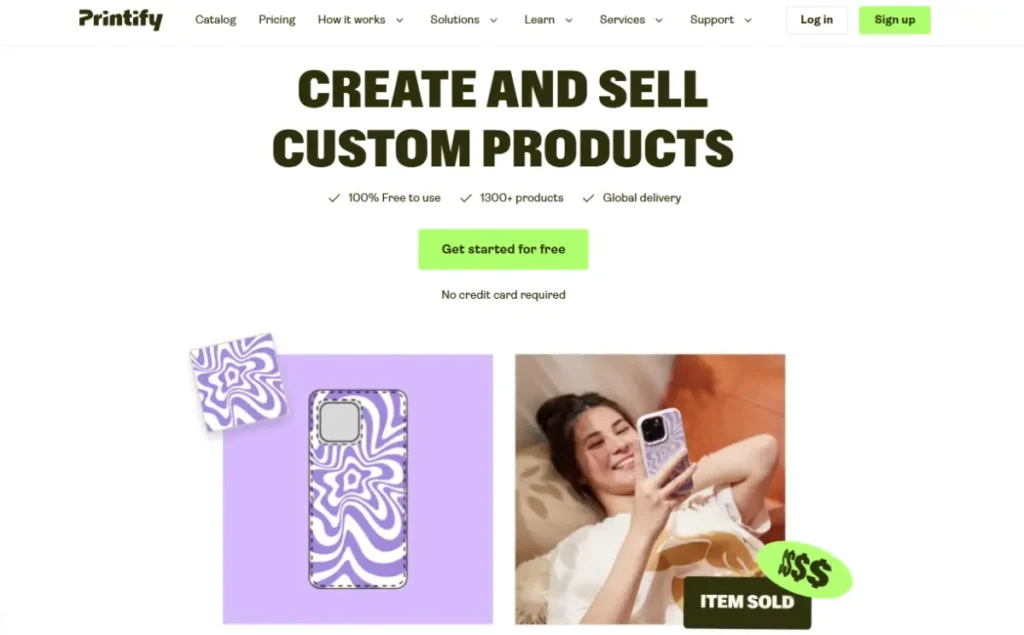
Printify is a print-on-demand platform, not a supplier marketplace with pre-made inventory.
You upload your own design onto a blank product, a print provider makes it only after a customer orders, and you never hold physical stock.
This differs from dropshipping platforms like Spocket, which resell products that already exist rather than print anything custom.
If you are still mapping out the basics, how to start a dropshipping business and the fundamentals of dropshipping both cover the groundwork this review assumes you already know.
What Happens When You Sign Up
Printify’s free plan requires no credit card at signup, confirmed directly on our own test account.
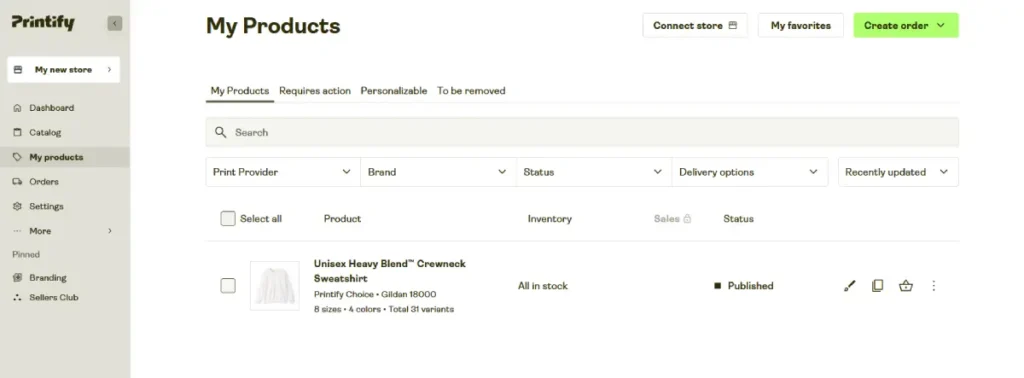
We connected a store, and the dashboard immediately opened into the product catalog rather than a paywall or upgrade prompt.
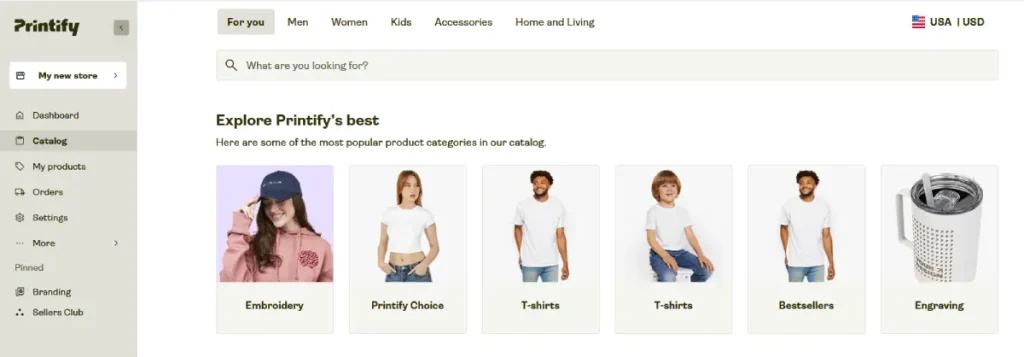
The catalog itself opens into browsable categories like Embroidery, Printify Choice, T-shirts, Bestsellers, and Engraving, instead of one flat product list.
Every core action we tried on the free tier, including building a product and comparing providers, worked without any locked feature warning.
The only limits we hit were structural: 5 connected stores and no access to Printify Connect or the deeper product discounts reserved for Premium.
Store Settings includes an Order Routing feature that automatically reroutes an order to a similar print provider if the original one runs into a delay or price issue.
We found routing capped at a maximum additional cost per item, set to USD 2.00 by default and adjustable up to USD 100.00.
A separate checkbox activates an upgrade to Printify Choice, Printify’s own system for picking the best-priced, fastest provider automatically on eligible orders.
Publishing preferences also set a default profit margin, which arrived pre-filled at 40 percent in our account with a built-in warning against going lower.
Sellers shipping to the EU or United Kingdom must also choose a General Product Safety Regulation setting, since Printify requires this before allowing sales into those regions.
If that structure fits your plan, start with Printify’s free plan and connect your first store to see the same dashboard we tested.
Printify’s Core Features, Tested
The features below reflect what we found using a real free-plan account, cross-checked against Printify’s own site and help center.
Product Creator
The Product Creator is the tool you use to place a design onto a blank item and generate a sellable listing.
We uploaded a design ourselves and moved it around a product mockup in real time, adjusting size and placement before publishing.
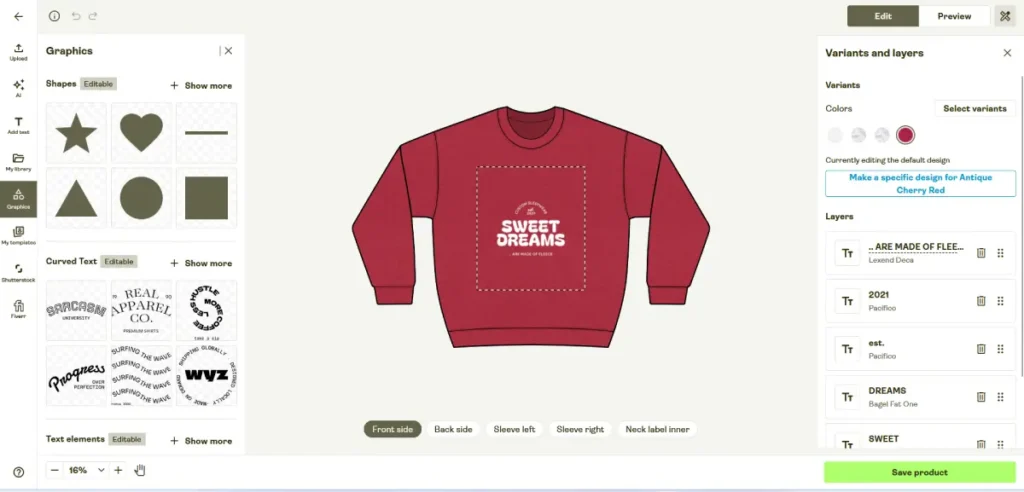
Inside the Product Creator, the free plan includes an AI image generator with 15 free image attempts per day, confirmed in our own account.
Style options include None, Anime, Photographic, Digital Art, Comic Book, and Fantasy Art, letting you generate artwork instead of uploading your own file.
The Add Text panel offers curved text templates and a searchable font library, plus an option to upload a custom font file.
Printify’s own upload rules cap files at 100 MiB for JPG or PNG, 20 MiB for SVG, with a 3852 by 4398 pixel print area at 300 DPI.
A separate Trends page surfaces AI-generated design ideas by category, refreshed regularly and generated by Gemini 3.1 Flash Image, per the page’s own disclosure.
Print Provider Network
Printify works with over 90 print providers across more than 140 fulfillment centers, according to Printify’s pricing page.
We compared providers for the same product ourselves, and each one showed a different fulfillment cost and shipping estimate for identical items.
That price gap is the reason Printify recommends checking multiple providers before publishing, not just picking the first option shown.
Mockup Generator
The Mockup Generator creates realistic product photos of your design on the actual item, without a physical photo shoot.
Premium adds AI Mockups on top of the standard generator, producing lifestyle-style images automatically rather than a flat product shot.
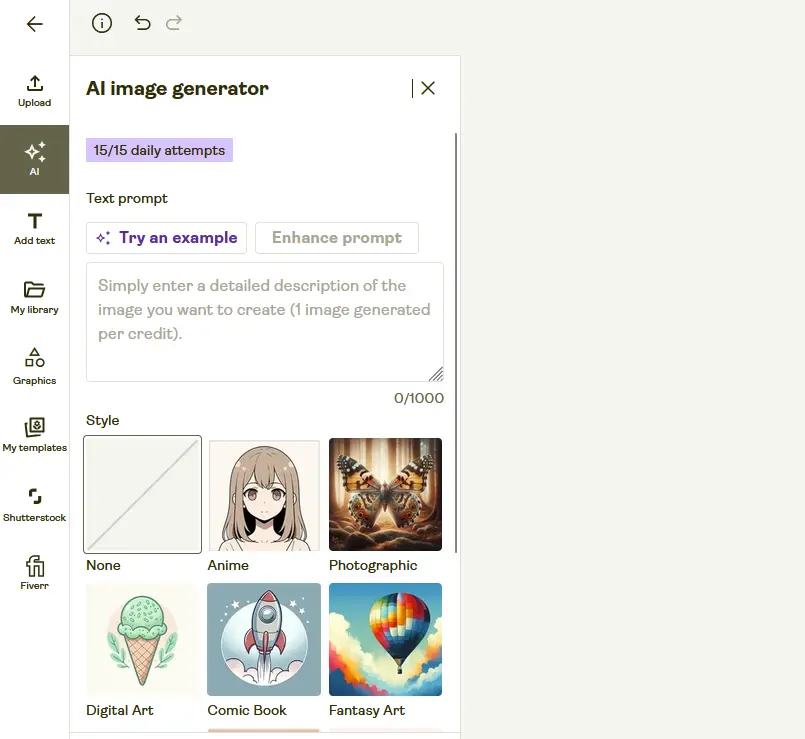
The mockup library groups images by color and angle, including Front, Back, Folded, and lifestyle shots with a model wearing the product.
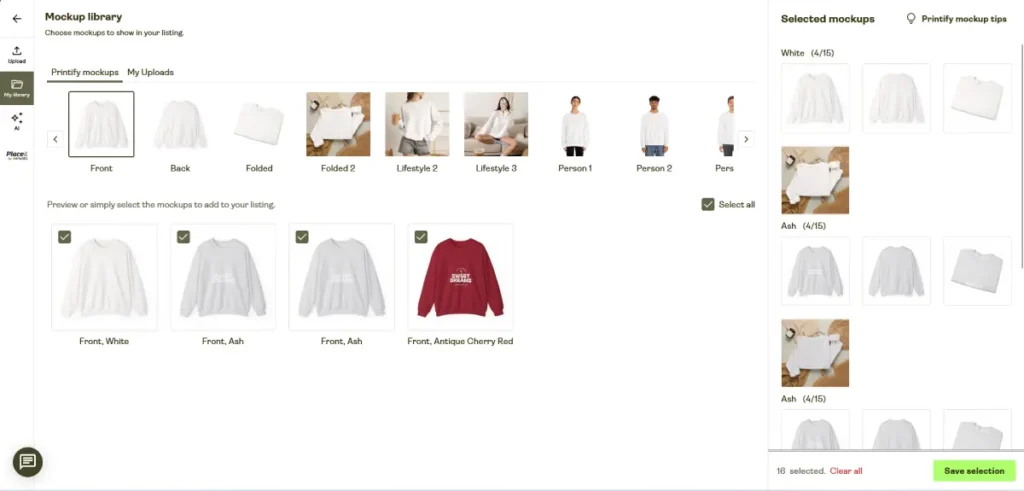
On our own test product, each color offered up to 15 mockup images, and we selected 16 across three colors before saving the listing.
Store Platform Integrations
Printify’s integrations page lists Shopify, Etsy, WooCommerce, Wix, Squarespace, BigCommerce, eBay, Amazon, and PrestaShop as supported platforms.
It also connects to TikTok Shop, currently limited to US-based TikTok creators, letting sellers publish print-on-demand products straight to a TikTok storefront.
Pairing that with a Shopify-based TikTok Shop setup covers sellers who want both a custom product line and a resale catalog in the same store.
We connected our own store during testing, and the setup required choosing a sales channel before any product could sync.
Merchant Protection
Merchant Protection is Printify’s policy covering reprints and refunds when a customer receives a damaged or incorrectly printed product.
Printify’s pricing page states this covers a free reprint or refund within 30 days of an order, for errors covered under Printify’s Terms of Service.
Printify’s dedicated merchant-protection page adds that a refund is issued to your account within 1 business day once Merchant Support confirms the issue.
Automatic Product Removal
Printify’s help center states this cleanup of old, inactive products has run since September 9, 2025.
The removal criteria break down by product history:
- Past orders, no recent activity: removed after 2 years with no new orders and 1 year with no edits.
- Never sold: removed after 1 year of no activity at all.
- Draft, unpublished products: deleted under the same rule as published ones.
Every product gets a 30-day grace period first, shown under a To Be Removed tab, where clicking Retain Product extends it another year.
Your live storefront listing and saved design file both survive even after Printify’s own copy of the product is removed.
If a customer somehow orders that deleted listing anyway, the order still comes through under Printify’s Other Orders tab, where you can recreate the product and fulfill it manually.
Printify Connect and Premium Tools
Printify Connect is a Premium-only feature that lets Printify’s support team step in directly on eligible order-related issues.
Premium also includes Sellers Club PRO mentorship access, meaning live sessions and support beyond the standard self-serve help center available on Free.
Branding and Packaging Add-Ons
Printify sells optional branding add-ons that attach to an order rather than living inside the base product price.
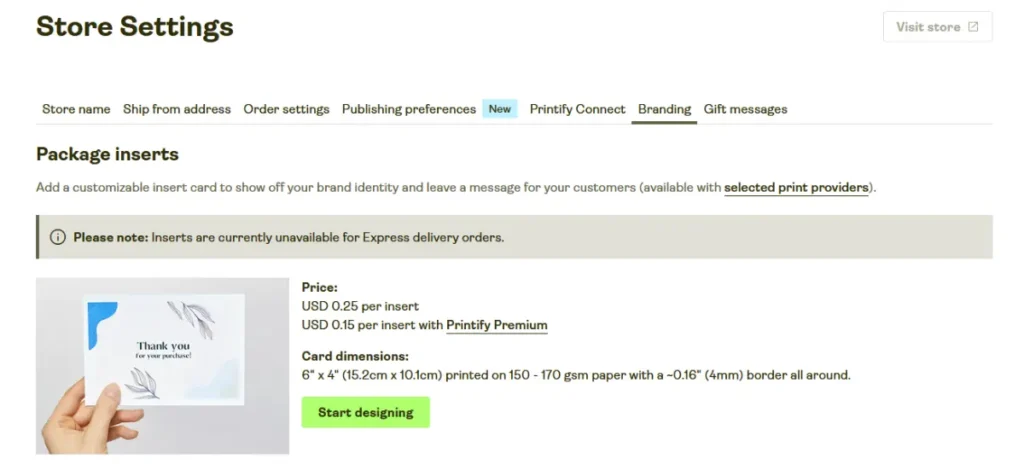
Packing inserts cost USD 0.25 each, dropping to USD 0.15 with Premium, and are available on every store regardless of plan.
Neck labels are also available on all stores, though the price varies by product and print provider rather than one flat rate.
Both add-ons appeared under Branding in our own dashboard, confirmed as store-wide settings rather than a per-product option.
Printify Pricing in 2026
Printify’s own pricing page lists three tiers.
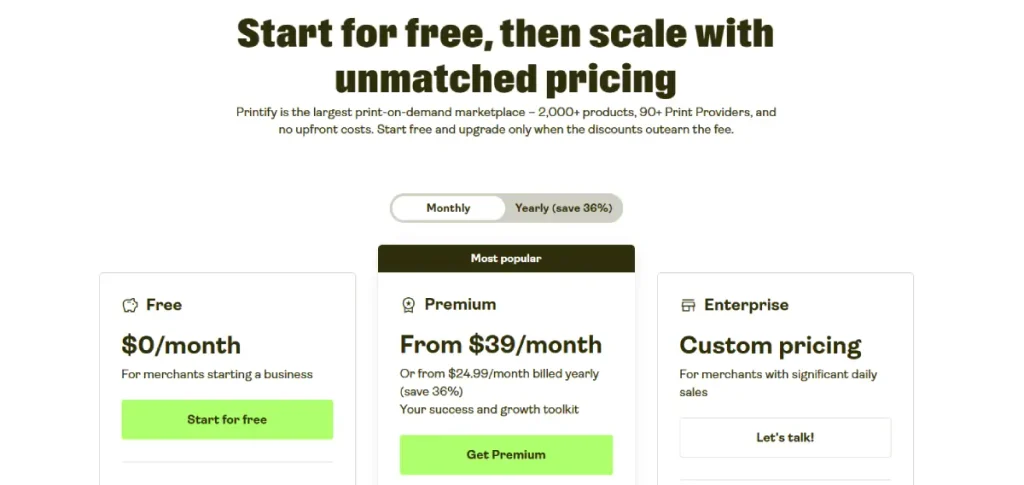
| Tier | Monthly Price | Annual Price | Stores | Best For |
|---|---|---|---|---|
| Free | $0 | $0 | 5 | Testing a product idea with no upfront cost |
| Premium | $39 | $299 ($24.99/mo) | 10 | Sellers ready to scale past a few designs |
| Enterprise | Custom | Custom | Unlimited | High-volume sellers needing an account manager |
Each tier builds on the one below it:
- Free: 5 stores, unlimited product designs, the standard Product Creator, and integrations with every major sales channel Printify supports.
- Premium: everything in Free, plus a tenth store slot, up to 33 percent off new products, up to 20 percent off the full catalog, up to 33 percent off custom branding features, Printify Connect, Sellers Club PRO mentorship, and early access to new features.
- Enterprise: everything in Premium, plus unlimited stores, a dedicated account manager, custom API access, and branded customer support.
Paying annually holds Premium at $299 a year, which works out to roughly $24.99 a month, a substantially better rate than paying month to month.
The February 2026 Price Change Most Reviews Still Get Wrong
Printify’s monthly Premium price rose from $29 to $39 this year, according to Printify’s own help center announcement.
| Billing | Before Feb 17, 2026 | After Feb 17, 2026 |
|---|---|---|
| Monthly | $29 | $39 |
| Annual | $299 ($24.99/mo) | $299 ($24.99/mo), unchanged |
Several competing reviews still list the old $29 rate, since that change log page is easy to miss if you only check the live pricing page.
What this means depends on how you are billed:
- Existing monthly subscribers: do not keep the $29 rate. Doing nothing means the subscription renews at $39 on the first billing cycle on or after February 17, 2026, unless they switch to annual billing or cancel first.
- Shopify App Store subscribers: get a Shopify notification asking them to approve the new $39 price. Ignoring that notification auto-downgrades the account to Free, removing every Premium discount, including the 20 percent catalog-wide rate.
- Anyone switching to annual billing before the change: locks in the $299 yearly rate regardless of when they signed up.
The price increase is not one-sided. Printify added a new discount of up to 33 percent on select new products, on top of the existing 20 percent catalog-wide rate.
Premium also now includes complimentary Sellers Club PRO access, 30 days for monthly subscribers and 1 year for annual subscribers.
What the Live Shopify Reviews Reveal
Printify holds a 4.7 out of 5 rating across 4,330 reviews on the Shopify App Store, with 83 percent five-star and 3 percent one-star, verified directly from the live listing.
That headline number is genuinely strong, but two dated 2026 complaints are worth reading before you build a large catalog:
- Currency display (August 25, 2026): an Australian merchant reported that Printify shows retail prices in USD, and that number transfers into a non-USD Shopify store with no conversion or currency label attached. The store’s shipping field also showed a locked $0, leaving no way to build real shipping costs into the retail price. The merchant sold shirts at $35.25 AUD while Printify’s actual cost ran $46.68 AUD per order, a loss of $11.43 per sale.
- Automatic product removal (August 2026): a separate reviewer described losing dozens of published listings to the removal policy covered above, despite having spent almost $3,000 on past orders through the same account, and called the 30-day grace window easy to miss once a catalog grows large.
Neither issue makes Printify unreliable, but both are worth checking before you scale a store on it.
Confirm your currency conversion manually if you sell outside the US, and check the To Be Removed tab if you rarely update older listings.
Our Free Plan Testing Experience
We tested Printify’s free plan directly rather than describing it from the pricing page alone.
Connecting a store took only a few minutes, and the dashboard did not gate any core action behind an upgrade prompt during that process.
Building a product with the Product Creator felt closer to a design tool than a simple upload form.
Placement and sizing happened in the same screen as the live mockup preview.
Comparing print providers for one product surfaced a real cost difference between providers, confirming Printify’s own advice to check more than one before publishing.
Our own listing, a Unisex Heavy Blend Crewneck Sweatshirt on the Printify Choice provider, priced out to 31 total variants across 8 sizes and 4 colors.
Costs ranged from USD 17.87 for a small in a common color up to USD 25.17 for the largest size.
Rarer colors like Antique Cherry Red were limited to 2 print providers instead of 18.
We also walked through the sample-order flow under Create Order, which lets you buy your own product at cost before a customer ever sees it.
The Orders page starts empty until a sale or a self-bought sample comes through, with approval and tracking notifications both set to automatic by default.
Payment runs through a Printify Balance wallet or a saved card, and the dashboard supports up to 5 saved cards per account.
Is Printify Worth It
- Choose Printify if: you want to test a branded product idea without paying anything until you make a sale. The free plan alone covers a real, working store for most beginners, not a crippled trial meant to push an upgrade.
- Skip it if: you need more than 5 stores or want Printify Connect’s order-issue support, since both require Premium at $39 a month or $299 annually.
If the free plan’s 5 stores and unlimited designs cover what you need, sign up for Printify’s free plan and connect a store to try the Product Creator yourself.
Before publishing a large catalog, read the automatic removal policy and set a reminder to check your To Be Removed tab.
Printify does not send repeated warnings after the first cleanup email goes out.
If TikTok Shop is one of your sales channels, check what’s currently selling well on TikTok Shop before deciding which designs to launch first.
Frequently Asked Questions
Readers researching Printify tend to ask a similar set of questions. The answers below cover what comes up most.
Is Printify’s free plan actually usable long-term?
Yes. Our own test account and Printify’s pricing page both confirm the free plan has no expiration date and includes unlimited product designs across 5 stores.
The tradeoff is paying standard, non-discounted product costs on every order, since the Premium discount tiers are the main reason to upgrade.
Sellers running a smaller catalog can reasonably stay on Free indefinitely without losing any core platform functionality.
How much did Printify’s Premium plan actually change in 2026?
The short answer is it went up 34 percent, from $29 to $39 a month, and nobody keeps the old rate just by staying subscribed.
Printify’s help center confirms this renewal happens automatically on your first billing cycle after February 17, 2026, for any monthly subscriber who takes no action beforehand.
Annual billing held steady at $299 a year through the entire change, which is why it is now the safer long-term pick.
Does Printify really delete unsold products?
Yes, under a documented policy that started September 9, 2025.
A product with no orders gets removed after 1 year of inactivity.
One with past orders gets removed after 2 years without a new order plus 1 year without an edit.
Every product gets a 30-day grace period first under a To Be Removed tab.
Your live storefront listing and saved design file both survive even after Printify’s own copy is removed.
What ecommerce platforms does Printify integrate with?
Printify’s own integrations page confirms support for Shopify, Etsy, WooCommerce, Wix, Squarespace, BigCommerce, eBay, Amazon, and PrestaShop.
It also connects to TikTok Shop, currently limited to US-based TikTok creators, letting sellers publish print-on-demand products straight to a TikTok storefront.
Connecting each platform happens from the same sales channel menu inside the Printify dashboard.
Is Printify or Spocket better for a new seller?
The right choice depends on whether you want to design custom products or resell items that already exist.
Printify fits sellers who want a branded, custom product line and a genuine free plan with no time limit.
Spocket fits sellers who want ready-made inventory with no design step, though it charges from day one after a short trial rather than a permanent free tier.
TLinky’s full side-by-side comparison breaks down which situation favors each platform.
Does Printify charge a transaction fee?
No. Printify does not charge a platform transaction fee, earning instead through the fulfillment cost built into each product’s base price.
Your connected sales channel, such as Shopify or Etsy, may still charge its own separate transaction fee on top of Printify’s product cost.
Confirm your specific channel’s fee structure before pricing a product, since that fee is outside Printify’s control.
The Bottom Line
Printify’s free plan is a legitimate way to start a print-on-demand store without paying anything until a sale happens.
Budget for Premium once you scale past a handful of designs.
Annual billing now stands out as the better long-term deal at $299 a year, since the monthly plan costs $39.
Read the automatic removal policy before building a catalog of more than a few dozen products, and double-check currency conversion if you sell outside the United States.
Compare Printify against the other tools TikTok Shop sellers use for dropshipping and print-on-demand before committing to one platform for your entire catalog.
TLinky’s guide to print-on-demand for TikTok Shop covers what to sell once your storefront is ready.
If you have not connected a sales channel yet, start by choosing a website builder that fits your store.
Sources
- Printify Official Pricing Page
- Printify Premium February 2026 Price Change, Help Center
- Why Is My Product Scheduled for Removal, Printify Help Center
- Printify Reviews, Shopify App Store
- Printify Merchant Protection Page
- Direct testing inside a free Printify account, including store connection, the Product Creator, and print provider comparison