
QR Codes on Pet Tags
Make QR codes for pet tags in TLinky. Link a short web address or your phone number so the code stays readable on a small tag, then send the SVG to your engraver. Keep the microchip and license tag on too.
Pet tag QR codes you can test from your screen
Three tag styles, three different jobs. Point your phone at any of them: every code below opens something real, and the names and numbers are made up.
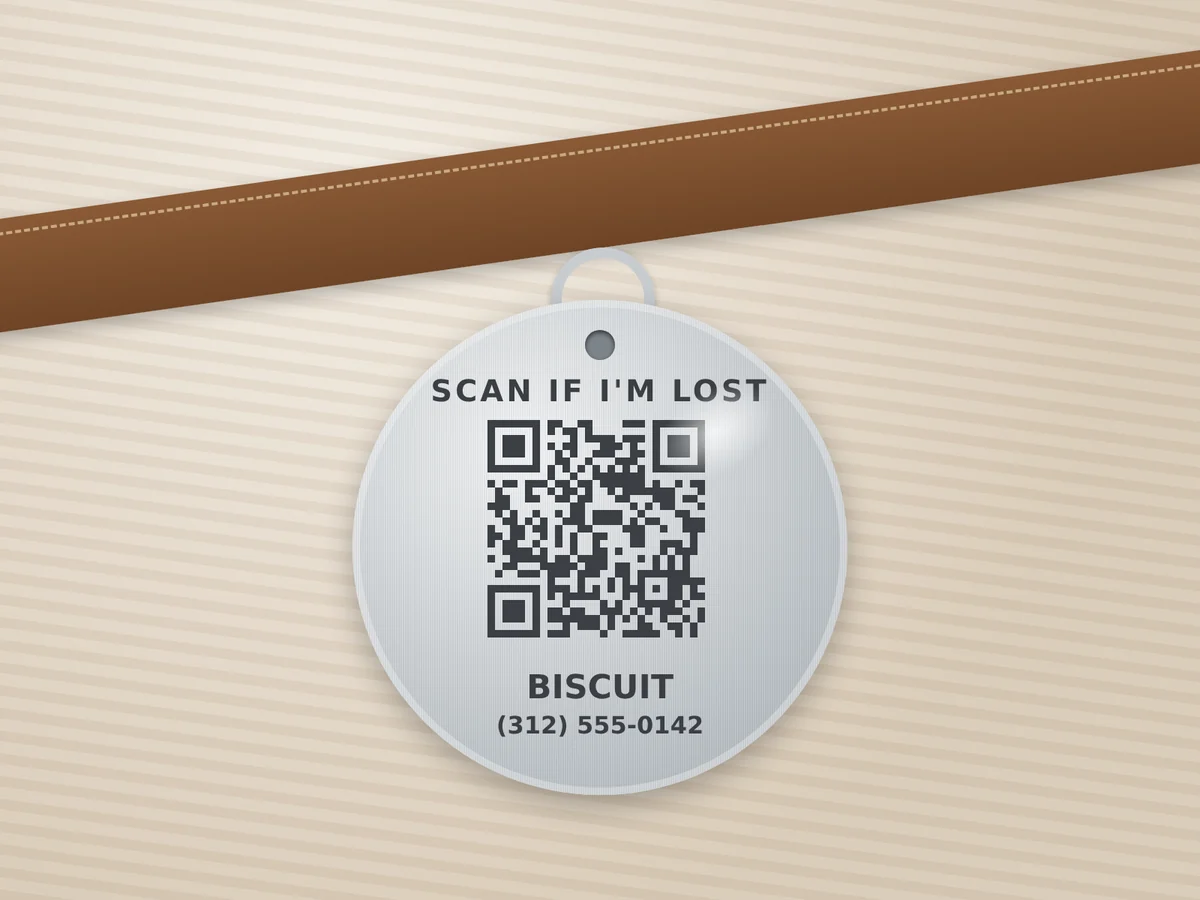
Engraved steel: the scan opens TLinky’s generator
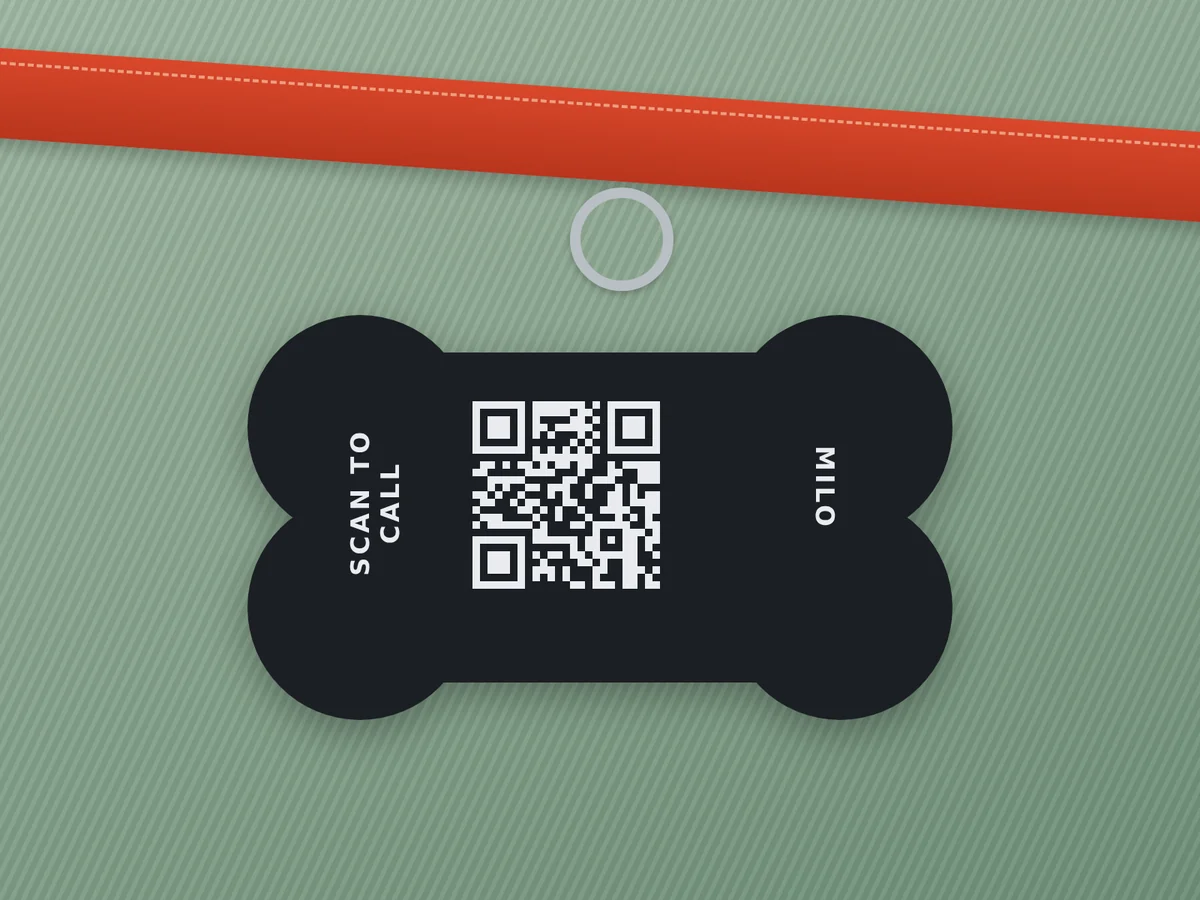
Anodized bone: a Phone code that offers to dial
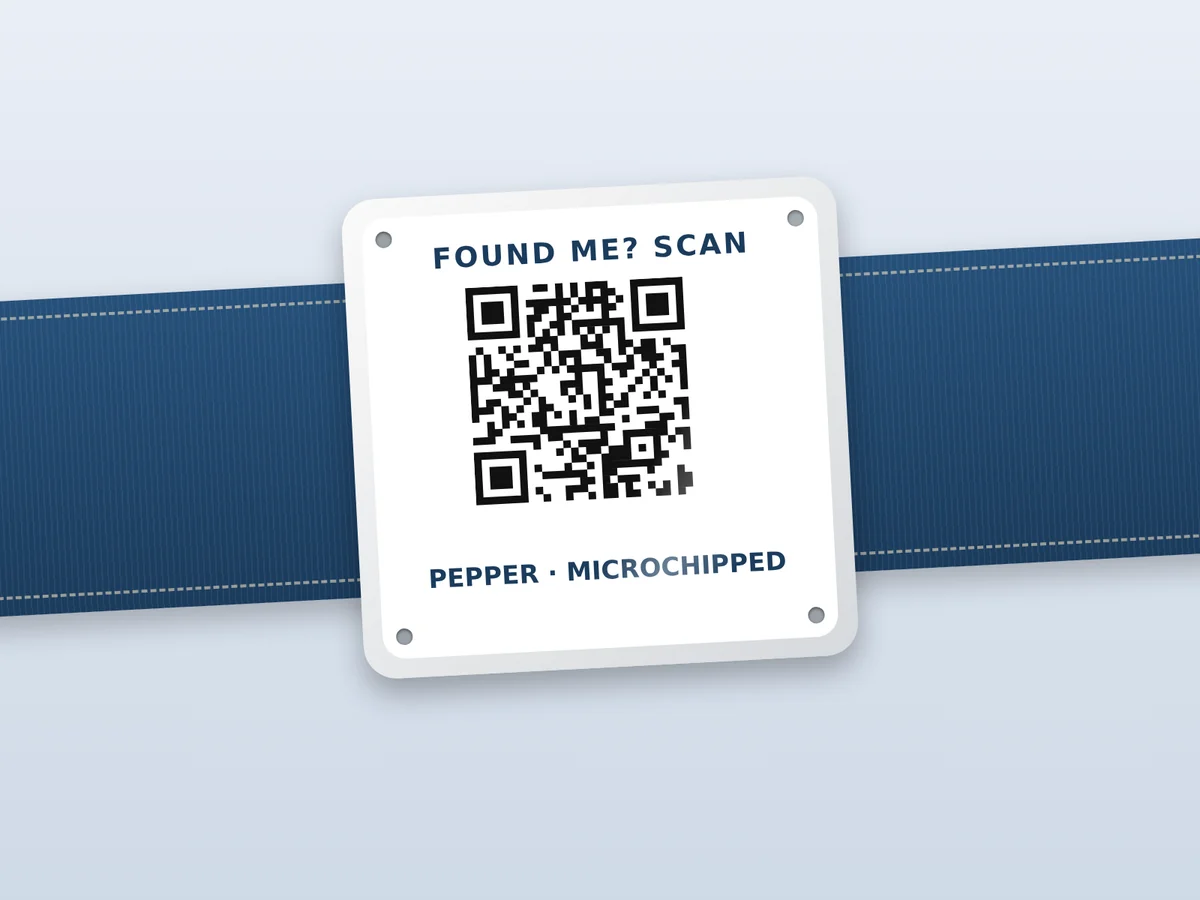
Collar plate: opens a Link in Bio page
Make one like this, then check below how much your tag can hold.
How small can a QR code on a pet tag be?
On a 1 inch round tag, the code itself ends up about half an inch wide once it clears the edge and keeps its blank border. That fits a short link or a phone number. A full contact card crams in so many squares that each one gets too fine to engrave cleanly. Our guide to the smallest QR code size explains why the amount of data matters.
More characters mean more squares in the same space. A QR code starts at 21 x 21 squares and grows by 4 per side with each larger size, as DENSO WAVE’s version table shows.
Room for the code on a round tag
| Tag across | Code area | Square: link vs card |
|---|---|---|
| 1 in (25 mm) | 12.5 mm | 0.50 vs 0.24 mm |
| 1.25 in (32 mm) | 15.9 mm | 0.64 vs 0.30 mm |
| 1.5 in (38 mm) | 19.3 mm | 0.77 vs 0.37 mm |
Tag simulation, Nov 27, 2026
What held up at tag size
We drew each code at 1.2 to 2.5 cm and read it the way a phone camera would from 10 to 25 cm away: flat, tilted and blurred. The short link read in 71 of 72 cases. The contact card read in 47, and at 1.2 cm, the room the smallest tag in the table gives, it never read from 25 cm. This was a computer model, not a phone in a park.
A short web address
Points to your pet’s page. Fewer characters mean bigger squares, and you can change the page later.
Make it in: a TLinky account
Your phone number
A Phone QR code offers to call you, and the code stays small.
Make it in: the free generator
Not a contact card
Name, phones, email and address in one code is too dense for a tag. Put those details on the page instead.
Make it in: your pet’s page, not the code
Engraved, etched or printed: which pet tag finish scans best?
Contrast and glare decide which tag finish scans best. Dark engraving on bare stainless steel looks crisp in your hand, but the polished metal around it bounces light straight back into the camera.
With a bright spot over the code, our simulation read engraved bare steel in 14 of 36 cases, etched anodized aluminum in 24 and a printed plate in 26.
Most glare
Engraved bare stainless
The classic tag, and the one that suffers most from glare. Ask for a deep, dark engraving on a brushed or matte finish, not a mirror polish.
Strong contrast
Etched black anodized aluminum
Light marks on a dark tag keep good contrast in bright sun. They are inverted codes, though, and some scanner apps only read dark on light, so try more than one phone.
Least glare
Printed plate or sticker
Black on white gives a camera the easiest job. Ink sits on the surface, so choose a plate with a clear cover over the code.
Picked your tag? Make the code for it.
It takes a minute, and you can test-scan the code on your screen before you place the tag order.
What should the page behind a pet tag QR code say?
Write it for a stranger holding your dog on a sidewalk: who the pet is, how to reach you in one tap, and anything that keeps the animal safe until you get there.
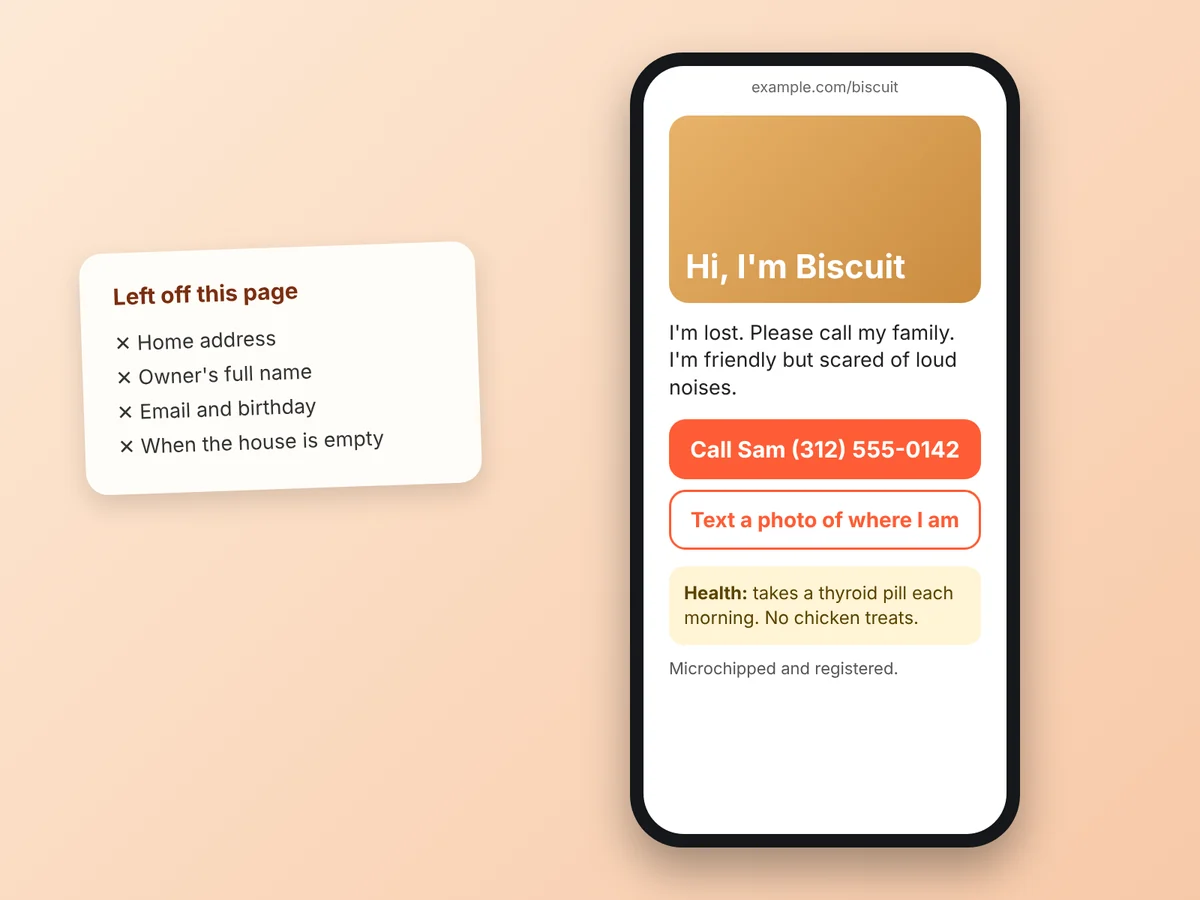
Put on the page
- Your pet’s name and a clear photo
- A call button and a text button
- A health note, such as a daily pill or a food allergy
- “Microchipped,” so the finder knows a shelter can help
- A backup contact while you travel
Keep off the page
- Your home address: meet the finder somewhere public
- Your full name and birthday
- When the house is empty
- Anything you would not post on a public profile
Anyone who scans the tag can read that page, including people who are not trying to help. No website of your own? A Link in Bio page works as a simple pet profile.
Static or dynamic: what happens when you move?
A static code keeps its content forever, so a new phone number means a new tag. A dynamic code holds a short link, and you change where it leads without touching the tag.
Free, no account
Static Phone or Text code
Made in TLinky’s free generator. There is no website behind it that could lapse, and the code stays small. When your number changes, order a fresh tag.
Change it later
Dynamic short link
Leads to your pet’s page. Move house, switch carriers or leave the dog with a sitter, and you edit the page or the link. TLinky pricing lists destination updates on paid plans, not on Free.
More on the trade-off in static vs dynamic QR codes.
Does a QR code tag replace a microchip?
No. A QR tag, a microchip and a license tag each cover a different gap, and animal welfare groups ask owners to use the tag and the chip together.
ID tag with a QR code
Anyone with a phone can read it. The ASPCA’s position on pet identification calls personal ID tags likely the fastest way home, and notes collars can come off.
Read by: anyone who finds your pet
Microchip
Humane World for Animals explains that a chip needs a scanner shelters have and neighbors don’t, and it is not a GPS tracker. Update the registry when you move.
Read by: shelters, vets and animal control
License tag
Many cities require one on the collar. New York City’s dog license page says the license must be attached to the collar in public.
Read by: animal control in your area
In an ASPCA survey of 1,015 pet households, published in 2012, 15 percent had lost a dog or cat in the past five years, and an ID tag or microchip was how 15 percent of the lost dogs got home.
What happens when someone finds your pet?
Someone who finds your pet scans the tag with the phone already in their pocket, with no app download and no account.
01
Point a phone at the tag
On an iPhone, the Camera app or Code Scanner reads it, per Apple’s QR code help. On Android, the camera or Google Lens does it, as Android’s scanning guide explains.
02
Tap what pops up
A Phone code offers to call your number. A link opens the page you wrote, with the buttons and the health note at the top.
03
Call, text or drop off
Your page tells them what to do next. If you don’t answer, a vet or shelter can still read the chip.
Make your pet tag QR code in TLinky
Four steps, and only the last one needs the finished tag in your hand.
01
Choose what the scan opens
Your pet’s page for an editable code, or your phone number for a fixed one.
02
Create the code
Use the Phone tab in the free generator, no sign-up needed. For an editable short link, use the Link tab in a TLinky account.
03
Hand the SVG to your engraver
A vector file stays sharp however small the shop cuts it. Ask them to keep the blank border, and stay with dark on light unless you chose anodized.
04
Test the finished tag
Scan it in sun and in shade with two different phones before the collar goes on.
Pet tag QR code questions
Is there a free QR code dog tag?
The code can be free, but the tag itself costs money. TLinky’s free generator makes a static Phone or Text code without an account, and you download it as an SVG. Any engraver or tag shop that accepts your own artwork can put it on a tag. You only pay for the code if you want to edit it later.
What information must be on a dog tag?
Dog tag rules depend on where you live, so check with your city or county animal services. San Diego County’s license rules, for example, say the license tag must be fastened to the collar or harness and worn at all times. Beyond the license, a phone number engraved as plain text beside the code is a smart backup.
Can a QR code dog tag track my dog’s location?
No. A QR code is ink or engraving with no battery and no signal, so it does nothing until a person scans it. Following a dog’s position takes a GPS tracker with its own battery, and usually a subscription. Some smart tags combine the two, but the QR part still only opens a page or a phone number.
Can I put a vCard QR code on a pet tag?
You can, but it’s a poor fit for something this small. A contact card with several fields needs about six times as many squares as a short link, so on a coin-sized tag each square shrinks to roughly half the width. A short link to a page carries the same details and is far easier to scan.
What happens if the page behind the QR code goes offline?
Then the tag leads nowhere, so treat that page as part of the tag. Keep the account or domain active, scan the tag yourself now and then, and fix a broken link before you need it. A static Phone code has no page that can disappear, which is why some owners pick it for tags.
Can a vet or shelter scan a pet tag QR code?
Yes, with any phone camera, exactly like a neighbor would. Clinics and shelters also run a microchip scanner, which shows the chip’s ID number so staff can look up the registry. That is why both the chip record and the page behind your tag should carry the phone number you use today.
Do engraved QR codes wear off pet tags?
Engraving cuts into the metal, so it outlasts ink on the surface, but scratches still eat into a small code. On a tag, each square is tiny, so a few scuffed ones can stop a scan. Check the tag after rough play or swims, and replace it once phones start to hesitate.
TLinky’s Recognitions & Awards







Trusted by the Industry Experts that YOU trust

Safety in Every Scan
Give your pets digital protection that travels with them. Simple, durable, and easy to scan.