
YouTube Description Generator
Get a first draft of your YouTube description without starting from a blank box. This free AI YouTube description generator writes a hook, a full description, a call to action, tags, and hashtags from a few details about your video, ready for you to edit.
TLinky uses affiliate links. We may earn a commission if you purchase through them, at no extra cost to you.
AppSumo Bundle
80% OFF
- Hostinger Cloud
- Bolt.new
- Reclaim AI
- Emergent AI
- Pica
Hostinger
Web Hosting
95% OFF
More Tools for YouTube Descriptions
Generate SEO-Optimized YouTube Descriptions with AI
The description sits under your video and tells viewers and YouTube what it covers. Its first lines are what people see before they click “Show more.”
The TLinky YouTube Description Generator uses AI to write one to five description variations based on your video title, target keywords, category, description type, and desired length. Each variation includes a hook, a full description, and a call-to-action line, and each run also adds a shared set of video tags and a hashtag block.
It works for tutorials, educational videos, product reviews, documentaries, gaming content, podcasts, travel vlogs, and business videos alike. You review and edit the package before anything goes live.
Free to use. No registration required.
How the YouTube Description Generator Works
Tell the form a few things about your video, and the generator builds the whole package from those details.

Enter Your Video Title or Topic
Type the video’s working title, or one line on what it covers.
Examples:
- How to Set Up Email Automation in Mailchimp
- Inside Tesla Factory
- Best AI Tools for Students
- Healthy Meal Prep Ideas
- DSLR Photography Tips for Beginners
Add Your Target Keywords (Optional)
List the terms you want your video to rank for, separated by commas.
Examples:
- mailchimp automation, email marketing tutorial
- factory tour, manufacturing process
- ai tools, student productivity
Add Your Channel Name (Optional)
Include your channel name so it can be referenced naturally in the description or call-to-action.
Select Your Video Category
Pick the one closest to your video:
- How To: a task shown one step at a time
- Review: your take on a product, service, or app
- Tutorial: a longer lesson that teaches a skill
- Tips: short, practical pointers
- Beginner: made for people new to the topic
- Advanced: for viewers who already know the basics
- Comparison: two or more options side by side, like “vs” videos
- Shorts: quick clips made for YouTube Shorts
Choose Your Description Type
Pick the writing style that fits how you want to present the video.
- SEO-Focused: puts your keywords up front in a clear opening hook.
- Storytelling / Narrative: opens with a story, a good fit for vlogs and documentaries.
- Sales / Promotional: leads toward a product, offer, or service.
- Educational / Informational: previews what the viewer will learn.
- Casual / Vlog-Style: conversational and personal, suited to community-driven channels.
Set Your Description Length
- Short: under 100 words
- Medium: 150 to 300 words (the default)
- Long: 300 to 500 words
Choose How Many Description Variations to Generate
Generate 1, 2, 3, or 5 distinct variations in the same style in a single run, each with its own hook, body, CTA, and SEO score, so you can compare phrasing and pick the one that fits your video best.
Set Your Tag and Hashtag Counts
- Tags: 5, 8, 10, or 15 shared video tags
- Hashtags: 3, 4, or 5 shared hashtags

Tags and hashtags are generated once and shared across every variation, since they describe the same video regardless of which description style you choose.
What You Get in the Description Package
Each run gives you one or more description variations plus a shared set of tags and hashtags.
- Hook: the opening lines viewers see before YouTube’s “Show more” link. The tool counts its characters against a 157-character target and flags a hook that runs longer.
- Full Description: a complete, scannable description for each variation, written in short paragraphs with your keywords worked in.
- Call-to-Action Line: a subscribe, like, or comment prompt for each variation.
- Shared Video Tags: a tag set for YouTube’s tag field.
- Shared Hashtag Block: 3, 4, or 5 hashtags formatted for direct use.
- SEO Score: the tool’s own score out of 100 for each variation, based on description length, hook length, and tag count.
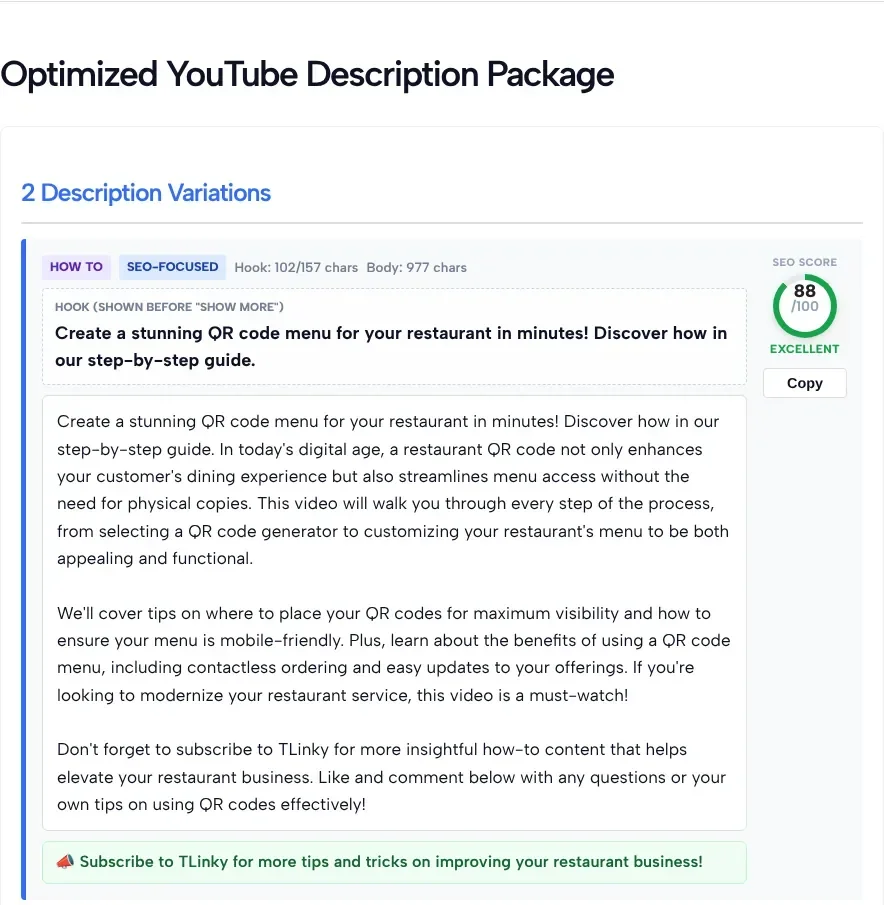
In our test on November 2, 2026, each variation showed the hook with its character count out of 157, a separate character count for the body, the SEO score, the full text, a call to action and a Copy button. The 8 shared tags and the hashtags came last, each set with its own copy button.
The SEO score is a quick check inside the tool, not a YouTube or Google metric. Read the full description before you publish, and fix any detail, link or claim that doesn’t match your video.
Features
- Generate 1 to 5 description variations per run
- Choose from 5 distinct description types
- Hook character counter with a 157-character target
- Shared tag and hashtag set across all variations
- Built-in SEO score for every variation generated
- Tailor suggestions to a specific category and length
- Copy buttons for each description, the tags, and the hashtags
- Free to use with no sign-up required
Why Use This YouTube Description Generator?
A strong YouTube description needs to do several things at once: hook viewers in the first couple of lines, include your keywords naturally, explain what the video covers, and end with a clear call-to-action, all without turning into a keyword-stuffed wall of text. That’s a lot to balance when you start from an empty box.
This tool generates multiple description variations using your video title, keywords, category, and preferred style, so you can compare different approaches side by side instead of committing to the first draft. Each variation comes with its own SEO score, giving you a quick check on description length, hook length, and tag count before you publish.
Perfect For
- YouTube creators
- Content marketers
- Businesses
- Agencies
- Educators
- Coaches
- Bloggers
- Technology reviewers
- Gaming channels
- Travel vloggers
- Product reviewers
- Podcast creators
- Documentary creators
- Small businesses
- Anyone creating YouTube videos
Frequently Asked Questions
Is this YouTube Description Generator free?
Yes. The tool is free to use and doesn’t require creating an account.
How are the descriptions generated?
AI writes the description variations from the information you provide, including your video title, target keywords, channel name, category, description type, and desired length.
What is the “hook” and why does it matter?
The hook is the opening of your description, the part people see before they click “Show more.” The tool counts it against a 157-character target. Put the main point of the video there, since many viewers won’t open the rest.
What’s the difference between the description types?
Each type changes how the AI structures and opens the description. SEO-Focused leads with keyword clarity, Storytelling opens with a narrative hook, Sales/Promotional leads toward an offer, Educational previews what viewers will learn, and Casual/Vlog-Style reads conversationally.
Can I generate more than one description?
Yes. You can generate 1, 2, 3, or 5 variations in the same style in a single run, each with its own SEO score, so you can compare and choose.
Why is the hashtag limit capped at 5?
The tool keeps the hashtag block short on purpose: you can pick 3, 4, or 5. A few relevant hashtags are easier for viewers to read than a long list. If you plan to add more, check YouTube’s own hashtag rules first.
What does the SEO Score mean?
The SEO Score is the tool’s own rating out of 100. It looks at body length, hook length, and how many tags were generated. It isn’t a YouTube or Google metric and doesn’t predict rankings, so use it as a quick check, not a goal.
Can I edit the generated description?
Yes. Every hook, description, tag, and hashtag is a starting point you can modify, shorten, or combine to fit your video and brand.
Will this tool improve my YouTube rankings?
Not on its own. A clear, well-structured description helps viewers understand your content, and it works best with a strong title and thumbnail. How a video performs also depends on content quality, viewer engagement, watch time, and YouTube’s recommendation system.