
A QR code menu for a restaurant is a printed code that opens a digital version of the menu on a guest’s phone, built by generating a dynamic QR code that links to a mobile-friendly menu page and printing it on table tents, counters, or signage.
Printed menus get expensive fast once you add seasonal items, price changes, or a new dish.
A digital menu behind a QR code updates in seconds instead of a reprint, and it works the same way whether you run one cafe or a five-location group.
In this article, you will learn:
- The exact steps to build and print a working QR code menu
- Whether a static or dynamic QR code is the right choice for your menu
- Where to place the code so guests actually scan it
- What California’s new allergen disclosure law means if you use a digital menu
- Whether guests actually prefer QR code menus over printed ones, based on real survey data
- The most common setup mistakes that make guests give up and ask for a paper menu
Unlock the Power of QR Codes! with 14+ different types of QR codes!
Elevate your marketing game with TLinky’s QR Code Generator. Create dynamic, eye-catching QR codes in seconds.
Key Takeaways
- A dynamic QR code lets you change menu prices, specials, or sold-out items without reprinting a single code.
- California’s Allergen Disclosure for Dining Experiences Act (SB 68) takes effect July 1, 2026, and requires chain restaurants with 20 or more locations to disclose the nine major allergens on digital or printed menus.
- DENSO WAVE, the organization that created the QR code standard, recommends keeping a quiet zone at least four modules wide around every QR code so cameras can find it.
- A QR code menu should never be the only option. Toast’s survey of 850 US adults found 81 percent still prefer a physical menu, so keep a printed or staff-assisted alternative for guests who cannot or prefer not to scan.
- Test the printed code from the actual guest seat, in both daytime and evening lighting, before running a full print batch.
- A QR code menu only displays your menu. Ordering or paying from a phone requires a separate integration with an online ordering or POS system.
Quick Answer
To create a QR code menu, build a mobile-friendly digital menu page or PDF, generate a dynamic QR code pointed at that URL using a tool like TLinky’s QR code generator, customize the design for brand and contrast, then print and test it at the table before rolling it out. Use a dynamic code so you can update prices and items later without reprinting.
What Is a QR Code Menu?
A QR code menu is a printed square barcode that a guest scans with a phone camera to open a digital version of your menu, usually a web page or a hosted PDF. The code itself does not store your menu items. It stores a link, and that link is what actually displays the menu.
This distinction matters because it means the QR code and the menu content are two separate things you manage separately. You can redesign your entire menu page without touching the printed QR code, as long as the code points to a link that stays the same or is set up to update automatically.
How to Create a QR Code Menu: Step-by-Step
Follow these steps in order. Skipping the testing step is the most common reason a QR code menu fails on opening night. In our testing, the fastest path from a blank generator to a printable code was choosing the dynamic Link type first, before touching any design settings.
1. Build Your Digital Menu First
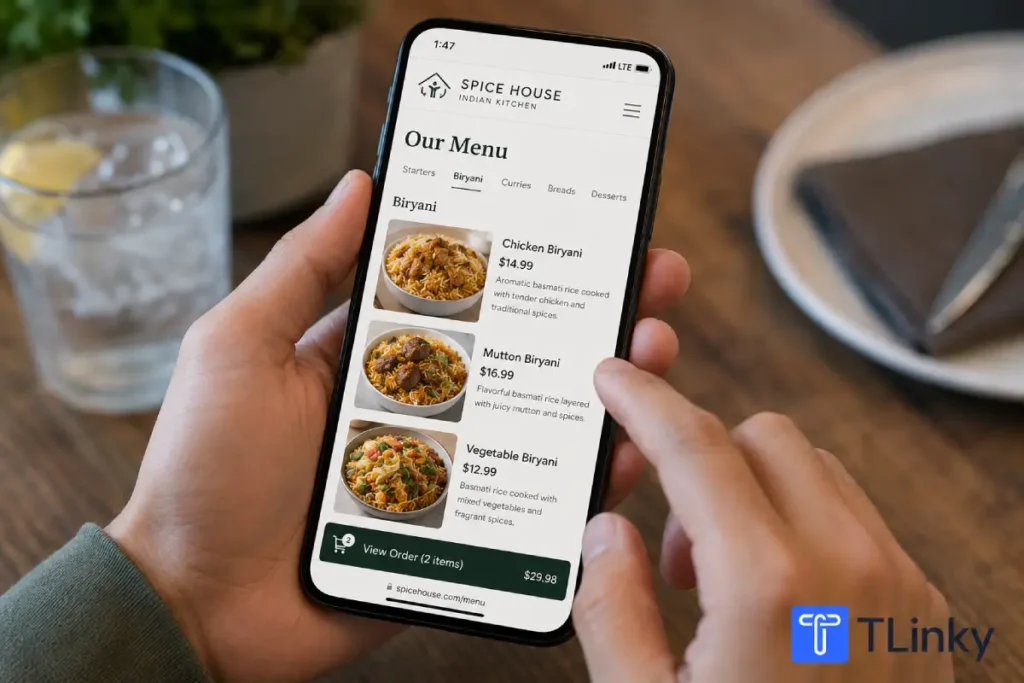
Create a mobile-optimized menu page or a clean PDF with large text, clear prices, and food images if you have them. Confirm the page loads quickly on a phone using cellular data, not just office WiFi.
2. Choose a QR Code Type
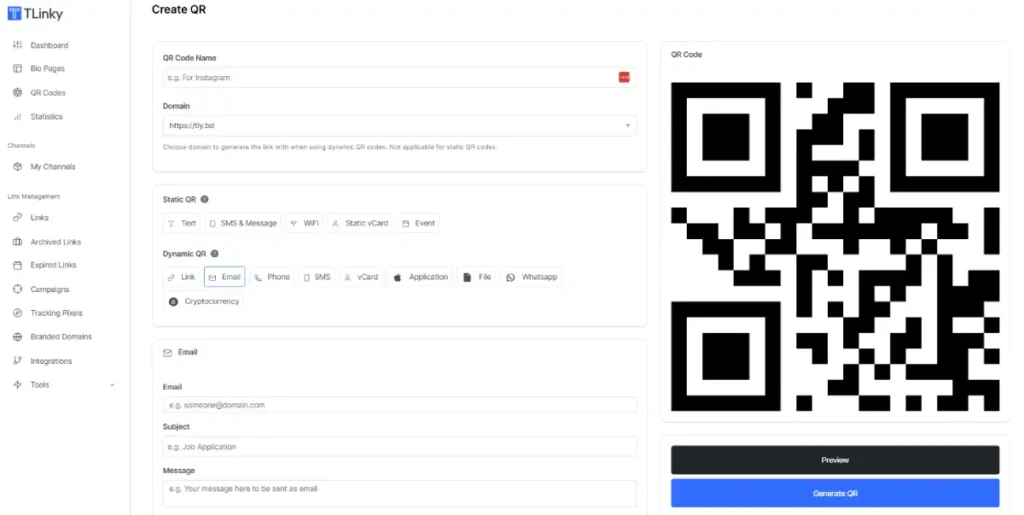
In TLinky’s QR code generator, select Create QR, then choose the dynamic Link type rather than a static type. A dynamic Link QR code can have its destination URL changed later without generating a new code image.
3. Paste Your Menu URL and Generate the Code
Enter the web address of your digital menu and generate a preview. Check that the preview actually opens your menu, not a placeholder or draft page.
4. Customize the Design
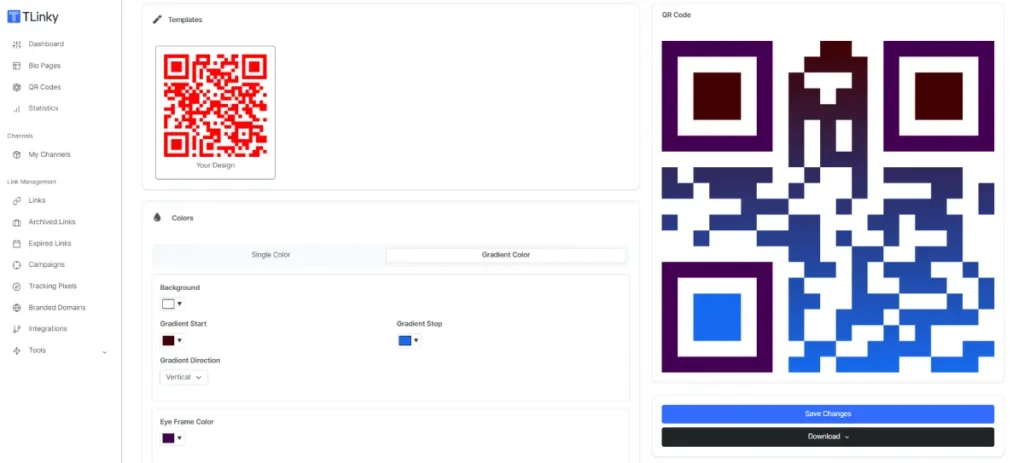
Add your restaurant’s colors, a logo, and a short call-to-action label such as “Scan for Menu.” Keep the color contrast high between the code and its background, and raise the error correction level if you are adding a logo, since a logo covers part of the code’s data.
5. Download and Print a Single Proof
Download the code as a high-resolution PNG, SVG, or PDF depending on what your printer accepts, then print exactly one table tent, sticker, or sign before ordering a full batch.
6. Scan the Physical Proof From the Guest’s Seat
Test it on both iPhone and Android, in daytime and evening lighting, from the actual distance a seated guest would scan from. Confirm the menu loads, prices are current, and any ordering links work.
7. Print the Full Run and Place It Strategically
Once the proof passes, print the rest and place the codes where guests naturally look before ordering.
8. Keep the Destination Current
When a price or item changes, update the digital menu page (or repoint the dynamic QR code if the URL itself changes) and rescan the same physical code to confirm the update went live.
Static or Dynamic QR Code: Which One for a Menu?
Most restaurants should use a dynamic QR code for their menu, not a static one, because menus change more often than owners expect.
| Question | Static QR code | Dynamic QR code |
|---|---|---|
| Can you change the destination after printing? | No | Yes |
| Does it track scans? | No | Yes, on most generators |
| Best fit | A menu that will never change | A menu with regular price or item updates |
| Risk if the menu changes | Must reprint every code | Update the link, keep the same printed code |
A static QR code can still work for a genuinely fixed menu, such as a single set-price tasting menu that rarely changes. For daily specials, seasonal items, or multi-location groups, the ability to tell a static QR code apart from a dynamic one before you commit to a batch of printed table tents can save a real reprint bill later.
Where to Place Your QR Code Menu
Placement decides whether guests notice the code at all. Match the placement to the moment a guest is actually deciding what to order.
| Placement | Best for | What to check |
|---|---|---|
| Table tent or table sticker | Sit-down dining | Seated reach and glare from overhead lighting |
| Counter or queue sign | Quick-service and order-ahead | Line-of-sight from the queue, not just the counter |
| Entrance or window | Walk-by foot traffic | Readability from outdoor light and viewing distance |
| Takeout bag or receipt | Repeat and delivery orders | Links to a reorder or loyalty page, not just the same menu |
A QR code that is technically scannable but placed where nobody looks gets ignored. If your dining room uses table tents for QR codes, test a few different table positions with real customers for a few days before assuming one placement works everywhere.
Design Rules That Keep Your QR Code Scannable
A poorly designed QR code is the fastest way to send a frustrated guest back to asking a server for help.
- Keep the quiet zone clear. DENSO WAVE, the company that created the QR code standard, specifies a clear border at least four modules wide around every side of the code. Do not let text, logos, or a table tent’s border cross into that space.
- Use high contrast. Dark modules on a light background scan more reliably than light-on-dark or low-contrast color combinations, especially under dim restaurant lighting.
- Size it for the distance. A code scanned from a seated table needs less size than one read from a window or entrance across a sidewalk. When in doubt, print larger and test at the real distance.
- Raise error correction for logos. Embedding a logo in the center of the code covers part of its data. A higher error correction level, available in most QR code generators including TLinky’s, helps the code stay readable despite the logo.
- Add a short call-to-action. A code with no label gets ignored. A simple “Scan for Menu” or “Order Here” next to the code tells guests exactly why they should scan it.
Allergen Disclosure Rules Restaurants Need to Know in 2026
There is currently no federal law requiring US restaurants to disclose major allergens on menus for food made and served on-site, but that is changing at the state level, and it directly affects how you can structure a QR code menu.
California’s Allergen Disclosure for Dining Experiences Act, known as SB 68, takes effect July 1, 2026 and requires chain restaurants with 20 or more locations to disclose the nine major food allergens, milk, eggs, fish, crustacean shellfish, tree nuts, wheat, peanuts, soybeans, and sesame, for every menu item that contains them.
The law specifically allows a QR code linking to a digital menu to satisfy this requirement, but only if the restaurant also offers a non-digital alternative, such as a printed allergen chart or booklet, for guests who cannot or do not want to use the digital version. A QR-only menu with no backup does not meet the requirement once the law is active.
If your restaurant operates 20 or more locations in California, treat this as a design requirement, not an afterthought: build the allergen disclosure into your digital menu page now, and keep a printed allergen reference at the host stand regardless of company size, since other states are moving in the same direction.
Do Guests Actually Prefer QR Code Menus?
Most guests still prefer a printed menu over a QR code, even though QR menus are common now. In a blind survey of 850 US adults, Toast found that 81 percent of respondents prefer a physical menu, and only 1 percent said they actively prefer scanning a QR code to view a menu.
The preference for paper is even stronger among older guests. Toast’s survey found that 90 percent of respondents aged 55 and up prefer a traditional menu, and 26 percent of all respondents named small, hard-to-read text as their biggest complaint about QR code menus on a phone screen.
This does not mean a QR code menu is a bad idea. It means a QR code menu works best as an added option, not a replacement for every guest’s preference, which is exactly why a printed backup matters even outside of California’s allergen disclosure requirement.
A QR code menu is also not the same thing as QR-based ordering or payment, even though restaurants often roll both out together. A menu QR code only displays your menu.
If you want guests to order or pay from their phone, that requires a separate integration with an online ordering or point-of-sale system, and it is worth deciding early whether your QR code menu needs to support that or stay a simple menu display.
Common QR Code Menu Mistakes to Avoid
- Using a static code for a menu that changes often. You end up paying for a reprint every time a price moves.
- Skipping the physical scan test. A code that works in a browser preview can still fail once printed at a different size or on a glossy table tent. A quick check with a QR code decoder confirms the printed code still points to the right link before it goes on every table.
- No backup for guests without a suitable phone. Keep a printed or staff-assisted option available at all times, not just during outages.
- Low contrast or a logo that swallows the code. Both increase failed scans, especially under dim restaurant lighting.
- Treating the QR code as the entire strategy. The code only gets someone to your menu. A slow-loading, hard-to-read digital menu page loses the guest anyway.
Frequently Asked Questions
These are the questions restaurant owners ask most often when setting up a QR code menu for the first time.
Do I need a special QR code generator for a restaurant menu?
No, any QR code generator that supports dynamic Link-type codes can create a restaurant menu QR code. The key requirement is the ability to update the destination URL later without reprinting.
Look for a generator that also offers scan analytics, design customization for your brand colors and logo, and downloads in the file format your printer accepts, such as PNG, SVG, or PDF.
Is a QR code menu free to set up?
Creating the QR code itself can be free using a generator with a free plan, such as TLinky’s QR code generator. The main cost is building the digital menu page it points to, which can range from free, using an existing website page, to a paid cost if you hire someone to design a dedicated menu page.
Ongoing costs depend on whether you need scan analytics beyond the free tier or additional dynamic codes for multiple locations, though several free trackable QR code plans cover a single-location menu without any cost.
Can I update my menu without reprinting the QR code?
Yes, as long as you used a dynamic QR code and either update the content at the same URL or repoint the dynamic code to a new URL. A static QR code cannot be updated after printing, which is why most restaurants should avoid static codes for menus.
Always rescan the physical printed code after making a change to confirm the update actually reached guests, rather than assuming a saved edit worked.
What size should a restaurant QR code be?
There is no single correct size for every table, camera, and lighting condition. A code meant to be scanned from a seated table generally needs less size than one placed in a window or at an entrance viewed from further away.
Keep the four-module quiet zone clear regardless of size, and always test the final printed size from the actual guest position before ordering a full batch.
Do I still need paper menus if I use a QR code menu?
Yes. A QR code menu should add a convenient option, not replace every alternative. Some guests do not have a smartphone with them, have poor reception, or simply prefer a printed page, and forthcoming allergen disclosure laws in states like California require a non-digital alternative alongside any digital menu.
Toast’s survey data backs this up directly: 81 percent of respondents said they prefer a physical menu, a preference that rises to 90 percent among guests 55 and older. Keep a small stack of printed menus or a staff-assisted option available at all times, not only when the QR code system has an outage.
Wrapping Up
A QR code menu is only as good as the digital menu it points to and the physical proof you test before printing hundreds of copies. Build the menu first, choose dynamic over static, and treat the placement and lighting test as mandatory steps, not optional ones.
If your restaurant operates in California or plans to grow past 20 locations, start building allergen disclosure into your digital menu page now rather than scrambling before the July 2026 deadline.
Ready to build one? Generate your first dynamic QR code for restaurants or explore QR codes for menus specifically to get a code pointed at your digital menu in a few minutes.
Sources
- California Restaurant Association, Allergen Disclosures: SB 68
- California Legislative Information, SB-68 Bill Text
- DENSO WAVE, QR Code Standard Quiet Zone Guidance
- Toast, How Guests Really Feel About QR Code Menus